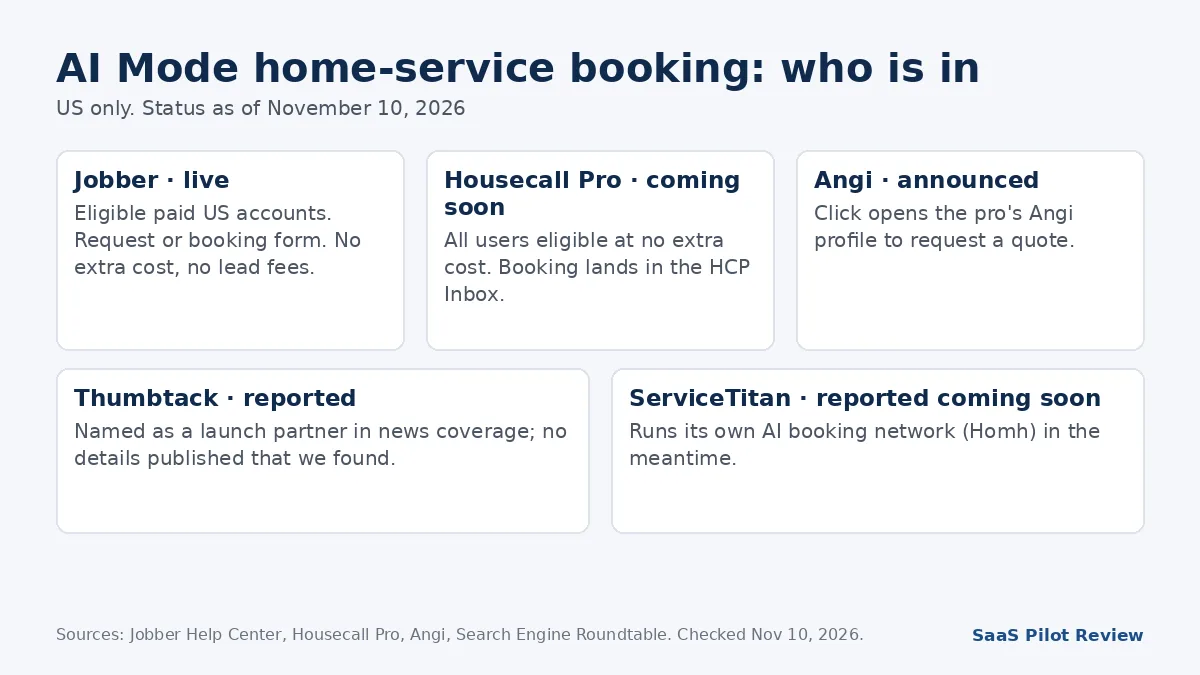
November 10, 2026 · What changed: On November 4, 2026, Google began showing booking and quote links for home-service businesses inside AI Mode in the US. Jobber, Housecall Pro and Angi each announced their part the same day. Jobber’s version is live for eligible paid accounts, Housecall Pro says its version is “coming soon,” Angi sends homeowners to a pro’s Angi profile to request a quote, and ServiceTitan was reported as “coming soon.”
A homeowner with a leaking water heater asks Google’s AI Mode for help, gets a short list of local plumbers with prices and reviews compared, and books one without leaving the answer. That is the flow Google’s Robby Stein described when he announced the change on X: “Today, we’re making it even easier to research & book home services with direct links in AI Mode.” For an owner, the useful question is narrower: does the software I already pay for put me in that list, and what do I have to switch on? The short version: if you run Jobber, check four settings today; if you run Housecall Pro, watch for the rollout; if you rely on Angi, your Angi profile is what homeowners will land on.
How we put this together: researched from Jobber’s Help Center article and press release, Housecall Pro’s November 4 announcement, Angi’s November 4 press release and Search Engine Roundtable’s report of Google’s announcement, all read on November 10, 2026. We have not booked a job through AI Mode or tested the integrations from a contractor account. Where a detail comes only from news coverage, we say “reported.” Our research and testing methods explain how we separate the two.
What homeowners now see in AI Mode
Booking and quote buttons now appear on home-service listings inside AI Mode results, in the US only for now. Search Engine Roundtable reported the partners shown at launch as Angi, Thumbtack, Housecall Pro and Jobber, with ServiceTitan listed as coming soon. Google announced it on X rather than in a blog post we could find, so the partner list comes from that report and from each partner’s own announcement.
The click does not do the same thing on every platform, and that difference decides who gets the job:
| Platform | What the homeowner can do | Status on Nov 10, 2026 | Cost to the business |
|---|---|---|---|
| Jobber | Send a request, or book a time if you assign a booking form | Live for eligible paid US accounts | No extra cost, no lead fees |
| Housecall Pro | Book an appointment; request lands in your Housecall Pro Inbox | “Coming soon to eligible US customers” | No extra cost, no lead fees or bidding |
| Angi | Open the pro’s Angi profile and request a quote | Announced Nov 4 | Not stated in the announcement |
| Thumbtack | Listed as a partner (reported) | Reported at launch | No detail published that we found |
| ServiceTitan | Not yet available | Reported as “coming soon” | Not announced |
Checked November 10, 2026, from each company’s own announcement or help page, except where marked “reported.”
The split matters because a booking form puts a time on your calendar while a quote request starts a conversation. A homeowner with a burst pipe is more likely to pick the listing that lets them book a slot now.
Jobber: the four settings that decide whether you show up
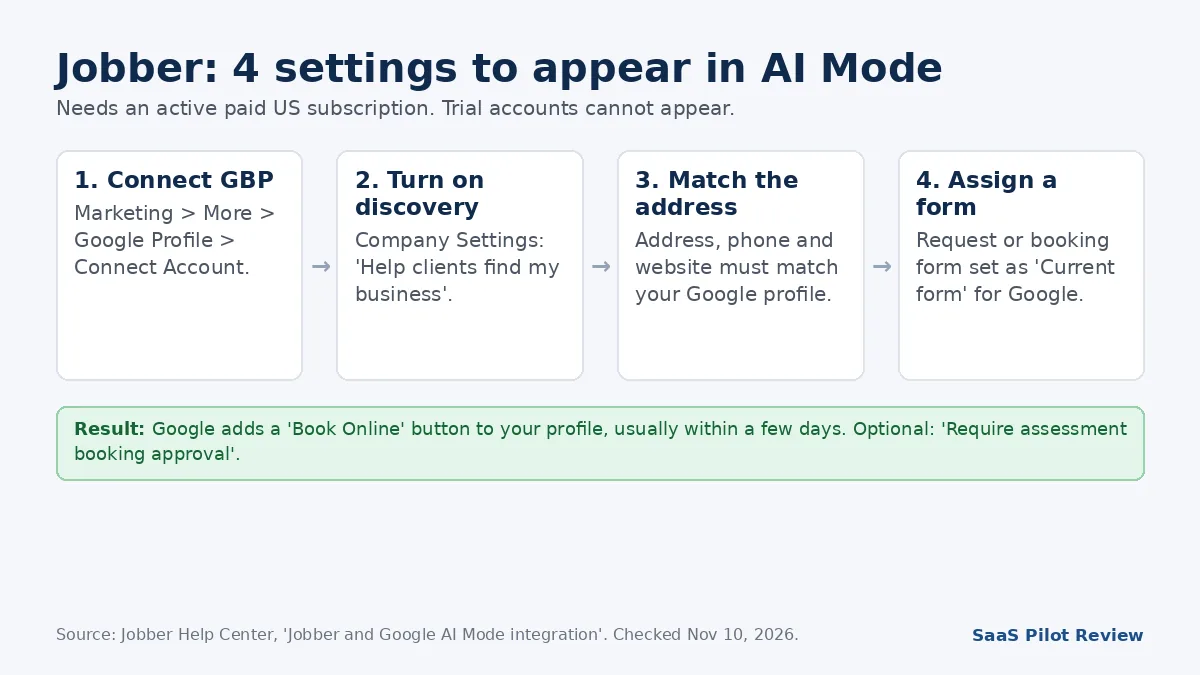
Jobber’s integration is the most concrete so far, and its Help Center lists exactly what has to be true. You need an active paid subscription (trial accounts cannot appear), a US business, a complete company address, and a Google Business Profile at that same address connected to Jobber. Then:
- Connect your Google Business Profile under Marketing > More > Google Profile, then Connect Account.
- Turn on “Help clients find my business” in Company Settings.
- Match your address to Google Maps. If it still will not match, check that the phone number and website in Jobber match your profile exactly.
- Pick the form Google gets. A request or booking form must show “Current form” in the Google Business Profile section of its Settings tab. Jobber connects your default request form automatically.
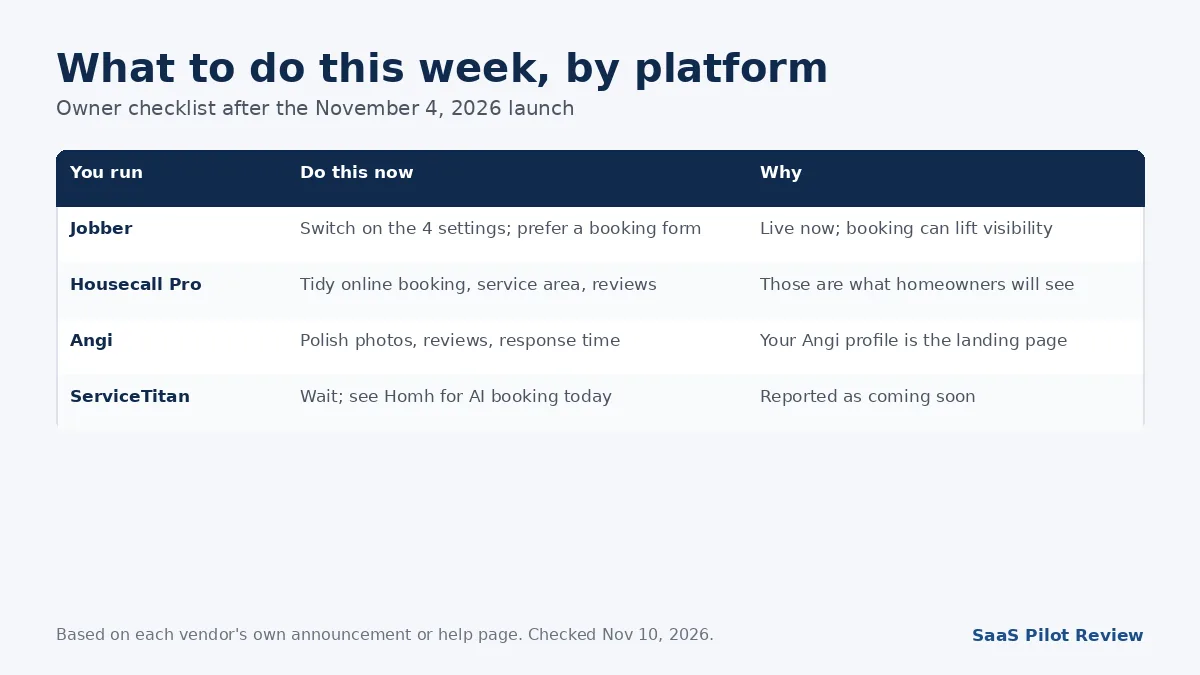
Once Jobber matches your profile, Google adds a “Book Online” button to it, usually within a few days, according to the help article. The same article says there is no extra charge for the integration and no lead fees on requests that come from AI Mode. If you are weighing what Jobber costs overall after this year’s increase, our Jobber pricing breakdown has the current plan prices.
Request form or booking form?
Use a booking form if your calendar can take it. Jobber’s help article says a request form collects details so the client can ask for work, while a booking form lets the client book a time directly, “which can improve your visibility.” Both arrive in Jobber on your Homepage, under Requests or under Jobs, with a notification.
If you worry about strangers booking slots you cannot honor, Jobber has a middle path: turn on “Require assessment booking approval.” Bookings then show as “Needs approval” until you accept or decline, and accepting sends the client a confirmation automatically. For a 2-truck plumbing or HVAC shop, that is a sensible default for the first few weeks while you see what kind of jobs AI Mode sends.
Housecall Pro: eligible at no cost, not live yet
Housecall Pro’s November 4 post says the integration “is coming soon to eligible US customers” and that “all Housecall Pro users will be eligible to appear in AI Mode at no additional cost.” Pros can show real-time availability, verified reviews and their service area, homeowners can book from the results, and “the request is sent straight to the selected Pro’s Housecall Pro Inbox.” The post mentions no lead fees or bidding, but it does not define “eligible” or list setup steps; it points to a partner page for details.
What you can do now: make sure online booking, your service area and your Google reviews are in good shape in Housecall Pro, because those are the three things the post says homeowners will see. If you are still deciding between the two platforms, our Housecall Pro vs Jobber comparison covers the rest of the trade-offs; AI Mode does not change that verdict on its own.
Angi, Thumbtack and ServiceTitan
Angi says homeowners using AI Mode can find Angi pros in results, and selecting one opens that pro’s Angi profile, where they can learn more and request a quote. Angi’s release does not describe direct booking or mention any new fee. Co-founder Angie Hicks called it another way for homeowners “to access Angi’s network of skilled local pros.” If Angi is a lead source for you, the profile is now a landing page from Google, so photos, reviews and response time there matter more.
Thumbtack was reported as a launch partner; we did not find a Thumbtack announcement with details.
ServiceTitan was reported as coming soon. ServiceTitan already runs its own consumer booking network for AI assistants; our explainer on ServiceTitan Homh and booking through ChatGPT covers how that works and who gets in.
What this does and does not change for your local marketing
It adds a door; it does not replace the house. AI Mode still has to pick your business before any button appears, and nothing in the announcements says how it chooses. In the example Google’s Stein gave, AI Mode compared local pricing and checked reviews, and Housecall Pro adds availability and service area to that list. Those are inputs you already work on. Our guide on how local service businesses get cited in AI Overviews and ChatGPT covers those inputs in more depth.
Three practical points:
- Your Google Business Profile is the anchor. Jobber’s matching depends on the address, phone and website lining up exactly with the profile.
- Pricing information helps the comparison. Stein’s own example had AI Mode compare local pricing. Google’s AI has also been calling businesses to ask about prices; our explainer on Google’s AI calling your business for quotes covers how to handle those calls.
- Track it as its own channel. Tag AI Mode requests separately in your software for the first month and compare close rate with your other sources before you change any ad budget.
More on field service software, including the other platforms’ booking tools, is in our field service software hub.
Quick answers
Is Google AI Mode booking available outside the US?
Not yet. Google’s announcement, as reported, and Jobber’s help article both limit it to the United States.
Does it cost anything to appear?
Jobber and Housecall Pro both say there is no extra cost and no lead fees. Angi’s release does not mention pricing.
Can I show up in AI Mode on a Jobber free trial?
No. Jobber’s help article says trial accounts cannot appear; you need an active paid subscription.
Sources (read November 10, 2026): Jobber Help Center, Jobber and Google AI Mode integration; Housecall Pro, Housecall Pro and Google AI Mode (November 4, 2026); Angi Inc., press release on AI Mode in Google Search (November 4, 2026); Search Engine Roundtable, Google AI Mode integrates with home services booking (November 5, 2026).