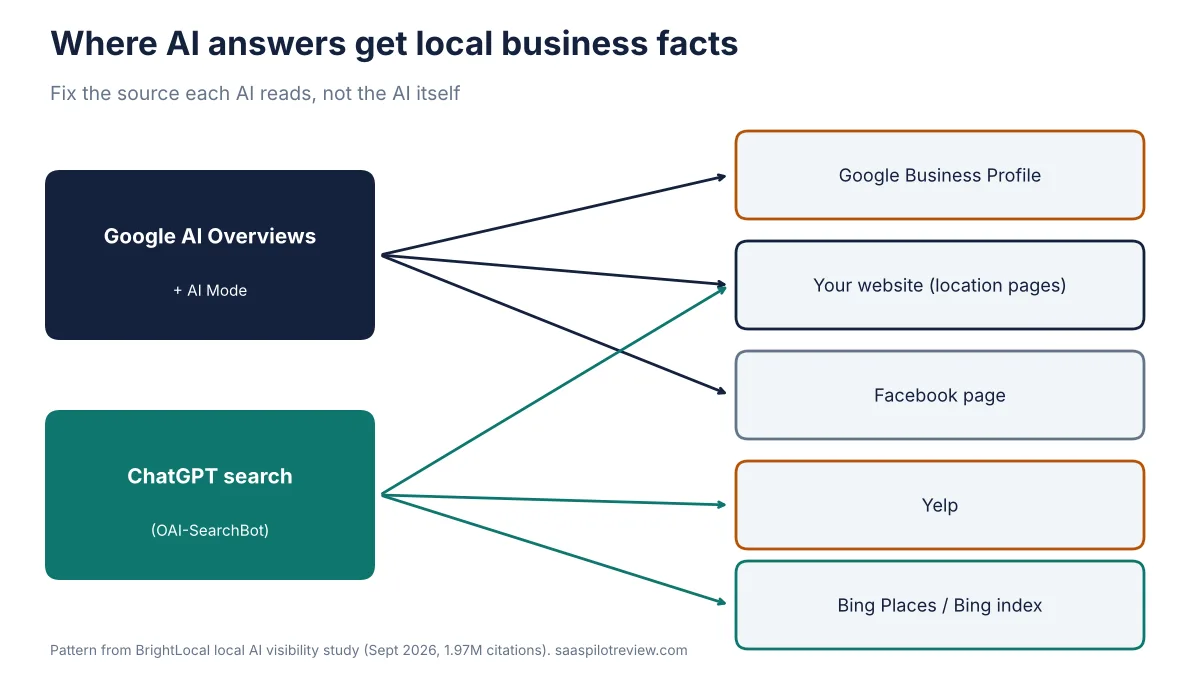
A local service business gets cited in Google AI Overviews and ChatGPT by fixing the sources those tools already read, not by adding a special AI file. Google says there are no extra technical requirements and no special schema for its AI features: the page has to be indexed and allowed to show a snippet. For local searches, the biggest single source is still your free Google Business Profile ($0 to create, per Google). ChatGPT leans on different places, mainly Yelp and Bing, and OpenAI says sites that block its search crawler, OAI-SearchBot, are left out of ChatGPT search answers.
How this guide was made: it is research, not a hands-on test. On October 30, 2026 we read Google Search Central’s page on AI features, OpenAI’s crawler and ChatGPT search help pages, and BrightLocal’s September 2026 study of 1,967,762 AI citations for local searches. We have not run a controlled before-and-after test on a client profile, so there is no score and no promise of a result. If you already track local rankings, our Localo vs BrightLocal comparison covers the two tools most small shops use to watch the map pack while they work on this.
Which sources do AI answers cite for “near me” searches?
Business websites and Google Business Profiles carry most of the weight. BrightLocal ran non-branded, localized prompts for more than 1,300 business locations through ChatGPT, Google AI Mode and Google AI Overviews over 60 days, checking nine map points around each location, and counted where the answers pointed. Business sites made up 42% of all citations and 93% of the unique domains. Google Business Profile came next at 28.63% (the report’s text rounds it to 28.5%), then Yelp at 9.53% and Facebook at 2.23%. Tripadvisor, OpenTable, MapQuest, BBB and Angi each sat under 2%.
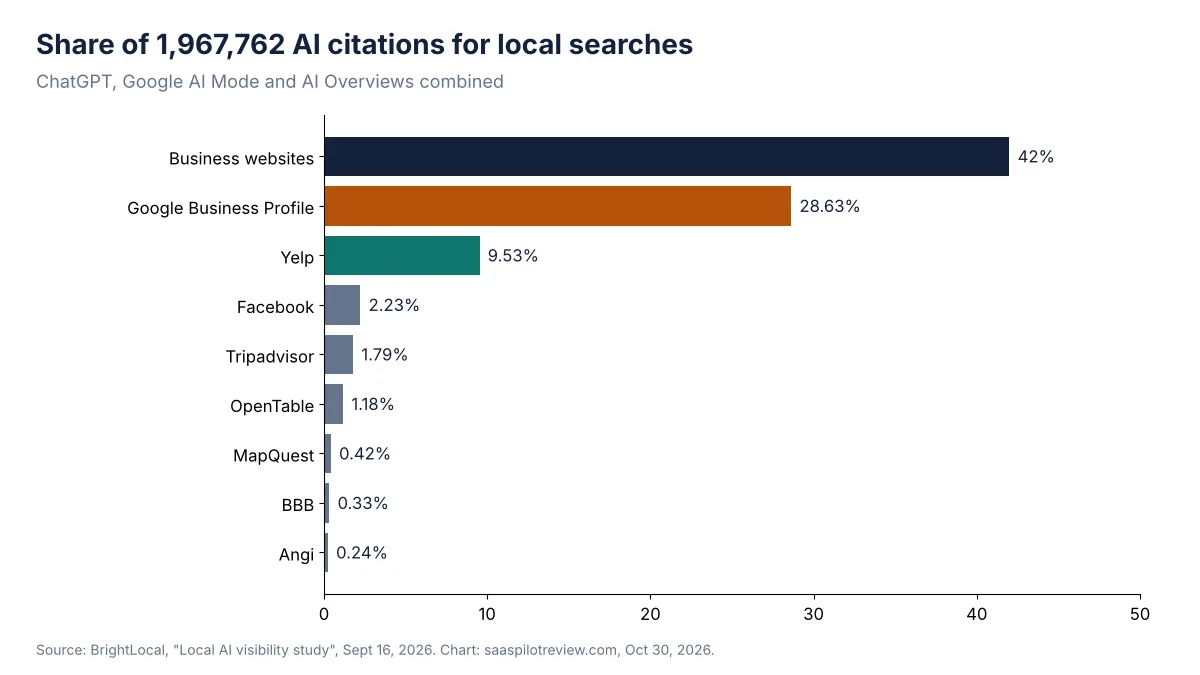
The split between platforms matters more than the totals. BrightLocal found that Google AI Mode and AI Overviews “heavily rely” on Google Business Profile, with Facebook also showing up for Google. ChatGPT hardly used Google Business Profile at all and leaned on Yelp and Bing instead. So a plumber with a perfect Google profile and an unclaimed, half-empty Yelp page can look strong in AI Overviews and invisible in ChatGPT.
The source map: what to fix for each AI
Work from this table rather than from a generic “GEO checklist”. Each row is a place an AI already reads, who reads it most, and the one fix that usually matters there.
| Source | Read most by | What to fix first | Cost to claim |
|---|---|---|---|
| Google Business Profile | AI Overviews, AI Mode | Primary category, services list, hours, service area, recent photos and reviews | $0 (Google: “creating a Business Profile and listing your business on Google is free”) |
| Your website | All three | One page per service and per real location, with the city, the service and your phone number in plain text | Your existing hosting |
| Yelp business page | ChatGPT | Claim it, match name, address and phone to Google, fill categories and hours | Free page to claim; some features are paid |
| Bing Places / Bing index | ChatGPT | Claim the listing; multi-location brands can import from Google | Check at sign-up |
| Facebook page | AI Overviews, AI Mode | Same name, address, phone and hours as Google; post real jobs | Free page |
Prices checked October 30, 2026. The Google figure comes from Google’s own Business Profile FAQ; the Yelp line comes from BrightLocal’s claim guide, which shows Yelp’s “Claim This Free Business Page” button and warns that some features are only for paid users.
Google AI Overviews and AI Mode: there is no AI-only switch
Google’s answer is plain: “There are no additional requirements to appear in AI Overviews or AI Mode, nor other special optimizations necessary.” The page also says you don’t need new machine-readable files, “AI text files” or special schema.org markup. What it does list is ordinary SEO: Googlebot can crawl the page, the page is indexed and eligible to show with a snippet, the important content is in text, internal links help Google find it, and your Business Profile information is up to date.
Three things on that list trip up local sites more than you would expect:
- Snippet controls. A
nosnippetor a tightmax-snippettag, often left behind by an old SEO plugin setting, limits what Google can show from the page. Google lists these as the controls for limiting what appears in Search, so check your service pages don’t carry them by accident. - Service details locked in images. Price sheets, service-area maps and “areas we serve” lists saved as images give Google nothing to quote. Put the towns and services in text.
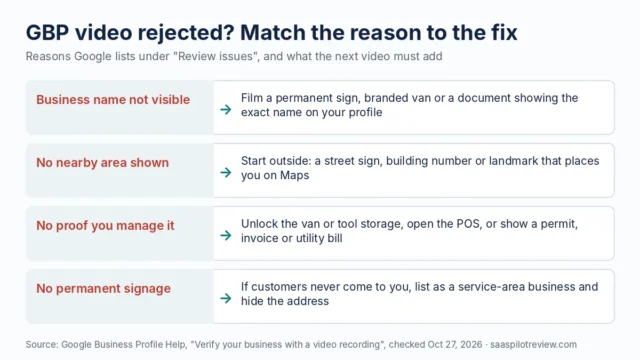
- A stale profile. If your Business Profile still says you close at 5 and your site says 7, you are handing the AI two answers. Fix the profile first. If verification is what is blocking you, our guide to fixing a failed GBP video verification walks through the options.
Google also notes that recrawling after a change “can take anywhere from several days to several months”, so judge changes over weeks, not days.
ChatGPT: open the door to OAI-SearchBot, then fix Yelp and Bing
Start with your robots.txt file. OpenAI says OAI-SearchBot “is used to surface websites in search results in ChatGPT’s search features”, and that sites opted out of it “will not be shown in ChatGPT search answers”. It is separate from GPTBot, which covers training: you can block GPTBot and still allow OAI-SearchBot. OpenAI says a robots.txt change can take about 24 hours to take effect. Some security plugins and firewall rules block unfamiliar bots by default, so look at the live file rather than assuming.
Next, look where ChatGPT looks. OpenAI’s search help says ChatGPT may share search queries with third-party search providers such as Bing, along with a general location from your IP address. BrightLocal’s data points the same way, with Yelp and Bing doing much of the work behind ChatGPT’s local picks. For most home-service businesses that means two jobs Google never asked for: claim and complete the Yelp page, and claim the Bing Places listing so the name, address, phone, hours and categories match your Google profile word for word.
Reviews feed all of these. If your Yelp page has three reviews from 2021, ChatGPT has little to go on. A steady review routine fixes that faster than any content change; our review request text templates are written for crews asking right after the job.
What you can’t change: distance and a public address
Some of the outcome is out of your hands. In BrightLocal’s data, 52.8% to 59.3% of AI picks were within 5 km of the searcher and 71.7% to 78.2% within 10 km. Google’s tools stayed tight: 90% of recommended businesses fell within 64 km for AI Mode and 38 km for AI Overviews. ChatGPT ranged far wider, with its 90% radius at 287 km, which also means more of its answers point to businesses that may not serve the searcher at all.
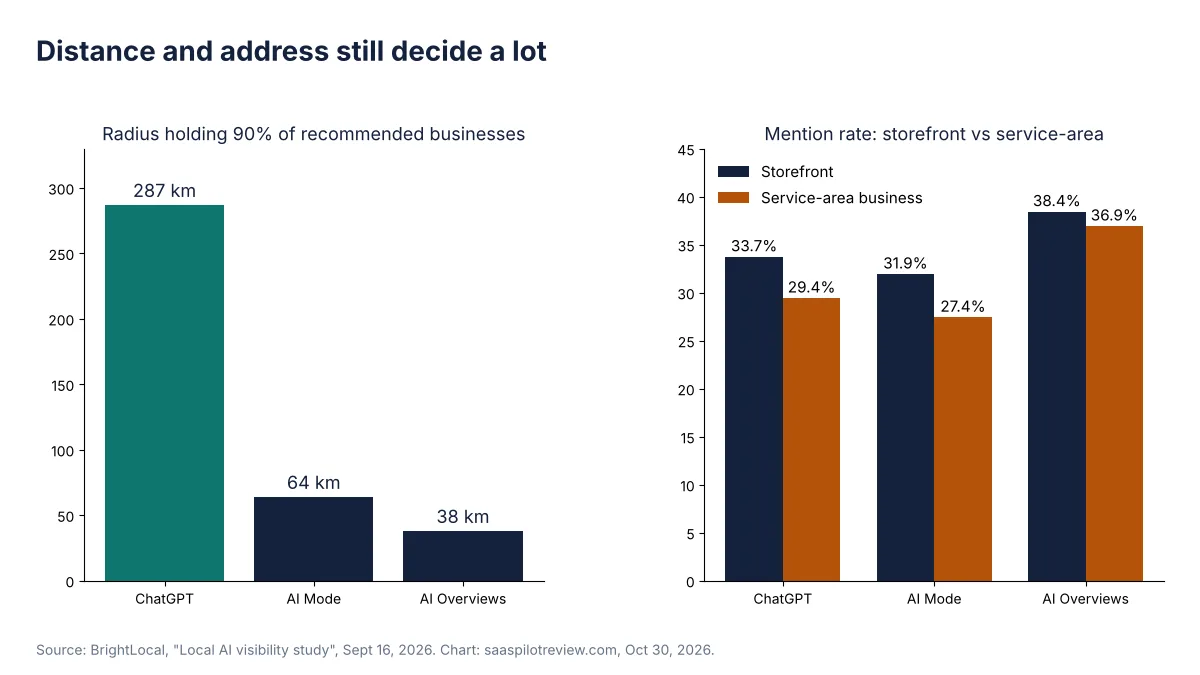
A public address helps too. Storefronts were mentioned more often than service-area businesses on every platform: 33.7% vs 29.4% on ChatGPT, 31.9% vs 27.4% on AI Mode and 38.4% vs 36.9% on AI Overviews. Don’t invent an address to chase that gap; Google’s profile rules don’t allow it. A service-area business closes the gap with clear service-area pages on its own site and a complete profile instead.
A 30-minute citation audit for one location
- Robots.txt (2 minutes). Open yourdomain.com/robots.txt. Make sure Googlebot and OAI-SearchBot are not disallowed.
- Snippet tags (5 minutes). View the source of your main service page and search for “nosnippet” and “max-snippet”.
- Google Business Profile (8 minutes). Check primary category, services, hours, service area and the last photo date.
- Yelp and Bing (8 minutes). Search your business name on each. Claim what is unclaimed and copy the exact name, address and phone from Google.
- Your service pages (5 minutes). Each core service should have a page that names the service, the towns you cover and how to book, in text.
- Prompt check (2 minutes). Ask ChatGPT and Google “best [service] in [town]” while logged out, and write down who gets named and which sources are linked.
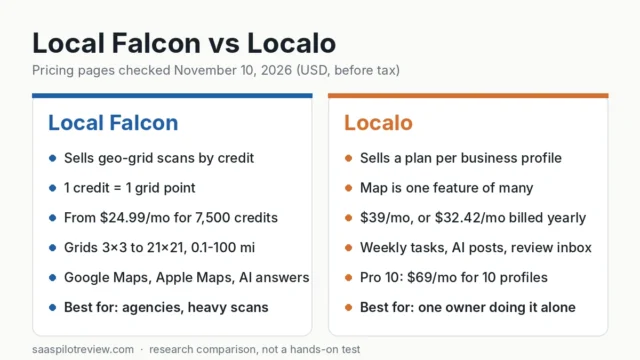
Repeat the prompt check monthly with the same wording so the results are comparable. A grid tracker shows the map pack side of the same picture; see our Local Falcon alternatives if you want a cheaper way to track one location.
How to tell if it’s working
Google doesn’t give AI Overviews their own report. Its AI features page says this traffic is counted in Search Console’s Performance report under the “Web” search type, together with regular results, so watch impressions and clicks on your service pages rather than looking for a separate line. For ChatGPT, check your analytics for referral visits from chatgpt.com, and keep the monthly prompt log from the audit above. Calls and booked jobs are the number that matters; if the review side is where you are weakest, our roundup of review management software for small businesses compares the tools that automate requests. More local search guides live in our local SEO hub, and our research method is on how we test.
Sources
- Google Search Central: AI features and your website
- Google Business Profile (FAQ on cost)
- OpenAI: Overview of OpenAI crawlers (OAI-SearchBot, GPTBot)
- OpenAI Help: ChatGPT search
- BrightLocal: Local AI visibility study (September 2026)
- BrightLocal: How to add or claim a Yelp business listing
- BrightLocal: How to add or claim a Bing Places for Business listing