If you run a pest control company with a few trucks, GorillaDesk vs PestPac is less a feature contest than a question of what kind of company you are. GorillaDesk publishes its price, charges by route and lets you start a trial tonight. PestPac, sold by WorkWave, prices every account after a demo and puts its weight behind commercial work: IPM records, auditor access, multi-unit buildings and multiple branches.
This comparison is based on research, not a test account: we have not run a route in either product. Everything below comes from each vendor’s own pricing, feature and help pages, checked on October 24, 2026. If you are still choosing between pest-specific and general field service tools, our best field service software for small crews roundup ranks GorillaDesk next to Jobber, Housecall Pro and others.
GorillaDesk vs PestPac: the short version in one table
| GorillaDesk | PestPac | |
|---|---|---|
| Published prices | Yes. Basic $49, Pro $99, Growth $149 a month for the first schedule | No. Pricing packages through a consultant |
| What you pay for | Each technician schedule (route); +$50 a month per extra schedule on Basic and Pro | Not published |
| Office users | Unlimited admin, manager, sales and crew users on every plan | Not published |
| Tiers | Basic, Pro, Growth | Small Business, Professional, Enterprise |
| Trial and contract | 14-day free trial; no contract, no startup fee, free data migration | Book a demo; no trial or contract terms described |
| Route optimization | Routing with Drive Matrix on Pro | Basic scheduling and routing on Small Business; route optimization from Professional |
| Device and bait station scanning | Device Tracking add-on with barcode scanning in the mobile app | Mobile app scans bait stations and traps over Bluetooth or Wi-Fi |
| Commercial and audits | Device trend reports on work orders and invoices | IPM conditions, digital logbook, view-only auditor access; auditor reports on Enterprise |
| QuickBooks | QuickBooks Online integration on Pro | Exports financial totals to QuickBooks; general ledger export from Professional |
| Multiple branches | Not described | Multi-branch management on Enterprise |
Sources: GorillaDesk and PestPac pricing, feature and help pages listed at the end. Prices checked October 24, 2026.
What you pay: a $50 route against a sales quote
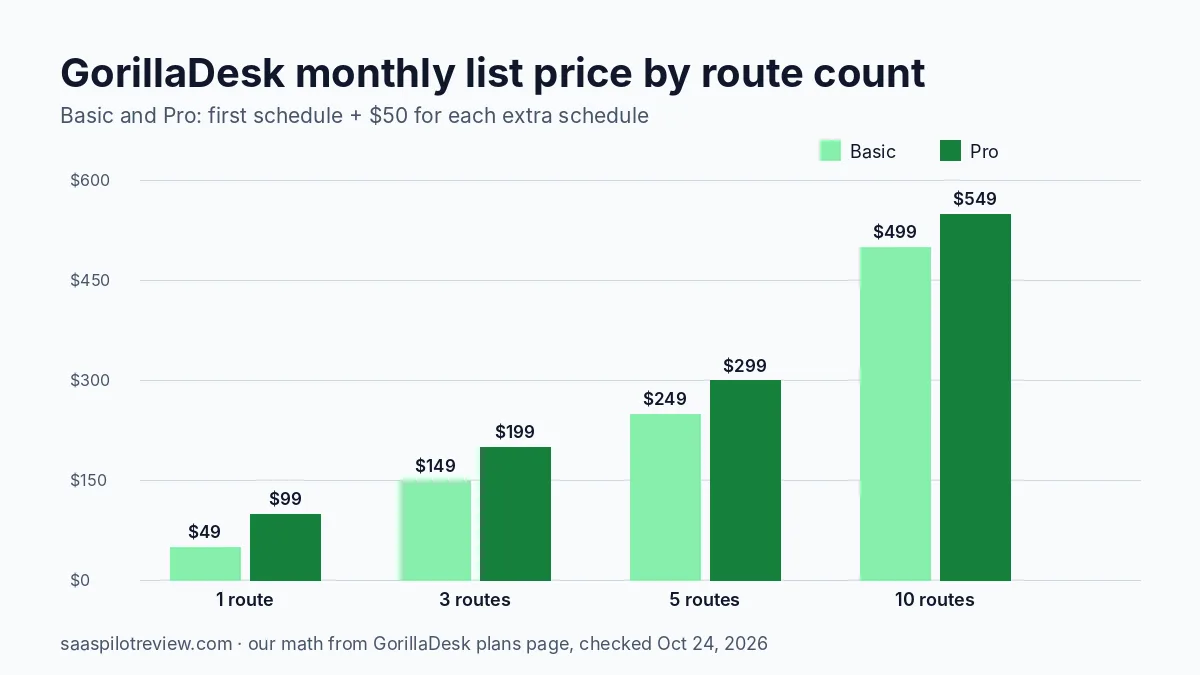
GorillaDesk is the one you can price on your own. Its plans and pricing help page lists Basic at $49 a month, Pro at $99 and Growth at $149 for the first schedule. A schedule is a technician with a route; each extra schedule adds $50 a month on Basic and Pro. The page does not give the extra-schedule price for Growth, so ask before you build a budget on it. Paying for a full year gets you one month free.
The part that suits a pest company is who does not cost money. Office staff, managers, sales reps and crew members who ride along are unlimited on every plan, and the mobile app has no extra charge. You pay for trucks on the road, not for the person answering the phone.
| Routes | Basic, monthly | Pro, monthly | Pro, paid yearly (11 months) |
|---|---|---|---|
| 1 | $49 | $99 | $1,089 |
| 3 | $149 | $199 | $2,189 |
| 5 | $249 | $299 | $3,289 |
| 10 | $499 | $549 | $6,039 |
Our math from GorillaDesk list prices on October 24, 2026: first schedule plus $50 per extra schedule; yearly assumes one month free as the plans page states. Excludes texting, phone and payment fees.
Two costs sit outside that table. Texting needs a local business number at $5 a month plus prepaid bulk SMS packages, whose prices the page does not list; incoming texts are free and unused messages roll over. GorillaDesk’s VoIP phone service starts at $65 a month per user for its basic phone tier.
PestPac’s pricing page names three packages and no numbers. It tells you to speak with a consultant for pricing, and it does not say whether the price is set per user, per vehicle or per branch. When you book the demo, ask for a written quote at your current number of technicians and at two more, plus any setup or professional services fee, so you can set it next to the table above.
Residential routes and recurring service
For a residential company running quarterly perimeter treatments, the daily work is scheduling, routing, texting customers and getting paid. GorillaDesk Basic covers invoices, estimates, work orders, material tracking, reporting and email or text automations. Pro adds the pieces most route businesses want within a year: a customer portal, Stripe and Square subscriptions for autopay, routing with Drive Matrix, QuickBooks Online, commissions, review requests and a document library with e-signatures. If you also run pool routes, our Skimmer alternatives guide compares GorillaDesk with pool-specific apps. Growth adds sales tools such as map-based estimates, dynamic estimates, estimate packages and pipelines.
PestPac’s Small Business package covers the same ground in its own words: customer records, basic scheduling and routing, the mobile app, billing and payments, basic accounting, reporting and a customer portal. It also lists termite inspection at this entry level. Route optimization, lead management, eCommerce and marketing automation start at Professional.
So on paper both can run a residential route. The practical difference is getting started: GorillaDesk quotes about two business days to migrate customers, or up to five with job history, and offers unlimited one-on-one training. PestPac does not publish an implementation timeline.
Commercial accounts, devices and audits
This is where PestPac pulls ahead. Its commercial pest control page describes techs inspecting and scanning bait stations, trap scanning over Bluetooth or Wi-Fi, recording conditions and recommendations for IPM compliance, a digital logbook for inspections and sightings, trend logs, and view-only access for auditors during an audit. It also handles multi-unit properties in bulk. These are the records commercial accounts such as food plants, warehouses and property managers tend to ask for.
GorillaDesk handles devices through an add-on. Its Device Tracking help article describes putting a barcode on each trap or station, scanning it in the field with the mobile app (which also fills in map coordinates), a device report in the Reports tab, and a Device Trend Report power-up that prints month-to-month activity on the invoice or work order. There is also a Sentricon power-up. The article does not give a price for the add-on, so confirm it during the trial.
If you have a handful of restaurant accounts with stations out back, GorillaDesk’s device reports may be all a customer asks to see. If an auditor will log in and review your records, PestPac is built for that conversation.
Chemical records and state paperwork
Every pest company has to keep application records. GorillaDesk’s chemical tracking page says techs record chemicals and the areas treated within the job, the data prints on invoices and work orders, and you can export your full application history to CSV or Excel in a few clicks. For states that require pesticide usage logs, the page says GorillaDesk can generate them. Pro adds a document library with state-specific forms and e-signatures.
PestPac lists logging materials and applications as part of its IPM tools, digital forms from Professional, and logbook and auditor reports on Enterprise. Neither vendor lists which states’ forms are covered, so bring your state’s required report to the trial or demo and ask them to produce it.
Books and payments: QuickBooks on each side
GorillaDesk connects to QuickBooks Online from the Pro plan. PestPac takes a different approach: a PestPac article on pest control QuickBooks software says PestPac exports financial totals into QuickBooks, so invoice and payment totals do not need to be rekeyed, and QuickBooks becomes your general ledger while PestPac keeps the service and billing detail. PestPac also sells its own accounting features, with general ledger export from Professional.
For an owner who does the books in QuickBooks Online every week, GorillaDesk’s integration is the simpler picture. For a company with a bookkeeper who wants totals, not every invoice, PestPac’s export model can be cleaner. Ask either vendor whether customers, invoices and payments sync both ways before you sign.
Picking one by company profile
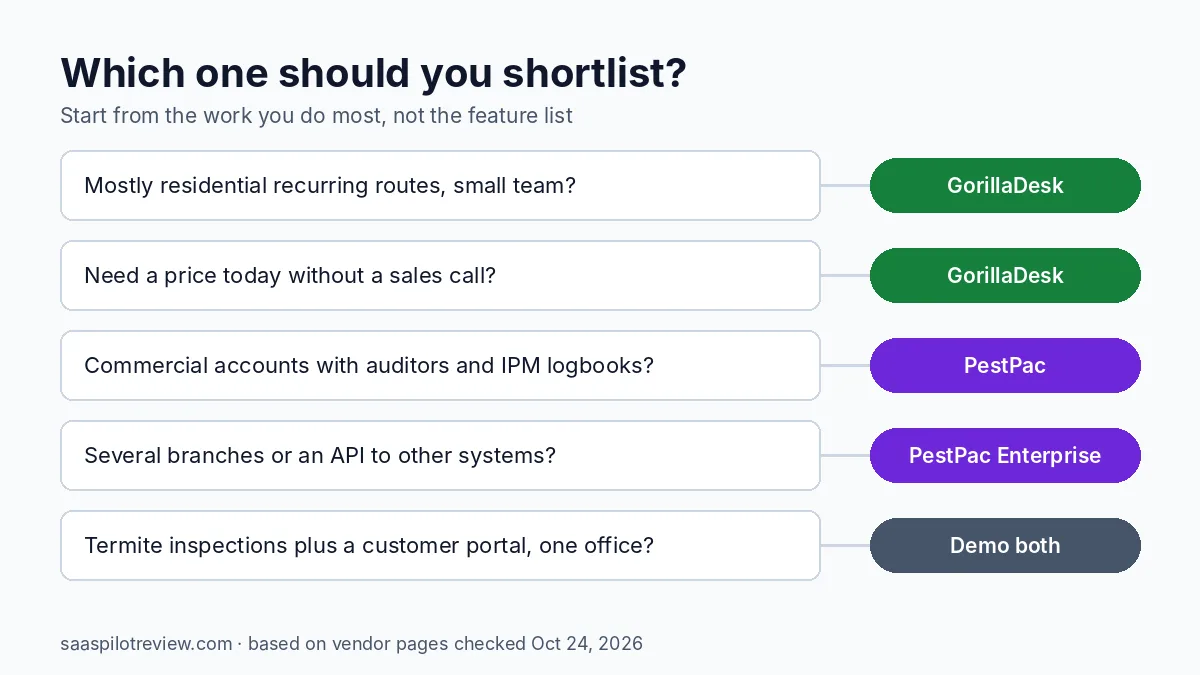
- Owner-operator or 2 to 5 trucks, mostly residential: start with GorillaDesk. The price is public, office users are free, and the 14-day trial lets you load a real route before paying. Pro is where autopay subscriptions, routing and QuickBooks Online start.
- Growing residential company that also sells lawn or mosquito add-ons: GorillaDesk Growth, for map estimates and sales pipelines, if the extra-schedule price makes sense once you have it in writing.
- Commercial-heavy accounts with audits: book a PestPac demo. IPM conditions, a digital logbook and auditor access are on its commercial page; GorillaDesk does not describe an auditor login.
- Two or more branches, or a need to connect other systems by API: PestPac Enterprise is the only one of the two that lists multi-branch management and API integrations.
The weak spots are clear too. GorillaDesk keeps texting and phone service outside the base price, and its device tracking add-on has no published price. PestPac asks you to commit time to a sales process before you see a number, and its pricing page does not say how the price scales.
How this comparison was researched
We read each vendor’s pricing page, feature pages and help articles on October 24, 2026, and only used numbers those pages state. The route cost table is our own arithmetic from GorillaDesk’s list prices. We have not used either product with a live crew, so there is no score on this page. You can read more about our process on how we test and research software. For more tools in this category, see our field service software guides.