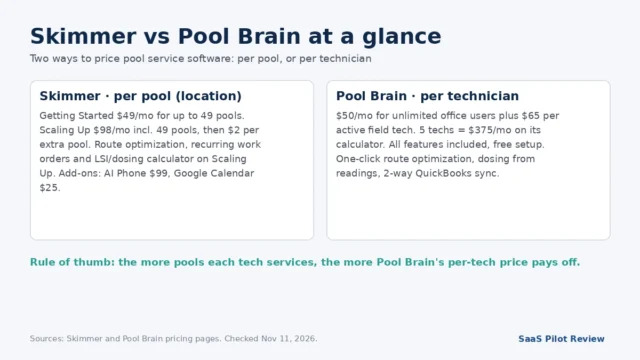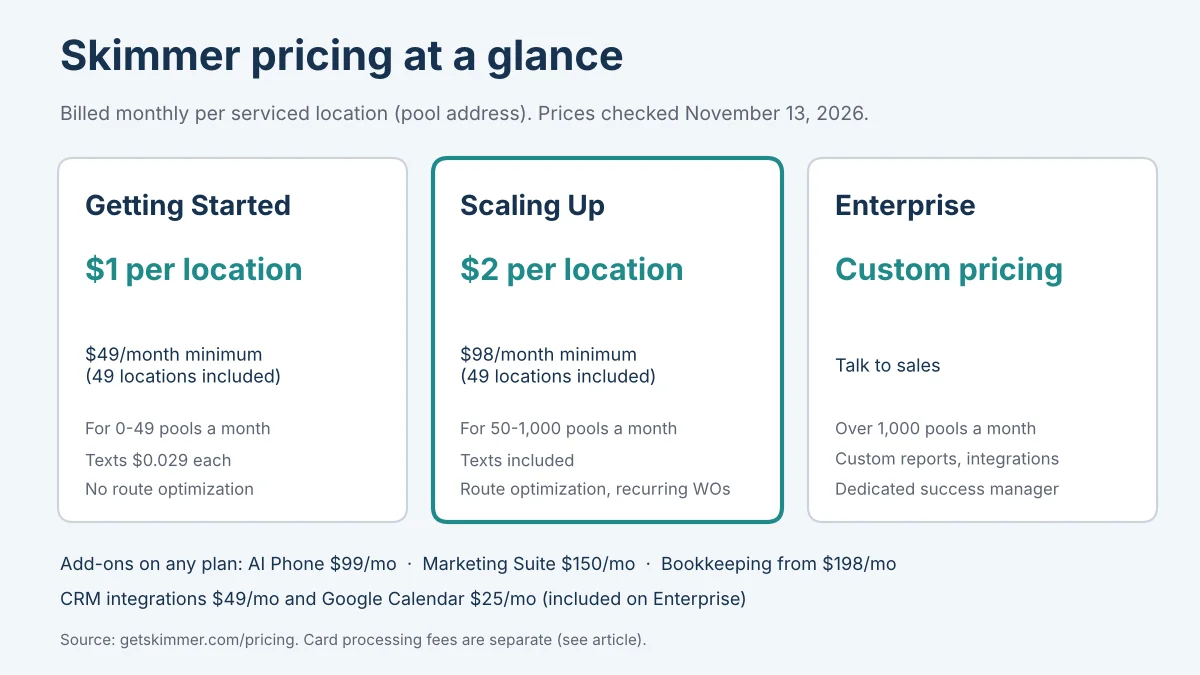
Skimmer pricing is quoted per pool, but the number on your card statement depends on three other things: which plan your route size forces you onto, which add-ons you switch on, and how your customers pay their invoices. Skimmer charges $1 per serviced location a month on Getting Started (minimum $49) and $2 per serviced location on Scaling Up (minimum $98), with custom pricing above 1,000 pools. This page turns those rates into a real monthly bill for a 40-pool, an 80-pool and a 150-pool route, and shows why card processing can cost more than the software itself.
How we put this together: researched from Skimmer’s pricing page, its Q&A hub, its billing and AI Phone product pages, and five Skimmer Help Center articles (subscription FAQ, billing FAQ, surcharge FAQ, Instant Payouts, Bookkeeping), all read on November 13, 2026. Researched from vendor pages, not hands-on tested: we have not run a pool route in Skimmer, and every total labeled as our arithmetic is our own calculation on published prices. See our research and testing methods.
Skimmer’s price list, line by line
Skimmer bills monthly for each serviced location, meaning each service address you complete work at in that month, however many visits or bodies of water it has. The Skimmer pricing page lists three plans and five paid extras.
| Item | Getting Started | Scaling Up | Enterprise |
|---|---|---|---|
| Rate | $1 per serviced location a month | $2 per serviced location a month | Custom, volume-based |
| Minimum bill | $49 (49 locations included) | $98 (49 locations included) | Quote |
| Intended size | 0–49 pools a month | 50–1,000 pools a month | Over 1,000 pools |
| Service texts | $0.029 per message | Included, unlimited | Included |
| AI Phone | $99/month | $99/month | $99/month |
| Marketing Suite | $150/month | $150/month | $150/month |
| Bookkeeping | From $198/month | From $198/month | From $198/month |
| CRM integrations | $49/month | $49/month | Included |
| Google Calendar | $25/month | $25/month | Included |
Prices checked November 13, 2026. Taxes and payment processing are not included.
Technicians, admins and customers are unlimited on every plan, so a second truck adds nothing to the subscription; only the pool count does. That is the opposite of a per-technician model, which we compare head to head in Skimmer vs Pool Brain for pool service routes.
What 40, 80 and 150 pools cost per month and per pool
On Scaling Up, every route of 49 pools or more works out to exactly $2 per pool; below 49 pools the $98 minimum pushes the real rate higher. Skimmer’s own subscription FAQ gives the same shape: about $200 for 100 locations and about $160 for 80.
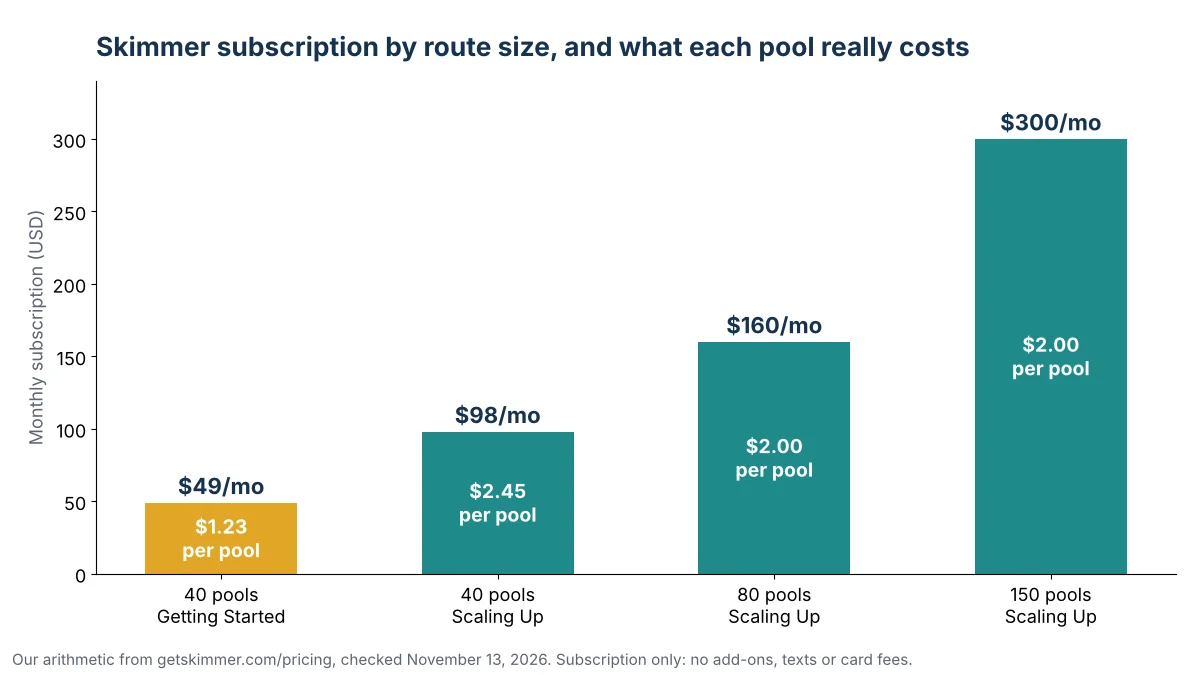
| Route | Plan | Monthly subscription | Per pool | 12 months |
|---|---|---|---|---|
| 40 pools | Getting Started | $49 | $1.23 | $588 |
| 40 pools | Scaling Up | $98 | $2.45 | $1,176 |
| 80 pools | Scaling Up | $160 | $2.00 | $1,920 |
| 150 pools | Scaling Up | $300 | $2.00 | $3,600 |
Our arithmetic from prices checked November 13, 2026: Scaling Up = $98 + $2 × (pools − 49). Subscription only.
The useful way to read this: for an owner charging pool customers a monthly service fee, Skimmer’s software line is a fixed $2 per account on Scaling Up. Budget it the way you budget chlorine per pool, not as a flat office expense.
The $49 plan’s fine print
Getting Started is the cheapest way into Skimmer, but it is missing the tools most full-time routes use every week. Quotes and estimates, job management, the schedule, recurring work orders, route optimization, required checklist items, the LSI and dosing calculator and live phone support are listed only from Scaling Up up.
Texts are the other gap. On Getting Started each service text costs $0.029. A 40-pool weekly route makes about 173 visits a month (40 × 52 ÷ 12, our arithmetic), so one text per visit is about $5 a month. That is small, but it means the $49 plan is really about $54 for an owner who texts after every stop.
One open question: the pricing page describes Getting Started as being for 0 to 49 pools, yet the subscription FAQ gives an example of a Getting Started bill of about $100 for 100 locations. If that still applies, an 80-pool route that does not need routing tools would pay about $80 rather than $160. Ask Skimmer in writing before you plan around it.
Add-ons that can double the bill
Every add-on is a flat monthly fee, so it costs a 40-pool route the same as a 150-pool one. On a small route, one add-on can cost more than the subscription.
- AI Phone, $99/month. Skimmer’s AI Phone page calls this a launch price and offers 30 days free. If you are weighing it against a standalone answering tool, our AI receptionist picks for small businesses list the alternatives.
- Marketing Suite, $150/month. Campaigns plus automated Google review requests in one bundle.
- Bookkeeping, from $198/month. Software plus an assigned bookkeeper; the Bookkeeping help article says catch-up work for past periods is a separate service.
- CRM integrations ($49) and Google Calendar ($25). Paid on Getting Started and Scaling Up, included on Enterprise.
Our arithmetic: a 40-pool owner on Getting Started who adds AI Phone and Google Calendar pays $49 + $99 + $25 = $173 a month, or $4.33 per pool, more than double the plan rate. The same two add-ons on a 150-pool route lift $300 to $424, or about $2.83 per pool.
Card and ACH fees: the cost that grows with your invoices
Skimmer Billing has no monthly fee, but processing fees often outweigh the subscription. The Skimmer Billing FAQ lists 2.9% + $0.25 per card transaction, an extra 0.5% for keyed or recurring transactions, and 1% + $0.25 per ACH payment, capped at $10. The billing product page itself says only that rates are “competitive”, so the help article is where the numbers live.
To show the scale, assume every customer pays one $100 invoice a month. That $100 is our example, not a Skimmer price; swap in your own average invoice.
| Route (plan) | Subscription | Fees, all ACH | Fees, cards on AutoPay | Total range |
|---|---|---|---|---|
| 40 pools (Getting Started, texts ~$5) | $54 | $50 | $146 | $104–$200 |
| 80 pools (Scaling Up) | $160 | $100 | $292 | $260–$452 |
| 150 pools (Scaling Up) | $300 | $187.50 | $547.50 | $487.50–$847.50 |
Our arithmetic. ACH = 1% + $0.25 = $1.25 per $100 invoice; AutoPay card = 3.4% + $0.25 = $3.65. Fees checked November 13, 2026.
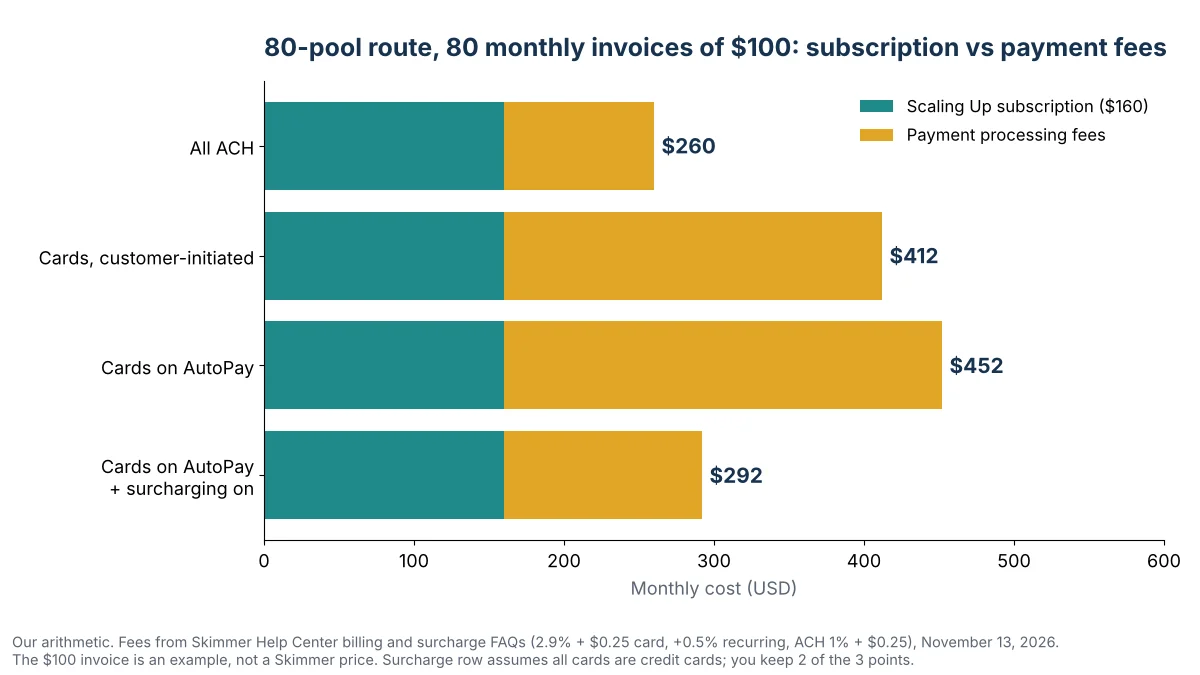
Two levers cut that line. First, steer AutoPay customers to bank accounts: on an 80-pool route that is the difference between $292 and $100 a month in our example. Second, surcharging. Skimmer’s surcharge FAQ says it adds 3% to credit card payments (not debit, ACH or check), keeps a 1% program fee, and passes the rest back to you, while standard processing still applies. Our reading: you recover about 2 points, so the AutoPay card example drops from $292 to about $132. Surcharging is not supported in Minnesota, New York, Maine, Massachusetts or Connecticut.
One more fee to know: Instant Payouts cost 1% of the amount and unlock only after 90 days of payments, 5 completed stops and $2,000 processed, per the Instant Payouts article. Standard card payouts arrive the next business day; ACH deposits take 5 to 7 business days.
Monthly only: trials, refunds, pauses and slow months
Skimmer publishes no annual plan or annual discount; the pricing page and the Skimmer Q&A answer on cost both describe monthly, per-location billing. That cuts both ways.
- Slow months bill less on their own. Locations you do not service that month are not billed. Our arithmetic for an 80-pool summer route that drops to 50 pools for four winter months: 8 × $160 + 4 × $100 = $1,680 a year, against $1,920 if it stayed at 80.
- There is no pause. The subscription FAQ says the bill falls to the $49 or $98 minimum in a month with no service, described as a cloud storage fee, and data is not guaranteed after cancellation.
- Free first month on Scaling Up. The promotion covers up to 49 locations; usage beyond 49 during the trial is billed in arrears afterward. Our arithmetic: an 80-pool route would owe about 31 × $2 = $62 for its free month. The older FAQ text still mentions a flat $49 first month, so confirm which offer applies when you sign up.
- 30-day refund. Cancel and request a refund within the first 30 days to get the subscription fee back.
When per-pool pricing stops making sense
Skimmer pricing rises in a straight line with pools, so it suits routes where pools grow faster than anything else is likely to change. It looks expensive in three situations:
- Many pools per technician. If each tech carries a heavy route, a per-technician price can undercut $2 per pool; the break-even math is in our Skimmer and Pool Brain price comparison.
- You need routing tools under 50 pools. The jump from $49 to $98 for route optimization is a 100% increase. Per-pool tools with no feature gate, and per-user tools, are compared in our Skimmer alternatives for small pool routes.
- Pools are one service among several. A per-route tool can be cheaper when pest or lawn work shares the truck; see GorillaDesk pricing by route for that model.
For general trades software beyond pool-only apps, the field service software hub collects our other pricing pages and comparisons.
Bottom line for budgeting: take your peak pool count, multiply by $2, add any flat add-ons, then add 1.25% to 3.65% of your monthly billings for payment processing depending on how customers pay. For most routes on Scaling Up, that last line is the one worth managing.
Sources
- Skimmer pricing page: plan rates, minimums, plan features, add-on prices, Scaling Up promotion terms, 30-day refund.
- Skimmer Q&A: How much does Skimmer cost?: monthly, per-location billing.
- Skimmer Help Center: Skimmer FAQ: billing examples, minimums, no pause feature.
- Skimmer Help Center: Billing FAQ: card and ACH processing fees, payout timing.
- Skimmer Help Center: Credit card surcharge FAQ: 3% surcharge, 1% program fee, excluded states.
- Skimmer Help Center: Instant Payouts: 1% fee and eligibility.
- Skimmer AI Phone page: $99/month launch price, 30 days free.
- Skimmer Billing product page: payment methods, surcharging and financing overview.
- Skimmer Help Center: Skimmer Bookkeeping: add-on scope and catch-up service.
Prices checked November 13, 2026.