If you run Housecall Pro and the phone keeps ringing while your techs are on a roof or under a sink, CSR AI is the obvious thing to try: it answers calls around the clock and books the job straight into your Housecall Pro schedule. The catch is the price. Housecall Pro sells CSR AI call answering as a paid add-on and does not print a number for it anywhere we could find, so this page lays out what you can confirm before a sales call, what you cannot, and how to judge the quote when you get one.
How we made this page: it is a research piece, not a hands-on test. We have not paid for CSR AI. On October 19, 2026 we read Housecall Pro’s pricing page, its AI Team product page and two of its help center articles, plus the pricing pages of three AI receptionists that publish their prices. Our testing and research method explains how we work and where AI tools help us.
Is there a published price for Housecall Pro CSR AI?
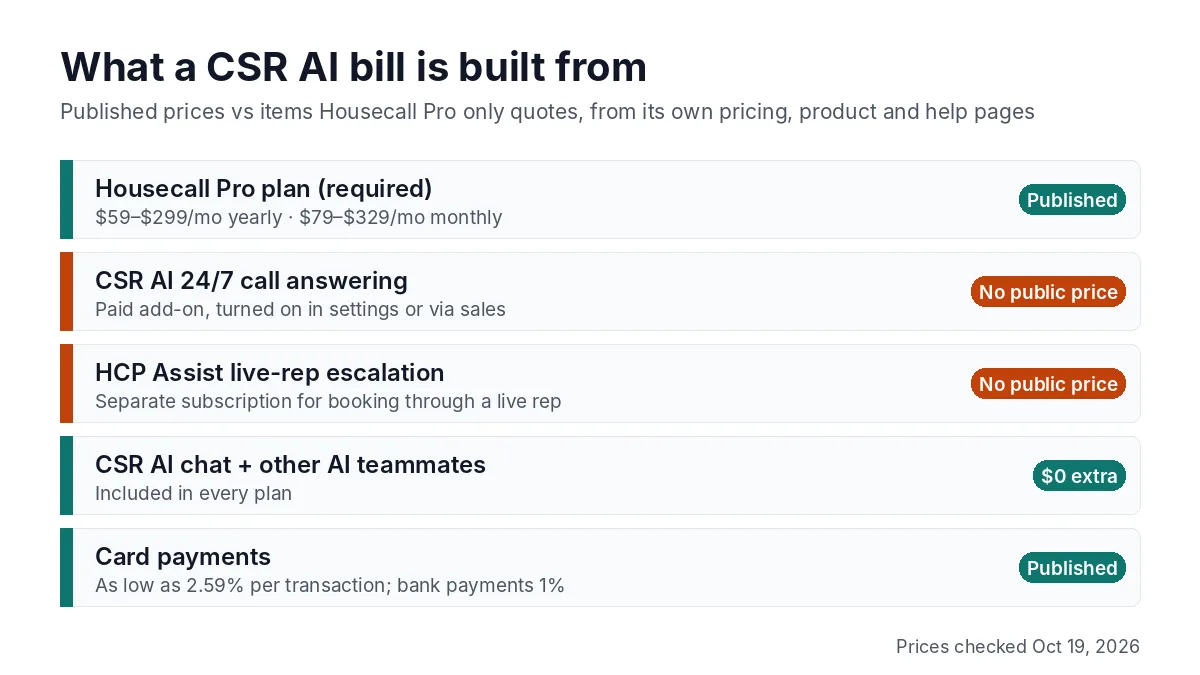
No. As of October 19, 2026, Housecall Pro does not publish a price for CSR AI call answering. Its AI Team page says “CSR AI sold separately” and its FAQ calls 24/7 call answering a paid feature you turn on in settings. The pricing page lists CSR AI as a feature that “answers calls and books jobs 24/7” with no price or plan next to it.
The help center’s CSR AI Overview says existing customers can sign up through a self-serve process inside their account, and everyone else can request a demo or contact sales. So the number you pay is whatever that signup screen or the sales rep shows you. If you see a figure on a third-party blog, treat it as one company’s quote, not a list price.
We already compared what CSR AI does against Jobber’s version in Jobber Receptionist vs Housecall Pro CSR AI. This page stays on the money.
Free with every plan vs paid on top
Part of the AI Team costs nothing extra. Housecall Pro’s AI Team page says Marketing AI, CSR AI chat, Analyst AI, Coach AI and Help AI are included in all plans, and its AI Team Overview help article says the AI Team is included with your account. Only the phone side of CSR AI is billed separately.
| Item | Included in every plan? | Published price |
|---|---|---|
| CSR AI website chat | Yes | $0 extra |
| CSR AI 24/7 call answering and booking | No, paid add-on | Not published |
| CSR AI text answering | Listed as “coming soon” | Not published |
| Escalation to a live HCP Assist rep who books or quotes | No, needs an HCP Assist subscription | Not published |
| Marketing AI, Analyst AI, Coach AI, Help AI | Yes | $0 extra |
The HCP Assist line matters more than it looks. The CSR AI Overview says a call escalated to HCP Assist without a subscription gets basic note-taking only; booking, reviewing pricing and using your custom FAQs through a live rep need an HCP Assist subscription. If you want a human safety net behind the AI, ask for both prices together.
The Housecall Pro plan you pay for first
CSR AI sits on top of a Housecall Pro subscription, so the plan is the part of the bill you can price today. These are the list prices on Housecall Pro’s pricing page on October 19, 2026, before the short intro discounts the page was also showing.
| Plan | Billed yearly | Month to month | Users included |
|---|---|---|---|
| Basic | $59/mo | $79/mo | 1 |
| Essentials | $149/mo | $189/mo | 5 |
| MAX | $299/mo | $329/mo | 8, then $35/mo per extra user |
Card payments start at 2.59% per transaction and bank payments carry a 1% fee, according to the same page. For crew-size math and the add-ons that also have no listed price (Voice, Pipeline and others), see our full Housecall Pro pricing breakdown.
The pricing page does not say that CSR AI needs a particular plan. That is worth asking, because a one-truck owner on Basic and a 6-tech shop on MAX may get different quotes.
How to judge a CSR AI quote against published AI receptionist prices
When the quote arrives, the fair yardstick is what AI receptionists with public prices charge. None of the three below books into Housecall Pro the way CSR AI does, and that native booking is the main thing you would pay CSR AI for, but they tell you what answering the phone costs on the open market.
| Product | Entry price | What it includes | Books into Housecall Pro? |
|---|---|---|---|
| Upfirst Starter | $24.95/mo | 30 calls, $1.50 per extra call; booking and call transfer included; 14-day trial, no card | No native connection |
| Jobber Receptionist | $29/mo add-on | Included on Jobber’s Plus plan | No, Jobber only |
| Rosie Scale | $149/mo | 1,000 minutes; first Rosie plan with calendar booking and live transfer; 7-day trial | No |
| Housecall Pro CSR AI | Not published | 24/7 call answering and booking inside Housecall Pro | Yes |
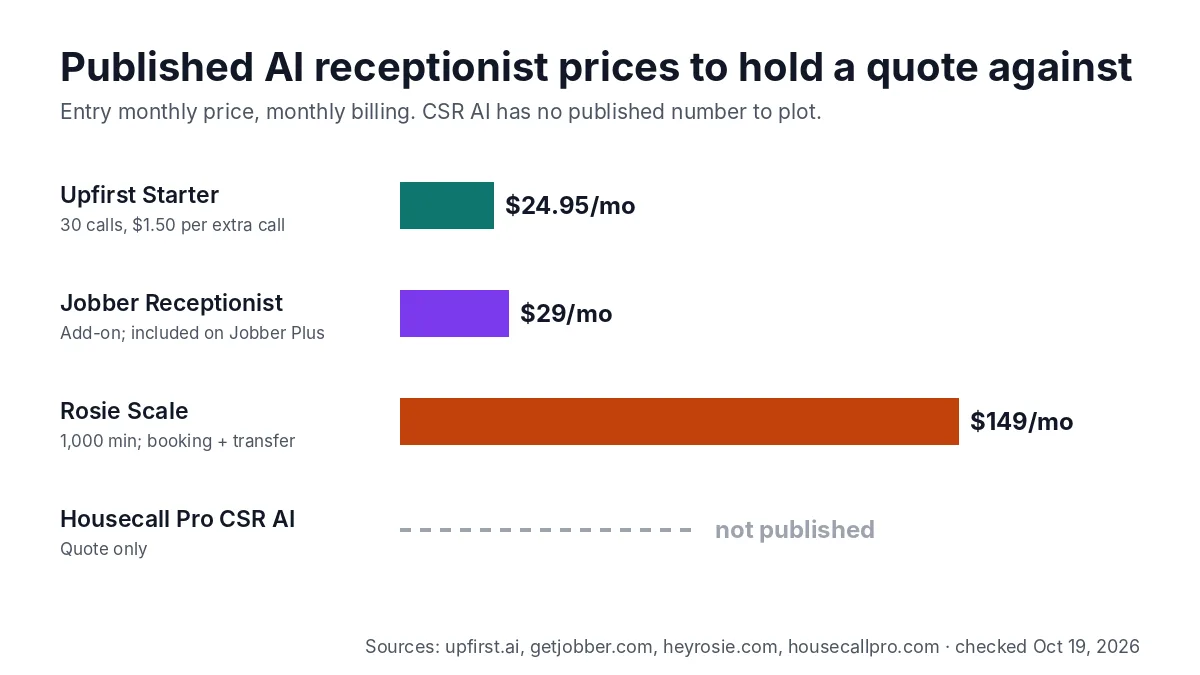
A simple way to compare: divide the monthly quote by the number of calls you expect CSR AI to answer. Upfirst’s Starter plan works out to about 83 cents a call if you use all 30 calls ($24.95 ÷ 30), and every call past 30 costs $1.50. If a CSR AI quote comes to several dollars per answered call at your volume, you are paying a premium for booking straight into Housecall Pro; decide whether that saves enough office time to be worth it. For what the three standalone tools cost at 60, 150 and 300 calls a month, see our Rosie vs Upfirst vs Goodcall cost comparison, and for the wider field, our best AI receptionist picks for small businesses.
Seven questions to ask before you switch it on
Because the pricing page leaves the add-on blank, the quote call is where the real price gets set. These questions cover each cost line we could not confirm in public.
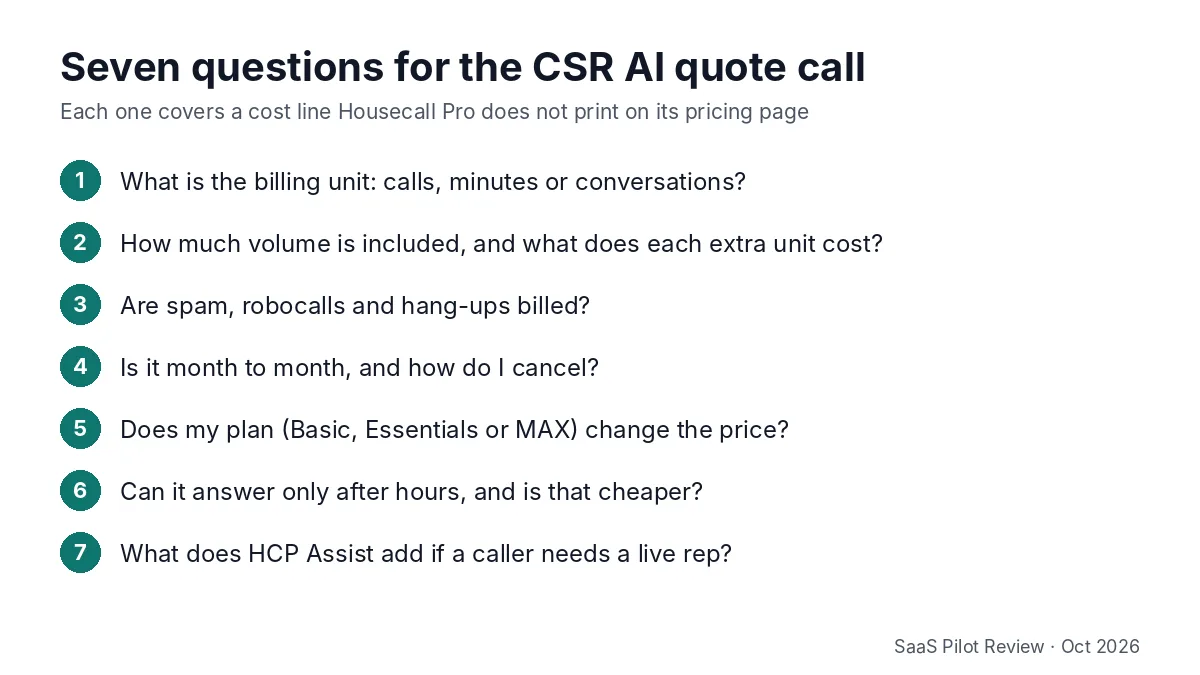
- What is the billing unit? Calls, minutes and conversations add up very differently for a shop with long estimate calls.
- How much volume is included, and what is the overage rate? Ask for the per-unit price after the allowance, in writing.
- Are spam calls, robocalls and hang-ups billed? Home service lines get a lot of them. Upfirst, for example, publishes that it does not bill spam or calls under 15 seconds; ask whether CSR AI has a similar rule.
- Is it month to month? The help center says you cancel CSR AI by submitting a request from your billing tab or contacting support, so ask whether a minimum term applies.
- Does the price change by plan? Basic, Essentials and MAX are priced very differently; the add-on may be too.
- Can it answer only after hours? Many owners only want nights and weekends covered. Ask whether that lowers the bill.
- What does HCP Assist add? If you want a live person to take over calls the AI cannot finish, get the HCP Assist price in the same quote.
Turning CSR AI on, pausing it and cancelling
The setup has no published fee. According to the CSR AI Overview, Housecall Pro gives you a call forwarding number and you route calls to CSR AI by forwarding your business line to it. That number is only for CSR AI and should not go on your truck, website or Google profile.
Three practical points from the same article that affect cost:
- You can try the demo first; the help center says the demo needs no setup or cost.
- To pause CSR AI for a while, turn off call forwarding with your phone carrier. That stops calls reaching it, but ask whether billing pauses too.
- To cancel, submit a request from the billing tab or contact support by chat or phone.
Housecall Pro’s 14-day free trial needs no credit card, according to the AI Team page. The page does not say whether paid CSR AI call answering is part of that trial, so confirm it before you forward your main line.
Who should ask for a quote and who can skip it
Ask for a quote if you already run your schedule in Housecall Pro, you miss calls when the crew is on jobs or after hours, and you want new jobs to land on the calendar without anyone retyping them. That native booking is the one thing the cheaper standalone tools above cannot match.
Compare first if you are a one-person shop on Basic who misses a handful of calls a week. A published plan such as Upfirst’s Starter, combined with a missed call text back setup, may cover you for less, and you can see the price before you start.
Skip it for now if you are not on Housecall Pro. CSR AI only books into Housecall Pro, so it is not a reason to switch software on its own. Browse the rest of our AI receptionist guides instead.
Prices checked October 19, 2026. Housecall Pro can change its pricing at any time; we will update this page when it publishes a CSR AI price.
Sources: Housecall Pro pricing page, AI Team page, help center articles CSR AI Overview and AI Team Overview; Upfirst, Jobber and Rosie pricing pages. All checked October 19, 2026.