The best AI receptionist for a small business answers every call you miss, books the job or takes a clean message, and costs less than the work it saves. For most owners that means a plan between $25 and $150 a month. The catch is the billing unit: some tools charge by the minute, some by the call and some by the caller, so the cheapest sticker price is often not the cheapest bill.
Below are eight AI receptionists that come up again and again when small businesses shop for one, viewed through the eyes of a service business with one location and a small team. You get the plan that fits, the features the cheapest tier leaves out and the real bill at 100 calls a month.
Our method for this page: on October 10, 2026 we read the pricing page of every vendor listed, noted the call or minute allowance and the overage rate, and priced one identical month of calls on each tool. We have not run these receptionists on a live phone line yet. Full reviews will follow our testing process, get linked from this page when they publish, and could move a tool up or down. No vendor here pays us, and none of the links below are affiliate links. Read our editorial policy for how we stay independent.
Which AI receptionist is best for a small business?
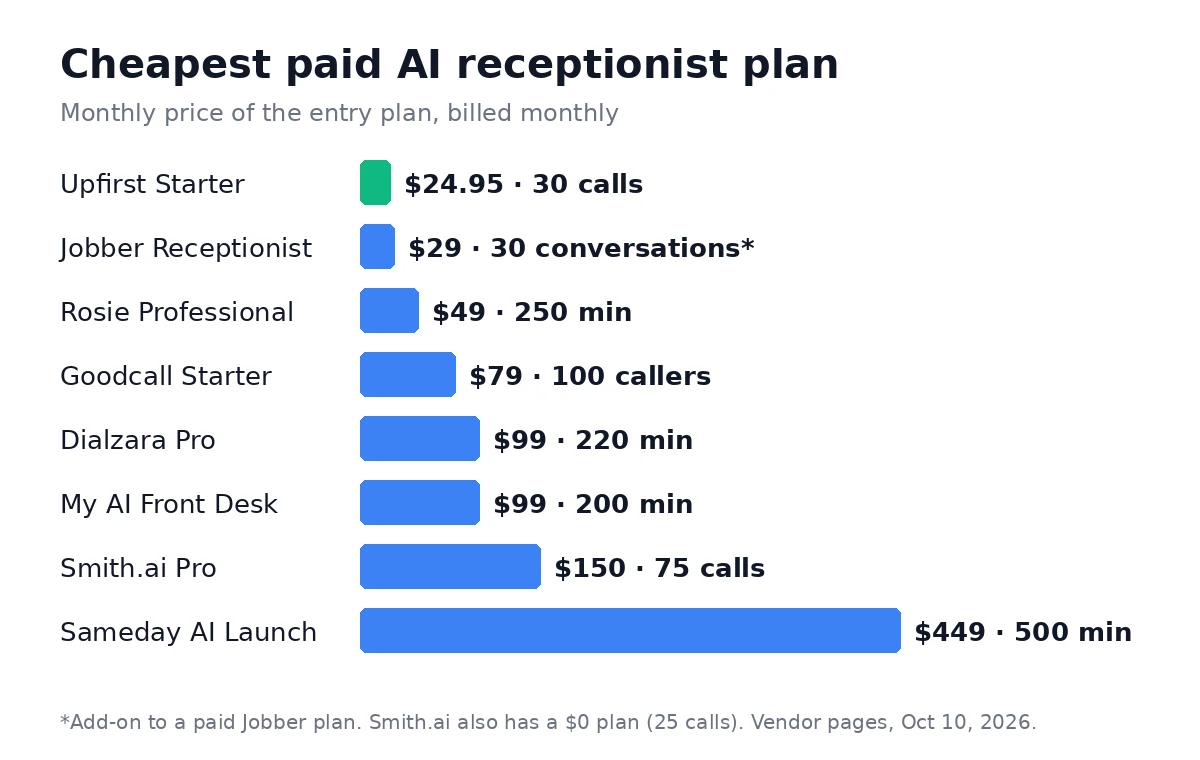
Upfirst is the best starting point for most small businesses: booking, call transfer and texting are on every plan, billing is per call, and the entry plan is $24.95 a month. If you already run Jobber, its built-in Receptionist is the simpler choice. Pick Goodcall if most of your calls come from the same customers. To see how the three cheapest options price out at your volume, read our Rosie vs Upfirst vs Goodcall cost comparison.
| Tool | Best for | Entry plan | Billed by | Free trial |
|---|---|---|---|---|
| Upfirst | Most small businesses | $24.95/mo, 30 calls | Call | 14 days, no card |
| Jobber Receptionist | Teams already on Jobber | $29/mo add-on, 30 conversations | Conversation | With the 14-day Jobber trial |
| Goodcall | Repeat callers and busy lines | $79/mo, 100 unique customers | Unique caller | Free demo agent |
| Rosie | Trades and home services | $49/mo, 250 minutes | Minute | 7 days |
| Smith.ai | Very low call volume, law and professional offices | $0, 25 calls | Call | Free plan |
| Dialzara | Calendar-first offices | $29/mo, 60 minutes | Minute | 7 days |
| My AI Front Desk | Owners who want one simple plan | $99/mo, 200 minutes | Minute (credits) | 7 days |
| Sameday AI | Larger home service shops on ServiceTitan | $449/mo, 500 minutes | Minute | Demo only |
What should an AI receptionist do for a small business?
Our shortlist kept only tools that cover these jobs when the phone rings and nobody can pick up:
- Answer in a natural voice and handle the common questions: hours, service area, prices you publish. Decide too what the greeting should tell callers about AI, since a few states now set rules for it.
- Book straight into the calendar you already use, or send a booking link by text.
- Pass urgent calls to a person, with a short summary first.
- Send you a written summary of every call, so nothing gets lost.
- Work after hours, on weekends and when the office line is busy.
We dropped platforms that only sell to developers or enterprises. Synthflow, for example, lists enterprise contracts starting at $30,000 a year, which puts it out of reach for this guide. Then we compared what each entry plan includes, how the bill grows past the allowance and which tools connect to the software small service businesses run on.
There is one more caller to plan for. Google now phones some local businesses on a customer’s behalf to ask about price and availability, and a missed call means you are left out of the comparison it sends back. Here is what Google’s AI asks when it calls your business and how to answer it.
Upfirst: best for most small businesses
Upfirst bills by the call, not the minute, and every paid plan includes appointment booking, live call transfer and texting a caller during the call. That makes the cheapest plan a complete receptionist rather than a trimmed-down trial.
- Plans: Starter $24.95 a month for 30 calls, Premium $59.95 for 90 calls, Pro $159.95 for 300 calls, Scale $299 for 600 calls. Paying yearly brings them down to $20, $48, $128 and $240 a month.
- Extra calls: $1.50 each on Starter, $1 on Premium, $0.75 on Pro and $0.70 on Scale.
- Calendars: books into Google, Outlook, Calendly, Acuity, Square and Clio.
- Trial: 14 days, no credit card.
Watch for: per-call billing is cheap for short calls and expensive if your callers are mostly spam. Upfirst says it does not bill spam or calls under 15 seconds, which is worth checking against your own call log in the trial. There is no native connection to Jobber, Housecall Pro or ServiceTitan.
Jobber Receptionist: best if you already use Jobber
If your quotes, jobs and invoices already live in Jobber, its own AI receptionist sits on the same customer list and schedule, so there is nothing to connect. It costs $29 a month as an add-on with 30 conversations included, then $0.79 per extra conversation. On the Jobber Plus plan it is included with unlimited usage.
- Separate greetings and phone menus for business hours and after hours.
- Calls that mention an emergency can be escalated to a team member.
- Works only with a paid Jobber plan. Our guide to the best field service software for small crews covers what Jobber itself costs.
Watch for: the add-on price comes on top of your Jobber subscription. At 100 conversations a month the add-on alone is $84.30, so a busy shop on a lower Jobber plan should compare that with the cost of moving to Plus. Housecall Pro users face a similar add-on question; our guide to Housecall Pro CSR AI cost lists what it publishes.
Goodcall: best for repeat callers and busy lines
Goodcall charges by unique customer instead of by minute or call, and says it never meters minutes. A customer who calls three times about the same job counts once, which suits property managers, salons and shops with regulars.
- Plans: Starter $79 a month for 100 unique customers, Growth $129 for 500, Scale $299 for 2,000. Enterprise pricing is on request.
- Extra customers: 79 cents each on Starter, 26 cents on Growth and 15 cents on Scale.
- Setup: you can build and try a demo agent for free and only pay once you connect a phone number.
- Connects to other tools through Zapier and its own API.
Watch for: Goodcall changed its plans during 2026. Earlier price trackers showed a $249 Scale plan and a flat 50-cent overage, so check the live page before you budget.
Rosie: best for trades and home services
Rosie is built around the calls a plumber, electrician or cleaning company gets: new job requests, quotes, scheduling questions. It bills by the minute, and the two higher plans add the features a busy service business needs.
- Plans: Professional $49 a month for 250 minutes, Scale $149 for 1,000 minutes, Growth $299 for 2,000 minutes. Yearly billing gives two months free.
- What the entry plan leaves out: Professional can text a booking link but cannot book on your calendar or transfer calls. Calendar booking, warm transfers and texting during the call start on Scale.
- Growth adds waterfall transfers, which try several numbers until someone answers.
- Connects to other apps through Zapier. A website texting add-on costs $50 a month.
Watch for: Rosie does not publish what happens when you run past your minutes, so ask before you sign up. Most service businesses will need Scale, which makes the real starting price $149.
Smith.ai: best for very low call volume
Smith.ai is best known for live receptionists, but it now sells an AI-only receptionist with a free plan. The free plan covers 25 real calls a month, then $3 per call, and Smith.ai says it is a permanent plan, not a trial. If you are torn between a human service and an AI one, our guide on choosing an AI receptionist or answering service compares the costs.
- Plans: Free $0 for 25 calls. Pro from $150 a month for 75 calls, with tiers for 150 and 300 calls. Enterprise from $500 a month.
- Extra calls on Pro: $2.50, $2.30 or $2.17 each, depending on the tier.
- AI scheduling through Calendly and other calendars on every plan, plus native connections such as Clio and Zapier.
- Live human agents can be added for an extra per-call fee.
Watch for: per-call prices are the highest on this list once you pass the free allowance. At 100 calls a month, Pro works out to $212.50.
Smith.ai AI Receptionist pricing
Dialzara: best for calendar-first offices
Dialzara focuses on booking into Google Calendar or Outlook and passing the details to other tools through Zapier or Make. It sells four minute bundles, which helps if your call volume is predictable.
- Plans: Lite $29 a month for 60 minutes, Pro $99 for 220, Plus $199 for 500, Business Elite $349 for 1,000.
- Extra minutes: $0.48 each on Lite and $0.35 on Business Elite. Dialzara does not publish the rate for Pro and Plus.
- Trial: 7 days.
Watch for: 60 minutes on Lite is roughly 20 short calls, so most businesses start on Pro or Plus.
My AI Front Desk: best for owners who want one simple plan
My AI Front Desk sells one main plan: $99 a month, or $79 a month paid yearly, with 200 voice minutes. Extra voice time is charged in credits worth about $0.25 a minute.
- Two editor seats and up to 20 outbound calls a day on the main plan.
- Connects to other apps through Zapier.
- Trial: 7 days.
Watch for: the vendor’s own fact sheet still lists older $99 and $149 tiers at $0.12 a minute, which does not match the live pricing page. Budget from the pricing page.
Sameday AI: best for larger home service shops on ServiceTitan
Sameday AI is aimed at home service companies with a real call volume and a dispatch team. It names ServiceTitan as an integration, which none of the cheaper tools here do.
- Plans: Launch $449 a month for 500 minutes, Scale $789 for 1,000 minutes, Enterprise on request.
- No free trial listed; you book a demo.
Watch for: at this price it competes with a part-time office hire, so it only makes sense once missed calls are clearly costing you jobs.
How much does an AI receptionist cost for a small business?
Covering 100 calls a month costs about $70 to $215 on the general tools here, depending on how each one bills, and $449 on Sameday AI. Because each vendor counts something different, we priced the same month on every tool: 100 calls, about three minutes each, from 100 different callers.
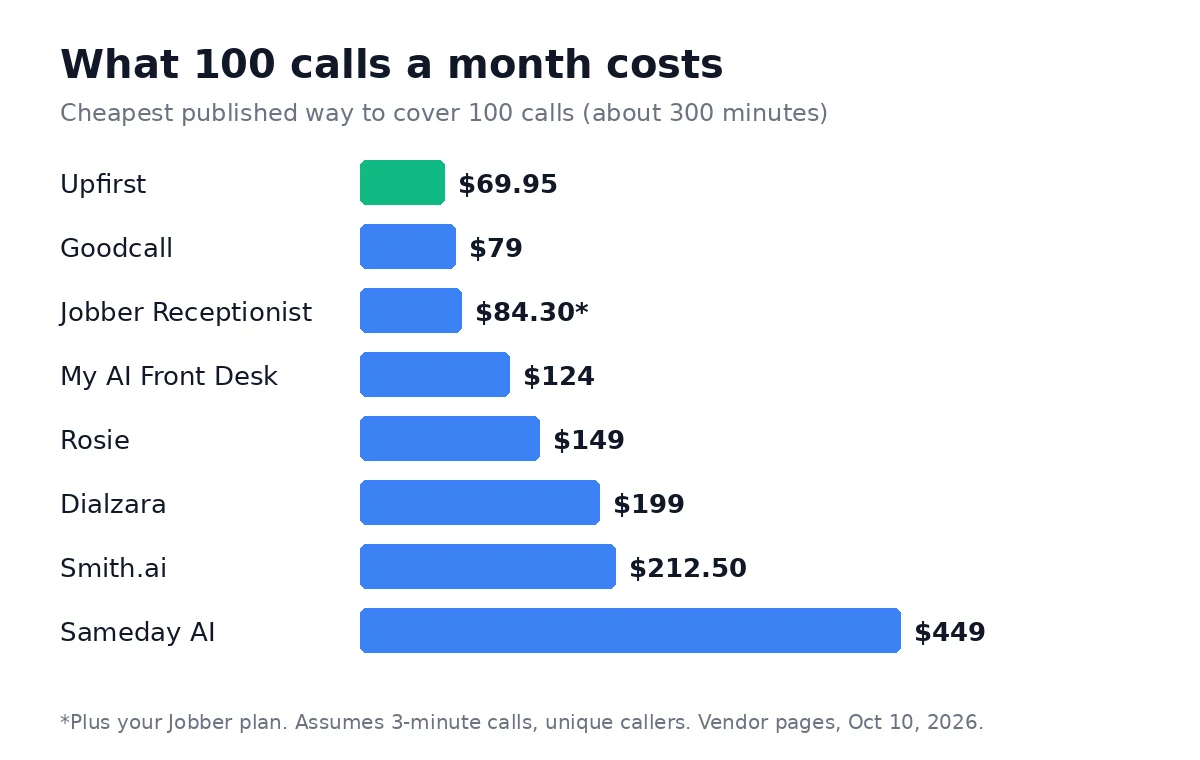
| Tool | Plan that covers 100 calls | Monthly cost | How we got there |
|---|---|---|---|
| Upfirst | Premium | $69.95 | $59.95 for 90 calls + 10 calls at $1 |
| Goodcall | Starter | $79 | 100 unique customers included |
| Jobber Receptionist | Add-on | $84.30 | $29 for 30 + 70 conversations at $0.79 |
| My AI Front Desk | Main plan | $124 | $99 for 200 minutes + 100 minutes at about $0.25 |
| Rosie | Scale | $149 | 300 minutes is over Professional’s 250; overage rate not published |
| Dialzara | Plus | $199 | 300 minutes is over Pro’s 220; Pro overage rate not published |
| Smith.ai | Pro, 75-call tier | $212.50 | $150 for 75 calls + 25 calls at $2.50 |
| Sameday AI | Launch | $449 | 500 minutes included |
Two things change this order. Longer calls push minute-based tools up, so a business whose callers talk for five minutes should look harder at Upfirst and Goodcall. Repeat callers push Goodcall down, because the same customer only counts once.
Can an AI receptionist book jobs into Jobber, Housecall Pro or ServiceTitan?
Only the tools made by those platforms, plus Sameday AI for ServiceTitan, connect directly. The general AI receptionists book into Google Calendar, Outlook or Calendly and pass the rest through Zapier, which means a second step before the job appears in your field service app.
- Jobber: Jobber Receptionist is built in. No other tool on this list names a native Jobber connection.
- Housecall Pro: its own CSR AI covers nights, weekends and holidays. Housecall Pro sells it as an optional add-on and does not publish the price.
- ServiceTitan: Sameday AI names it as an integration.
If your schedule lives in a field service app, start with the receptionist your app sells. Switch to a general tool only if it is missing something you need, such as better call transfers.
Does an AI receptionist work after hours and on emergency calls?
Yes, every tool here answers around the clock. The difference is what happens when a caller has a real emergency at 2 a.m. Jobber lets you set separate after-hours greetings and escalate calls that mention an emergency. Rosie’s Scale plan and Upfirst can transfer a call live to your on-call phone. On the cheapest plans, some tools can only take a message.
Before you switch on any receptionist, write down the three or four phrases that mean “send this to a person now” for your trade (a burst pipe, no heat, a gas smell) and test each one during the trial. Roofers, who miss the most calls in storm season, can add missed-call text back for roofers as a safety net. Auto repair shops, where many calls are “is my car ready?”, can compare the AI receptionists for auto repair shops.
Which one should you choose?
Start with the system you already pay for, then pick by how your callers behave:

- On Jobber: turn on Jobber Receptionist first.
- Under 30 calls a month: Smith.ai Free costs nothing; Upfirst Starter adds booking for $24.95.
- Many repeat callers: Goodcall, because each customer counts once.
- A trade business that needs transfers and booking: Rosie Scale at $149.
- Everyone else: Upfirst Premium at $59.95 for 90 calls.
Whichever you choose, run the trial on your real number for at least a week and read every call summary. That week tells you more than any feature list.