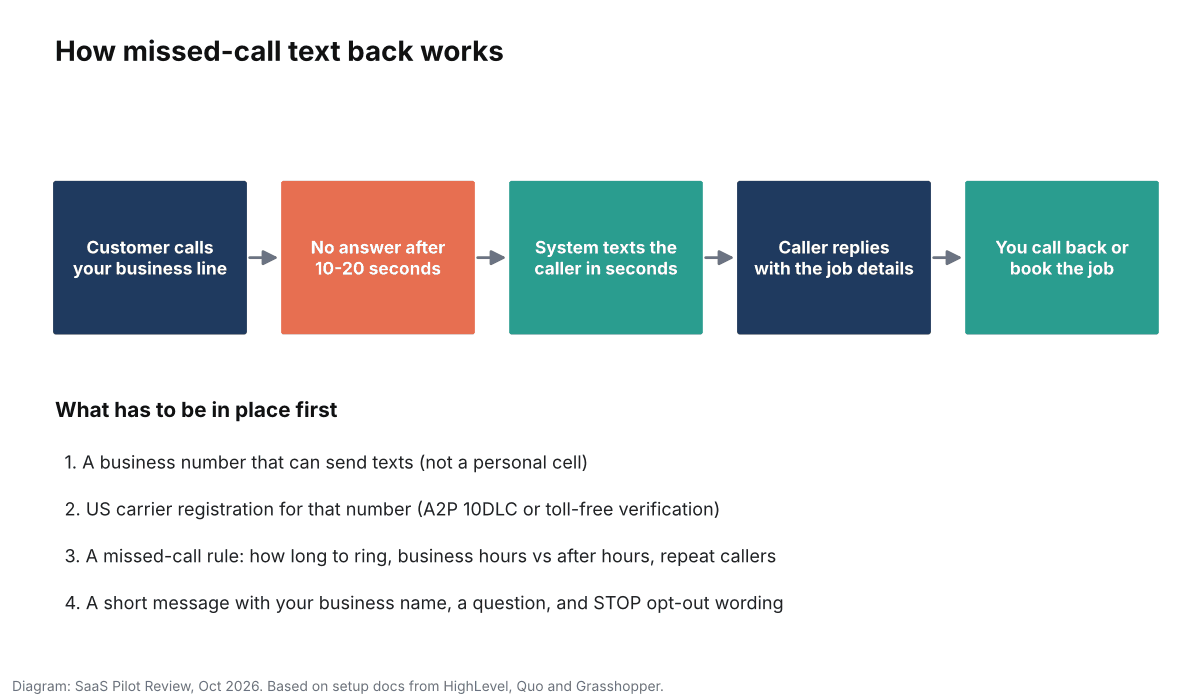
Missed-call text back sends an automatic text to anyone whose call to your business goes unanswered, so the caller gets a reply in seconds instead of moving on to the next company on Google. Setting it up takes about ten minutes in most phone apps. What trips small businesses up is everything around the toggle: a number that is not registered to send texts, a rule that fires three times at the same customer, or a message that reads like spam. This guide covers all of it, using the setup steps the main tools publish in their own help centers (checked October 14, 2026). To put a dollar figure on the calls you miss now, try our missed call cost calculator.
If you would rather have calls answered than texted back, compare the options in our list of the best AI receptionists for small businesses. More phone and texting tools are on our business phone and SMS hub. If a human service is also on your list, see how AI receptionist vs an answering service costs compare.
Before you switch it on: the number has to be allowed to text
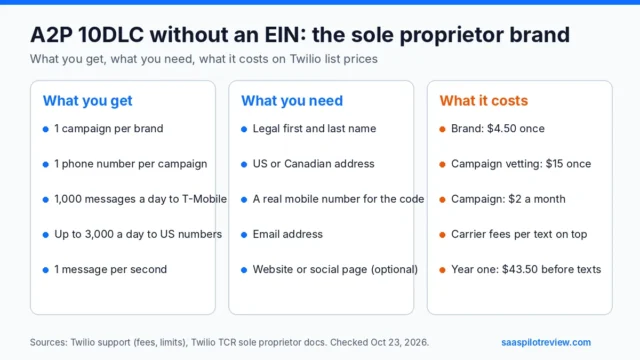
In the US, texts sent from a business’s local 10-digit number go through carrier registration called A2P 10DLC. Twilio, which powers many business phone and CRM tools, has blocked unregistered 10DLC messages to US numbers since August 31, 2023. If your missed-call texts never arrive, this is the first thing to check. Sole proprietors without an EIN can still register; see A2P 10DLC without an EIN.
Your phone or CRM provider usually walks you through registration inside its settings. You register your business (the “brand”) and describe what you send (the “campaign”). Registration fees, as Twilio lists them:
| Registration type | Who it fits | One-time brand fee | Campaign vetting (one-time) | Monthly campaign fee |
|---|---|---|---|---|
| Sole proprietor | One-person business without an EIN | $4.50 | $15 | $2 |
| Low-volume standard | Small business with an EIN, low daily volume | $4.50 | $15 | $1.50 (mixed use) |
| Standard | Higher volume, includes secondary vetting | $46 | $15 | $10 |

Toll-free numbers go through a separate toll-free verification instead. Either way, approval can take days, so start registration before you build the rest. Some apps also require a texting add-on: Grasshopper, for example, needs its SMS add-on enabled and the number verified for texting before Instant Response works.
Pick where the auto-text lives
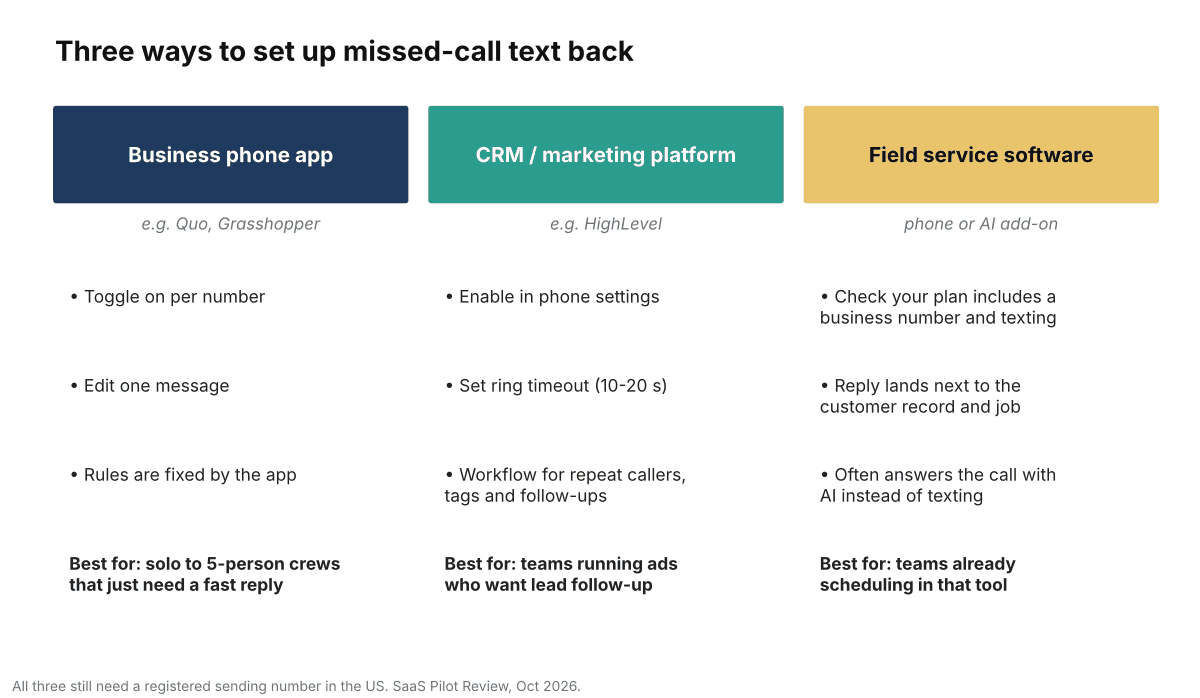
There are three common places to run missed-call text back. The right one is the tool where your calls already ring and where you will read the replies.
| Tool (example) | Where to switch it on | Who gets the text | Repeat callers | Message limit |
|---|---|---|---|---|
| Quo (formerly OpenPhone) | Settings, Phone Numbers, pick the number, Automations tab, Auto-Replies. Web or desktop app only. | Any unanswered caller; separate after-hours reply based on your business hours | At most one auto-reply per contact every 3 hours; none if you recently called or texted them | Not stated; Quo advises keeping it short |
| Grasshopper | Instant Response in the web portal, desktop or mobile settings; toggle per number | First-time callers who do not leave a voicemail and are not in your contacts | Not sent to repeat callers | 160 characters |
| HighLevel | Settings, Phone System, Voice tab, Voicemail & Missed Call Text Back | Every unanswered inbound call after your ring timeout | Sent on every missed call, unless you use the workflow version with a wait step | Standard SMS segments |
Field service platforms are the third route. Some bundle a business number and texting; others answer the call with AI instead of texting afterward. If you already pay for one, check its phone add-on first. Jobber’s AI Receptionist, for example, is priced in our Jobber pricing guide.
Set it up in five steps
- Confirm the number can text. Registration approved (or toll-free verified), texting add-on on if your app needs one. Send yourself a normal text from the business number first.
- Set the ring time. This decides when a call counts as missed. HighLevel recommends 10 to 20 seconds: shorter and you text people who were about to be answered; longer and the reply arrives after they have already dialed someone else.
- Write two messages: one for business hours and one for after hours (templates below). Quo uses your saved business hours to choose between them, so check those are right.
- Decide the repeat-caller rule. A customer who calls twice in five minutes should get one text, not two. Quo and Grasshopper handle this for you; in HighLevel, use the missed-call workflow and add a wait of about 20 minutes, as its help center suggests.
- Route the replies. Make sure replies land where someone will see them within the hour: the shared inbox, the owner’s phone app, or the CRM conversation view. A text back nobody reads is worse than voicemail.
Messages that get replies (and do not look like spam)
Every message should say who you are, ask one easy question, and tell people how to stop texts. Keep it under 160 characters where you can, since one segment is cheaper and some apps cap the length. Roofing crews can start from the storm-season templates in our guide to missed-call text back for roofers.
| Situation | Template | Length |
|---|---|---|
| Business hours, trades | Hi, this is Mike at Ridgeline Plumbing. Sorry we missed you, we’re on a job. What do you need help with? Reply STOP to opt out. | 127 |
| After hours | Thanks for calling Ridgeline Plumbing. We’re closed until 7am. Text us the problem and your address and we’ll reply first thing. STOP to opt out | 144 |
| Emergency-capable trade | Ridgeline Plumbing here. Missed your call. Is this an emergency (leak, no heat)? Reply YES and we’ll call right back. Reply STOP to opt out. | 140 |
| Appointment business | Hi from Bright Smile Dental. Sorry we missed you! Want to book a visit? Reply with a day that works, or book online. Reply STOP to opt out. | 139 |
Things to leave out: links in the first message (they raise spam filtering and look like phishing), promotions or discounts (this is a reply to the caller, not a marketing blast), and anything that pretends a person typed it when nobody is watching the inbox. Opt-out wording and a clear business name are what carriers’ messaging guidelines expect. If you plan to send marketing texts later, that needs separate consent; ask your provider or a lawyer about your situation, since this guide is not legal advice.
Test it in ten minutes
Do not trust the toggle. Run these checks from a cell phone that is not saved as a contact:
- Call during business hours and let it ring out. Time how long the text takes to arrive.
- Call again within five minutes. You should not get a second text (unless your tool sends on every call and you accepted that).
- Reply to the text and confirm the reply shows up where your team will see it.
- Change your phone’s business hours to closed, or call after hours, and check the after-hours message.
- Reply STOP and confirm the number is opted out, then reply START to undo it.
- Call from a number saved in your contacts. Some tools, such as Grasshopper, skip known contacts, which matters if regular customers call the main line.
When text back is not enough
Text back catches the caller; it does not book the job. If you are missing calls every day because the crew is on roofs or under sinks, the next step is software that answers live and takes job details. The AI receptionist comparison linked at the top of this guide lists tools that answer, qualify and book, with prices. Many teams run both: the receptionist answers during the day and text back covers dropped and after-hours calls. If many of your missed calls come from Google Local Services Ads, it also helps to track Google LSA calls so you can see which leads the text back saved.
How we put this guide together: we read the official setup documentation from Quo, Grasshopper, HighLevel and Twilio on October 14, 2026 and compared what each tool actually does with a missed call. We have not run these tools on our own business line for this guide, so we do not rank them here. See how we test for how hands-on reviews work on this site.
Sources
Quo support, “Auto-replies”; Grasshopper support, “Set up an Instant Response text on a phone number”; HighLevel support, “Where and how to configure the Missed Call Text Back feature”; Twilio support, A2P 10DLC fees and registration overview. All checked October 14, 2026.