An answering service puts a trained person on your line. An AI receptionist puts software on it. For a small home service or local business, the choice usually comes down to two numbers: how many calls you miss each month, and how many of those calls need human judgment. This guide compares the two on cost, call handling and booking, with prices taken from vendor pages. If many of your calls come from Google Local Services Ads, first track Google LSA calls so you know how many you actually miss.
How we made this guide: this is a research comparison. We have not run a paid account on the services named below for this article. Prices come from each vendor’s public pricing page, checked October 15, 2026, and the call-volume costs are our own math from those prices. Our wider process is on the how we test page.
The difference in one table
An AI receptionist is cheaper per call at almost any volume, while a human answering service is better at calls that need judgment, calm or a quote conversation. Most of the other differences follow from that.
| AI receptionist | Human answering service | |
|---|---|---|
| Who answers | Voice AI trained on your business info | A live receptionist working from your script |
| How you pay | Flat plan with minutes, or per call | Bundles of receptionist minutes |
| Entry price (checked Oct 15, 2026) | Rosie Professional $49/mo for 250 minutes; Smith.ai Free plan with 25 calls | Ruby $250/mo for 50 minutes |
| Several calls at once | Usually; confirm the limit with the vendor | Depends on the service’s staffing |
| Booking | Calendar booking on some plans (Rosie Scale and up) | Receptionist books from your instructions |
| Upset or confused callers | Weak spot; look for a transfer option | Strong point |
| Setup work | You feed it services, hours, service area and rules | You write a script and call-handling instructions |
If you want to compare specific AI products first, our best AI receptionist picks for small businesses cover pricing, booking and transfers tool by tool.
What each one costs at your call volume
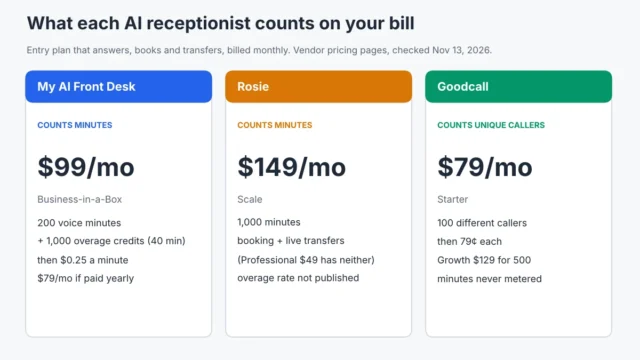
The pricing models are different, so a sticker price comparison is misleading. Ruby sells receptionist minutes, Rosie sells AI minutes, and Smith.ai’s AI Receptionist plans are billed per call. To compare them, we assumed an average call of about two minutes. That is our assumption, not a vendor figure; check your own phone logs and adjust.
| Calls a month (≈ minutes) | Ruby (human) | Rosie (AI) | Smith.ai AI Receptionist |
|---|---|---|---|
| 30 calls (≈ 60 min) | $395 (100-minute plan; the 50-minute plan is too small) | $49 (Professional, 250 min) | $15 (Free plan: 25 calls included, 5 extra at $3) |
| 100 calls (≈ 200 min) | $720 (200-minute plan) | $49 for text-a-link booking, or $149 (Scale) for calendar booking and transfers | $212.50 (Pro at 75 calls, 25 extra at $2.50) |
| 300 calls (≈ 600 min) | Over $1,725 (500-minute plan plus overage; Ruby does not publish its overage rate) | $149 (Scale, 1,000 min) | $501 (Pro at 300 calls, $1.67 a call) |
Prices checked October 15, 2026 on Ruby’s pricing page, Rosie’s pricing page and Smith.ai’s AI Receptionist pricing page. Rosie does not show an overage rate on its pricing page, and Ruby does not show overage or contract terms, so ask both before you sign up if your volume swings by season.
The gap grows with volume. At 30 calls a month a human service costs a few hundred dollars and an AI service costs under $50. At 300 calls a month the human option passes $1,700, while the AI options stay in the low hundreds. We priced three AI services at 60, 150 and 300 calls in our Rosie, Upfirst and Goodcall cost comparison.
Calls an AI receptionist handles well
AI receptionists are strongest on calls that follow a pattern. For a plumber, cleaner or HVAC shop, that covers a large share of the phone:
- “Are you open, and do you serve my area?” Hours, service area and basic service questions.
- Booking a standard job. A tune-up, a cleaning, a quote visit. On Rosie, calendar booking starts on the Scale plan; the $49 Professional plan sends the caller an appointment link by text instead.
- After-hours and overflow calls. The AI picks up while your crew is on a job or the office is closed, and it does not need a break.
- Taking a message with the details you need. Name, address, job type, how urgent it is.
A missed call that gets no answer at all is the costliest outcome. If you are not ready for an AI or a human service yet, a missed call text back setup is the cheapest first step, and it works alongside either option later. To see what unanswered calls cost you in jobs, run your numbers through our missed call cost calculator.
Calls that still need a person
A human answering service earns its higher price on calls where tone and judgment matter more than speed:
- Upset customers. A callback complaint or a billing dispute goes better with a person who can apologize and calm things down.
- Real emergencies. A burst pipe or a no-heat call in January needs someone who can judge urgency and follow your on-call rules exactly.
- Calls that go off script. Odd requests, callers who ramble, or people who refuse to talk to a machine. Whether to tell callers up front that they are talking to software is a separate decision: see should an AI receptionist say it’s AI.
- Industries with strict intake. Legal and medical offices often need intake handled in a specific way; check what the service supports in writing.
You don’t always have to choose. Smith.ai says complex calls on its AI plans can be transferred to a live North America-based receptionist, and Rosie lists warm and live transfers on its Scale and Growth plans. Ask how a transfer is billed before you rely on it, because neither pricing page shows a separate rate for it.
A new kind of caller: Google’s AI
Some of the calls you get are no longer from people. Google has started calling local businesses on behalf of searchers to ask about prices and availability. An AI receptionist handles those the same way as any other call; a human service bills you minutes for them. We explain what those calls sound like and how to answer them in Google’s AI is calling your business for quotes.
If you already use Jobber or Housecall Pro
Field service software now ships its own AI phone add-ons that book straight into your schedule. If your jobs already live in Jobber or Housecall Pro, compare those add-ons before buying a separate service; our Jobber Receptionist vs Housecall Pro CSR AI comparison covers what each one does.
Which should you pick?
Pick an AI receptionist if most of your calls are bookings, hours and service-area questions, you miss calls while on jobs or after hours, and your volume is more than a few calls a day. For a two-to-ten-tech home service business, this is usually the better value.
Pick a human answering service if your calls are few but high stakes (emergency work, legal or medical intake, high-ticket quotes) and a lost caller costs far more than the $250 to $720 a month that Ruby’s smaller plans cost.
Pick a mix if you want the AI to take routine calls and pass the hard ones to a person. Check that the transfer works the way you expect during a free trial: Rosie offers seven days, and Smith.ai has a free plan with 25 calls a month.
Whichever you choose, call your own number a few times as a customer before you go live: ask an easy question, ask an odd one, and pretend to be upset. That 20-minute test tells you more than any feature list.
Sources
- Ruby: plans and pricing (receptionist minutes, 24/7 coverage)
- Rosie: pricing (plans, minutes, booking and transfers by plan, 7-day trial)
- Smith.ai: AI Receptionist pricing (per-call rates, free plan, live receptionist transfer)
More guides in this topic: AI receptionists.