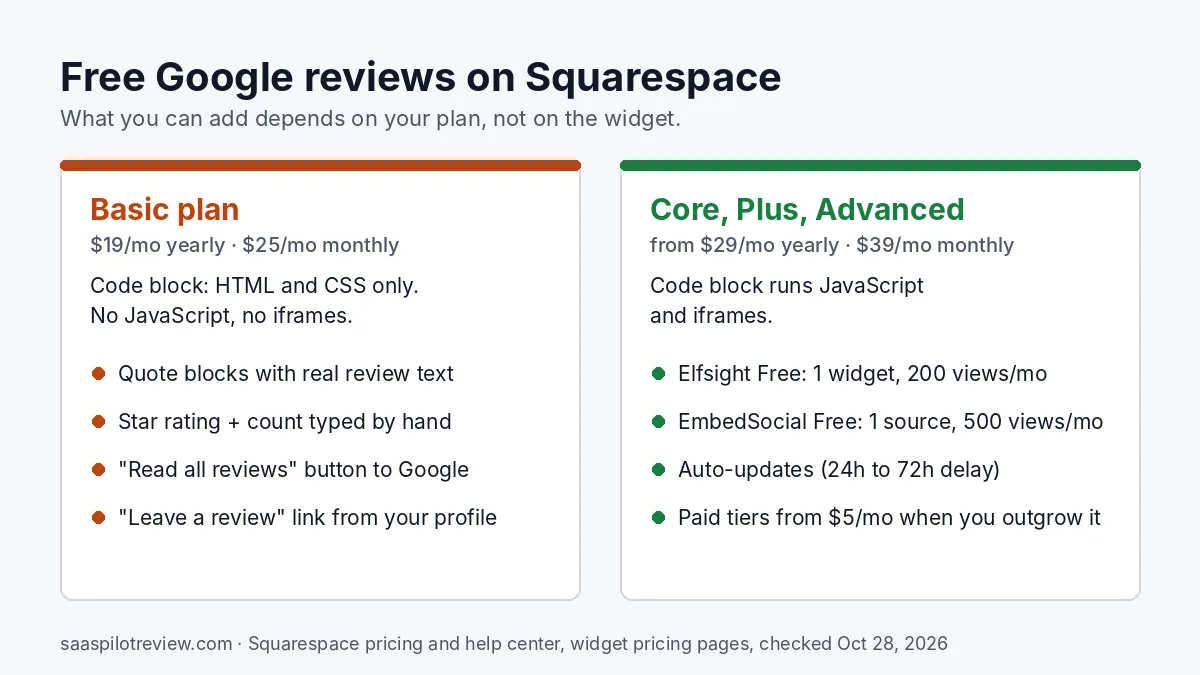
You can add Google reviews to a Squarespace website for free in two ways, and your plan decides which one you get. On Core, Plus or Advanced, paste a free widget such as Elfsight Free (1 widget, 200 views a month) or EmbedSocial Free (1 source, 500 views a month) into a Code block. On the Basic plan, Squarespace does not run JavaScript or iframes in Code blocks, so no review widget will load; there the free route is copying a few real reviews into Quote blocks and adding a button to your Google profile.
We built this guide from Squarespace’s help center and pricing page and from each widget’s public pricing page, all read on October 28, 2026. We have not installed these widgets on a client’s Squarespace site, so there are no load-time tests or ratings here. If you are weighing the two most common widget makers, our side-by-side of Trustindex and Elfsight pricing and refresh speed goes deeper on both.
Check your Squarespace plan before you pick a widget
Every Google reviews widget we looked at, free or paid, works the same way: you copy a short script from the vendor and paste it into your site. Squarespace’s Code block help page says that to add JavaScript or an iframe to a Code block, your site needs to be on the Core, Plus or Advanced plan. The pricing page lists Basic with a “Code block (basic)” for HTML, plain text, markdown and CSS, and with code injection not included.
So the first step takes ten seconds: open Settings → Billing in your Squarespace dashboard and read the plan name. Older sites may still be on a legacy plan such as Personal or Business; Squarespace says code injection is available on Core, Plus, Advanced and “some legacy billing plans,” so if you see a legacy name, check that plan’s feature list before you build a widget.
| Plan | Price (yearly / monthly billing) | JavaScript and iframes in Code blocks | Free way to show Google reviews |
|---|---|---|---|
| Basic | $19 / $25 per month | No (HTML and CSS only) | Quote blocks + link to your Google profile |
| Core | $29 / $39 per month | Yes | Free widget plan in a Code block |
| Plus | $49 / $65 per month | Yes | Free widget plan in a Code block |
| Advanced | $99 / $139 per month | Yes | Free widget plan in a Code block |
Prices checked October 28, 2026 on Squarespace’s pricing page (US). Squarespace’s own support team says it cannot help add or troubleshoot custom code, so widget problems go to the widget vendor.
The $0 route on Basic: Quote blocks and a review link
This route costs nothing on any plan, loads no outside script and never runs out of views. The trade-off is that it does not update itself: when a new five-star review lands, you add it by hand. For a small crew that gets a few reviews a month, that is a two-minute job.
- Get your review link. In your Google Business Profile on a computer, choose Read reviews, then Get more reviews, and copy the link. Google’s help page also offers a QR code from the same screen, desktop only.
- Get the link to your public reviews. Search your business name on Google Maps, open your profile, click the reviews tab and copy the address from the browser bar. This is where “Read all reviews” will send people.
- Add a Quote block per review. In the Squarespace editor, add a Quote block, paste the review text into the quote field and put the reviewer’s name as shown on Google plus the month into the source field, for example “Dana R., Google review, October 2026.” Three to five recent reviews is plenty.
- Add the rating line by hand. A Text block such as “4.8 stars from 127 Google reviews” with your real numbers. Put a reminder in your calendar to update it once a month, because a stale count looks worse than none.
- Add two buttons. One “Read all our Google reviews” button to the Maps link from step 2, and one “Leave us a review” button to the link from step 1.
Keep the wording exactly as the customer wrote it, typos included, and do not trim a mixed review so it reads as a rave. The quotes are plain text on your page, so they read fine on phones and do not depend on a third-party server being up.
On Core or higher: put a free widget in a Code block
If your plan runs JavaScript, a widget saves you the copying and shows new reviews on its own. The install is the same for every vendor:
- Create a free account with the widget maker, connect your Google Business Profile (usually by searching your business name) and pick a layout.
- Copy the embed code the vendor gives you.
- In Squarespace, edit the page, add a Code block where the reviews should sit, set its mode to HTML, paste the code and save.
- Log out, or open the page in a private window, and check it on a phone.
Here is what the free plans give you, from each vendor’s pricing page on October 28, 2026:
| Widget | Free plan limits | How fresh | First paid step |
|---|---|---|---|
| Elfsight Google Reviews | 1 widget, 200 views a month, Elfsight branding shown | New reviews usually appear within 72 hours (Elfsight’s Squarespace page) | Basic: $5/month billed yearly, 3 widgets, 5,000 views, no branding |
| EmbedSocial | 1 source, 500 views a month | Syncs every 24 hours | Pro: $29/month, 3 sources, 5,000 views (yearly billing saves 20%) |
| Trustindex | A “free forever” package exists; its pricing page does not spell out the limits for non-WordPress sites | Automatic updates are listed under paid plans | Single: $65/year for 1 company |
The catch with free plans is the view count. Elfsight counts a view each time the widget loads on a page, and its pricing page says going over the monthly cap temporarily deactivates the widget. That is why placement matters more than the vendor:
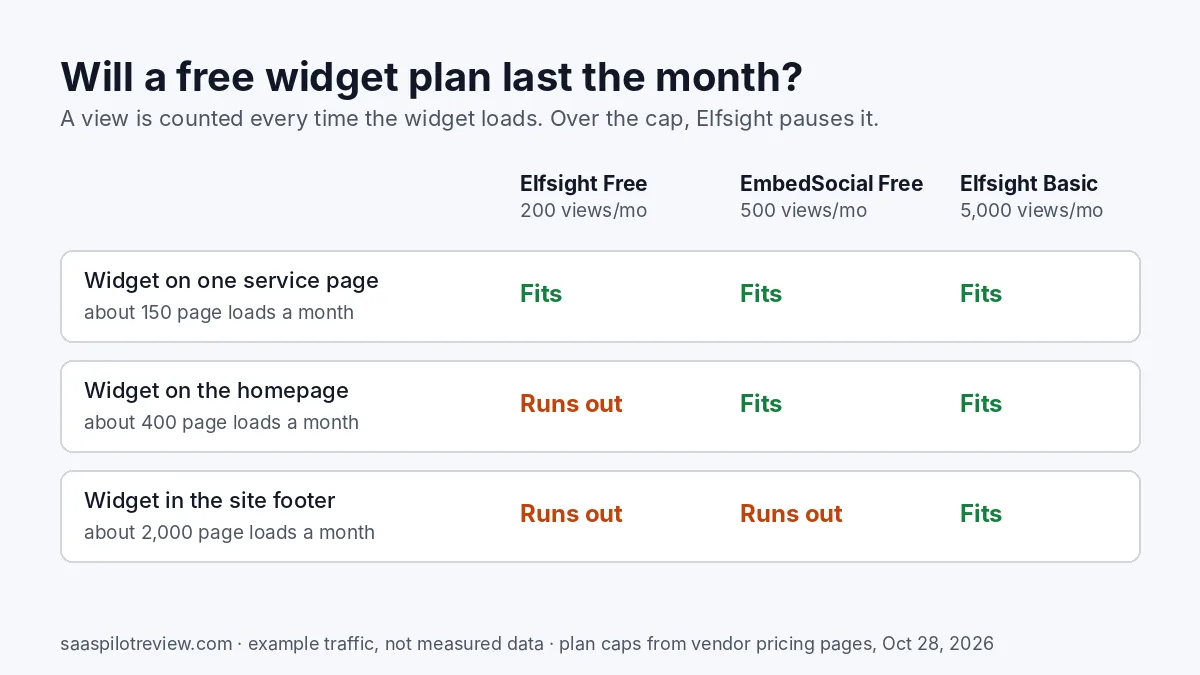
Put a free widget on one page people visit when they are deciding, such as a service page or the contact page, not in a footer that loads on every page. If you want reviews on the homepage of a site with steady traffic, the 500-view EmbedSocial plan lasts longer than Elfsight’s 200, and the cheapest no-branding option we found is Elfsight Basic at $5 a month on yearly billing. Our EmbedSocial vs Elfsight breakdown compares their paid tiers if you outgrow the free ones.
What “free” costs you over a year
The widget is free; the plan that runs it may not be. If you are on Basic only for the price, moving to Core to run a free widget adds $10 a month on yearly billing ($29 minus $19), or $14 a month billed monthly ($39 minus $25). Over twelve months that is more than a paid widget costs on its own.
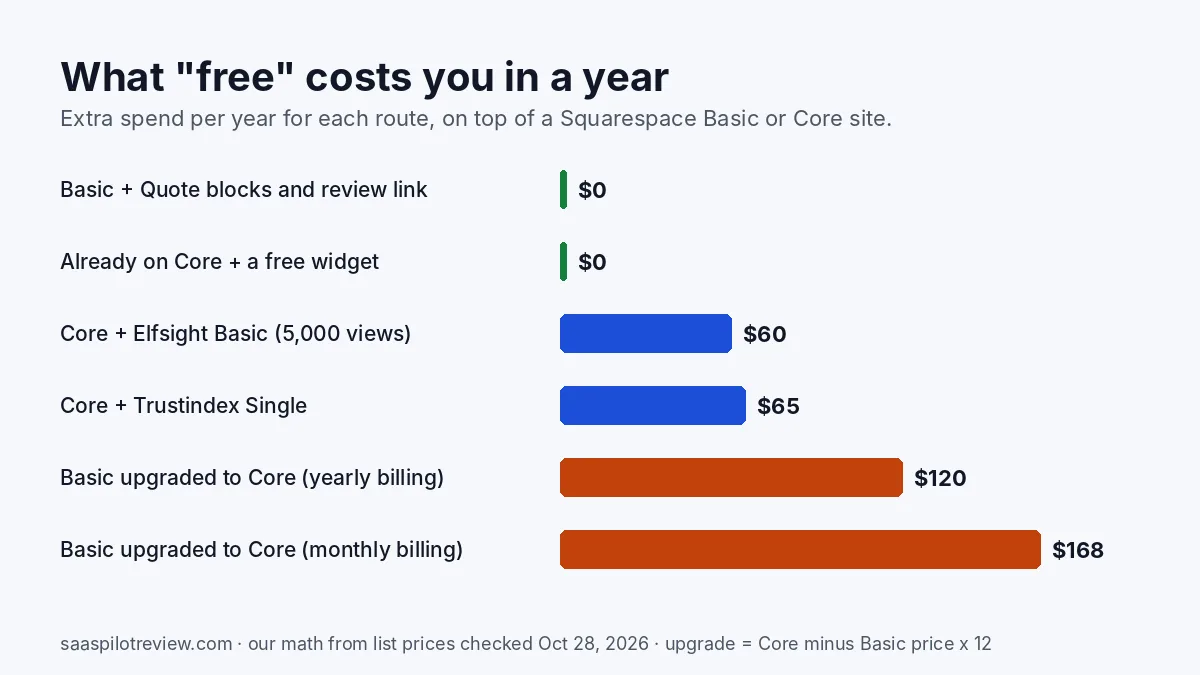
| Your situation | Cheapest sensible route | Extra cost per year |
|---|---|---|
| Basic plan, few new reviews a month | Quote blocks + review link | $0 |
| Already on Core or higher, low traffic page | Elfsight Free or EmbedSocial Free | $0 |
| Core or higher, reviews on a busy page | Elfsight Basic | $60 |
| Core or higher, reviews from several platforms | Trustindex Single | $65 |
| Basic plan, want a self-updating widget | Upgrade to Core + free widget | $120 (yearly) or $168 (monthly) |
Upgrading still makes sense if you also want what Core adds, such as code injection for a tracking pixel or live chat. Upgrading only for a reviews widget usually does not.
Widget pasted in but nothing shows? Five checks
- You are logged in. Squarespace’s help page notes that code sometimes doesn’t appear while you are logged in, even when visitors can see it. Check in a private window first.
- The Code block is not in HTML mode. Squarespace shows script as plain text unless the block’s mode is HTML and the code sits inside its script tags.
- Index page or Ajax loading. Squarespace says code may not render inside an index page or when Ajax loading is on (a setting on some 7.0 templates). Move the block to a regular page or turn Ajax loading off.
- The monthly views are used up. Log in to the widget dashboard and check the counter; an Elfsight free widget pauses when it hits 200.
- Basic plan. If you are on Basic, no widget will load however you paste it. Use the Quote block route above.
If your reviews do show but new ones take days to appear, that is the vendor’s refresh cycle, not Squarespace. We explain why review blocks lag behind Google in our guide on why a website’s Google reviews stop updating.
Will Google show review stars for your own business?
No, and no widget changes that. Google’s review snippet guidelines say pages using LocalBusiness or Organization structured data are not eligible for star review snippets when the business controls the reviews about itself, and they tell site owners not to aggregate reviews or ratings from other websites. A widget that adds rating markup to your homepage will not put stars next to your site in search results. Show reviews because they help visitors decide, not for search snippets.
Keep the reviews on your site honest
Google’s help page on review links says reviews must reflect a genuine experience and treats offering free or discounted services in exchange for reviews as fake engagement. Ask every customer the same way, show reviews as written, and label them as Google reviews. If you need wording for the ask itself, our review request text templates each fit in a single SMS, and our roundup of review management software for small businesses compares paid tools by budget if you want one tool to handle both the asking and the display.
How we put this guide together
We read Squarespace’s pricing page and its help articles on Code blocks, code injection and Quote blocks, Google’s help page on review links and its review snippet guidelines, and the pricing pages of Elfsight, EmbedSocial and Trustindex, all on October 28, 2026. The yearly cost figures are our own math from those list prices. The page-load numbers in the view-limit chart are examples, not traffic we measured. We have not installed these widgets on a client’s Squarespace site and did not score them. More on how we test and research, and more guides on our reviews and reputation hub.
Sources
- Squarespace: pricing
- Squarespace help: Code blocks
- Squarespace help: using code injection
- Squarespace help: Quote blocks
- Google Business Profile help: create a link or QR code to request reviews
- Google Search Central: review snippet guidelines
- Elfsight: Google Reviews widget pricing
- Elfsight: Google Reviews widget for Squarespace
- EmbedSocial: pricing
- Trustindex: prices