The best review request text for a home service business is short enough to fit in one SMS, sent the same day from the number the customer already knows, with one ask and your direct Google review link. Below are nine review request text templates for plumbers, cleaners, HVAC techs, roofers and other local crews, each counted so it fits in a single 160-character segment, plus the timing, wording and policy mistakes that quietly cost you reviews.
We wrote and counted these templates ourselves; we have not measured their response rates on a live business, so treat them as starting points to test, not proven numbers. If you run an HVAC company, our guide on getting more Google reviews for an HVAC business goes deeper on which jobs to ask after and what to expect each month.
Nine review request text templates you can copy
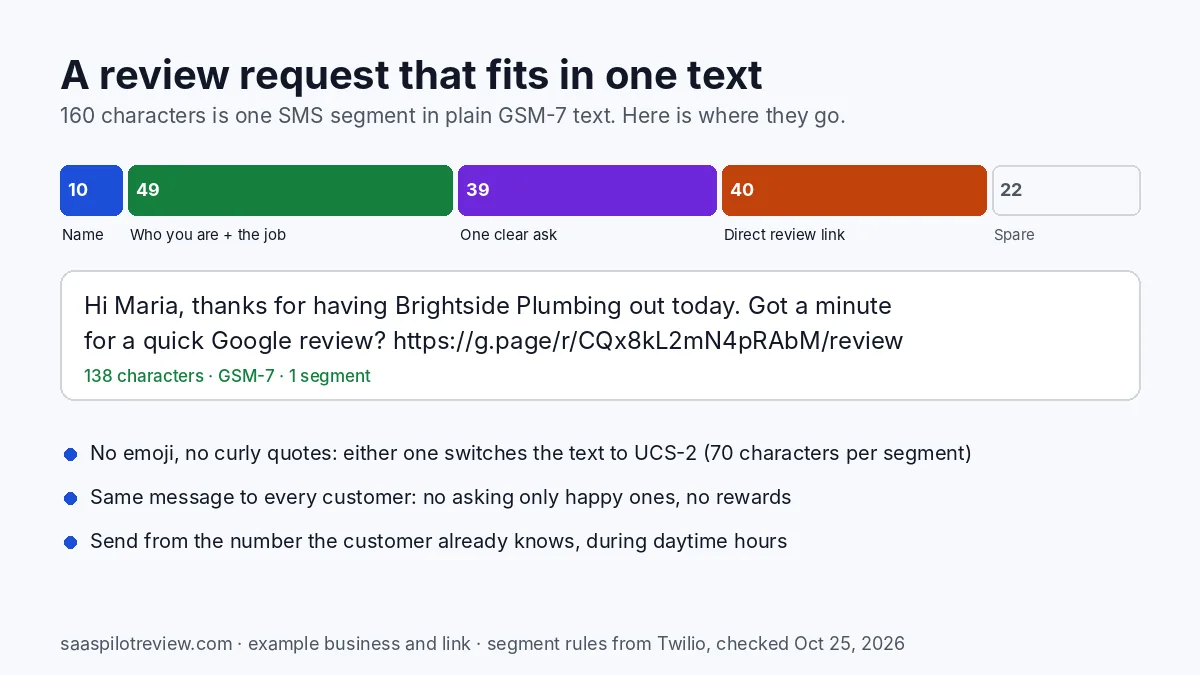
Swap the words in braces for your own. The counts assume a five-letter first name, a 19-character company name such as “Brightside Plumbing” and a 40-character Google review link. A longer company name eats into the spare room, so count again after you paste in yours.
1. Same day, after a service call
Hi {first name}, thanks for having {company} out today. Got a minute for a quick Google review? {link}
2. Recurring service (cleaning, lawn, pest, pool)
Hi {first name}, {company} here. You know our work by now. Would you share it in a Google review? {link}
3. After a repair
Hi {first name}, glad we got it fixed today. Reviews help neighbors find {company}: {link}
4. A few days after an install or big project
Hi {first name}, {owner} at {company}. How’s the new install? If you’re happy, a review means a lot: {link}
5. The morning after an emergency call
Hi {first name}, thanks for calling {company} last night. When you can, a review helps others find help fast: {link}
6. One reminder, a few days later
Hi {first name}, quick nudge from {company} in case our text got buried: {link} No worries if not.
7. When a customer texts you a compliment
Thank you, {first name}! Would you post those same words as a Google review? {link}
8. Property manager or commercial client
Hi {first name}, thanks for using {company} at {property}. A review from a property manager helps us a lot: {link}
9. Spanish, written to stay in one segment
Hola {nombre}, gracias por elegir {empresa}. Si tiene un minuto, una reseña en Google nos ayuda mucho: {enlace}
One note when you paste these into your software: the apostrophes on this web page may display as curly quotes. Retype them as straight apostrophes in your texting tool, for the reason in the next section.
| Template | Characters (filled in) | Encoding | Segments |
|---|---|---|---|
| 1. Same day | 138 | GSM-7 | 1 |
| 2. Recurring service | 140 | GSM-7 | 1 |
| 3. After a repair | 126 | GSM-7 | 1 |
| 4. After an install | 140 | GSM-7 | 1 |
| 5. Emergency call | 152 | GSM-7 | 1 |
| 6. Reminder | 134 | GSM-7 | 1 |
| 7. Compliment reply | 109 | GSM-7 | 1 |
| 8. Commercial client | 150 | GSM-7 | 1 |
| 9. Spanish | 149 | GSM-7 | 1 |
Our count, October 25, 2026, with straight apostrophes and the sample name, company and link above, using the segment limits Twilio publishes.
Why one segment matters more than clever wording
A text longer than one segment is split and billed as several. Twilio’s explainer on SMS segments puts the limit at 160 characters for plain GSM-7 text, or 153 per part once a message is split. Add a single character outside that set, such as an emoji, a curly apostrophe or an accented letter like í or ú, and the whole message switches to UCS-2, where one segment holds only 70 characters (67 per part when split).
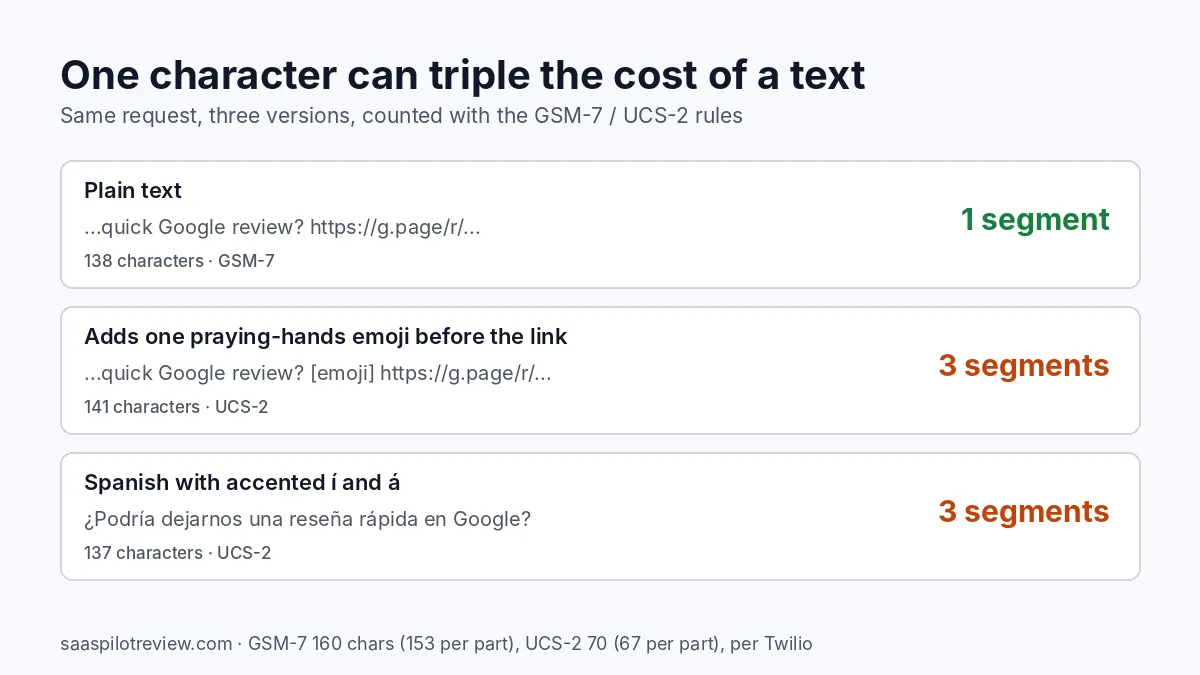
We ran our own first template through those rules. Plain, it is 138 characters and one segment. Add one praying-hands emoji before the link and it becomes three segments. A Spanish request that starts with “¿Podría dejarnos una reseña rápida…” is also three segments, because í and á are not in GSM-7, while ñ and ¿ are. That is why template 9 uses “Si tiene un minuto” instead. On a few hundred jobs a month, three segments instead of one adds up on a texting bill that is charged per segment.
When to send it, by type of job
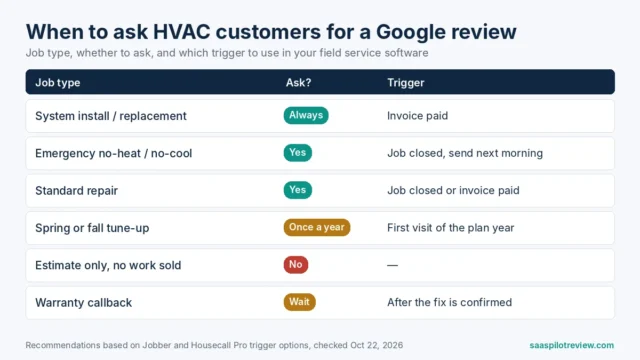
Send the request while the job is still fresh, but after the customer has seen the result. For most home services that means the same day; for installs, a few days later.
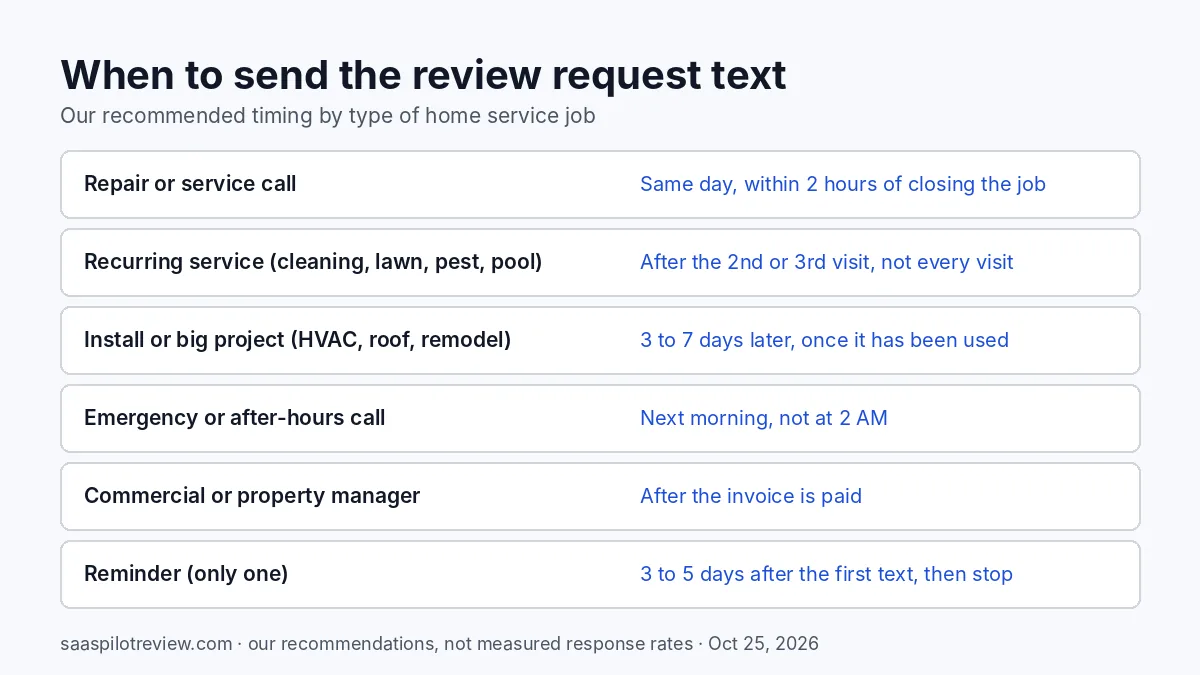
- Repairs and service calls: within a couple of hours of closing the job, while the tech’s visit is the last thing on the customer’s mind.
- Recurring service: after the second or third visit. Asking after every clean or mow trains customers to ignore you.
- Installs and big projects: three to seven days later, once the new system or roof has actually been used.
- Emergency and after-hours calls: the next morning. A review link at 2 AM reads as spam.
- Reminders: one, three to five days after the first text, then stop.
Keep all texts to daytime hours in the customer’s time zone. These timings are our recommendations from how these jobs run, not measured response rates.
Rules that can get reviews removed
A short text can still break Google’s rules. Google’s prohibited and restricted content policy says businesses should not “discourage or prohibit negative reviews, or selectively solicit positive reviews from customers,” and should not offer incentives such as payment, discounts or free services. The same policy lists merchants asking staff to collect a certain number of reviews, or reviews that include specific content, as problems.
In practice that rules out four habits:
- Review gating: sending a “how did we do?” text and only passing the Google link to customers who answer 4 or 5 stars. Send the same request to everyone.
- Rewards: “$10 off your next visit for a review” is out, whatever the review says.
- Scripting the review: “mention Dan and the 24/7 service” asks for specific content. Thanking Dan in your own text is fine; telling the customer what to write is not.
- Tech quotas: a bonus for every tech who gets ten reviews a month pushes exactly the behavior the policy names.
The federal rule points the same way. The FTC’s final rule on fake reviews and testimonials bans incentives conditioned on a review expressing a particular sentiment, and bans using threats or intimidation to keep negative reviews down. If a customer replies to your request with a complaint, call them. Do not send them a different message than everyone else.
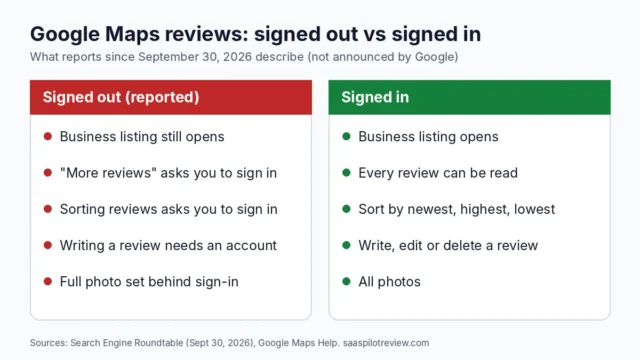
One reason to keep reviews coming: Google Maps now asks some people to sign in to read reviews, which puts more weight on the few a visitor sees first.
Sending from the right number, the right way
Send the request from the number the customer already has in their phone, usually your business line or the number your field service app texts from. A review link from an unknown number looks like a scam text. If you already set up missed call text back on your business line, send review requests from that same number so the thread stays in one place.
Business texting from a 10-digit local number in the US runs through carrier registration. If you are a sole proprietor without an EIN, our guide to registering for A2P 10DLC as a sole proprietor covers what carriers ask for. Some texting tools add opt-out wording such as “Reply STOP to opt out” automatically; if yours does, those characters count toward the segment too, so check the final message your tool actually sends.
The link itself should be the direct review link from your Google Business Profile. Google’s help page on getting reviews describes sharing a link or QR code with customers and notes that a customer needs a Google Account to post. Test the link on a phone that is not logged in to your business account before you send it to anyone.
Let software send it, once you trust the wording
Typing these by hand after every job works for the first month, then it stops happening. Most field service apps and review tools can send a request automatically when a job is marked complete, with a follow-up if the customer does not click. Our comparison of review management tools by budget covers which ones send texts, what they cost and which connect to Jobber or Housecall Pro. Whatever you pick, paste your final template in, send one to yourself, and count the segments on the bill before you switch it on for every job.
How we put this guide together
We wrote the nine templates, then counted each one with sample values using the GSM-7 and UCS-2 limits Twilio publishes. The policy section quotes Google’s contribution policy and the FTC’s announcement of its final rule, both read on October 25, 2026. We have not sent these templates for a client business, so there are no response rates on this page. More on how we test and research, and more guides on our reviews and reputation hub.