How this page was made: researched from vendor pages, not hands-on tested. Every rate below comes from Jobber’s pricing page, the Housecall Pro help center or ServiceTitan’s own pages, linked where it is used. Prices checked 2026-11-14 (US rates).
If you run a plumbing, HVAC or electrical shop, the card fee on a $1,200 repair is real money: roughly $31 to $42 depending on the app and how the customer pays. This guide puts the published rates for Jobber and Housecall Pro side by side, explains why ServiceTitan has no public number, and shows which of the three can pass the fee on to the customer. If you are still choosing a platform, our Housecall Pro vs Jobber comparison covers the rest of the decision.
The rates side by side
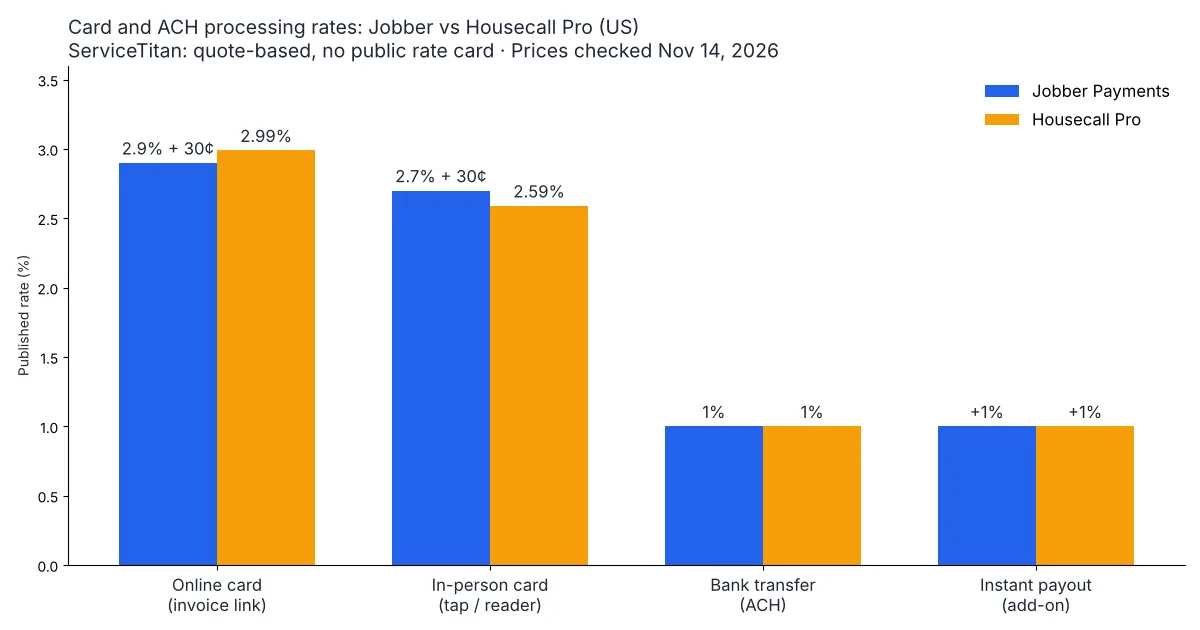
Online card payments cost almost the same in Jobber and Housecall Pro; the gap opens on keyed-in cards, Amex and surcharging. ServiceTitan prices payments per contract, so you only see your rate in a sales quote.
| Payment type (US) | Jobber Payments | Housecall Pro | ServiceTitan |
|---|---|---|---|
| Card paid online (invoice or quote link) | 2.9% + 30¢ | 2.99% | Not published |
| Card in person | 2.7% + 30¢ (Tap to Pay in the mobile app) | 2.59% (card reader or Tap to Pay) | Not published |
| Card keyed in, scanned or saved on file | Not listed separately on the pricing page | 3.49% | Not published |
| Amex and business/corporate cards | Not listed separately on the pricing page | 3.49% | Not published |
| ACH bank payment | 1% | 1% | Not published |
| Instant payout | +1% | +1% (Instapay) | Not published |
| Extra device fee | None listed for Tap to Pay | Tap to Pay add-on $5 per active device per month | Not published |
| Standard payout timing | 2-business-day rolling payouts (5 business days at first) | 2 business days for cards; first payout up to 7 | Next-day card deposits (ServiceTitan Payments for Service Pro page) |
Sources: Jobber pricing page (same payment rates on Core, Connect, Grow and Plus), Housecall Pro payment processing options, Housecall Pro payment processing page (payout timing), ServiceTitan payments page and ServiceTitan Payments for Service Pro.
Two details people miss
- Jobber’s 30¢ matters on small tickets. On a $150 drain call paid online, Jobber’s fee is $4.65 and Housecall Pro’s is $4.49. On a $5,000 install the order flips: Jobber $145.30, Housecall Pro $149.50.
- Housecall Pro charges more when the card is not presented. A card saved on file for a maintenance plan, or typed in by the office, is 3.49%, not 2.99%. So is any Amex or business card, however it is taken.
What one $1,200 invoice costs to collect
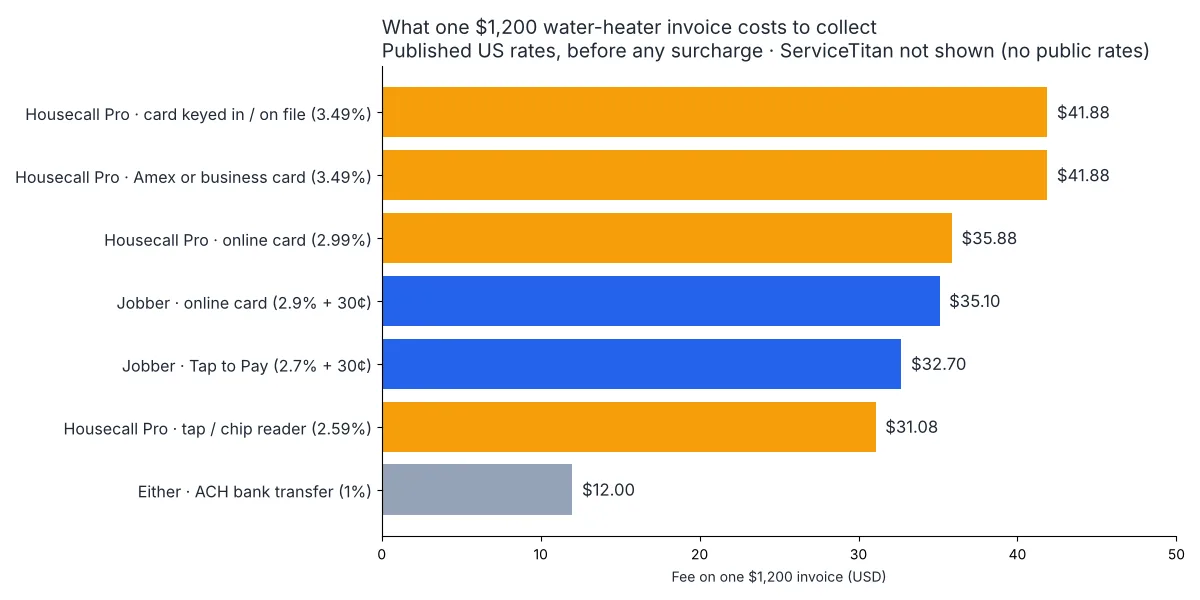
A $1,200 water-heater swap paid by card costs between $31.08 and $41.88 in fees on these two platforms, and $12 if the customer pays by bank transfer. The math uses only the published rates above, before any surcharge.
| How the customer pays $1,200 | Jobber fee | Housecall Pro fee |
|---|---|---|
| Taps a card on the tech’s phone | $32.70 | $31.08 |
| Pays the emailed invoice by card | $35.10 | $35.88 |
| Office keys in the card, or card on file | Not listed separately | $41.88 |
| Pays with Amex | Not listed separately | $41.88 |
| Pays by ACH bank transfer | $12.00 | $12.00 |
| Same card payment, paid out instantly | +$12.00 | +$12.00 |
Scale that to a shop that takes $40,000 a month in card payments online and the fee line is about $1,160 plus 30¢ per payment on Jobber, or $1,196 on Housecall Pro. The bigger lever is not the platform; it is how many large jobs you move to ACH, where both charge 1%.
Can you pass the fee to the customer?
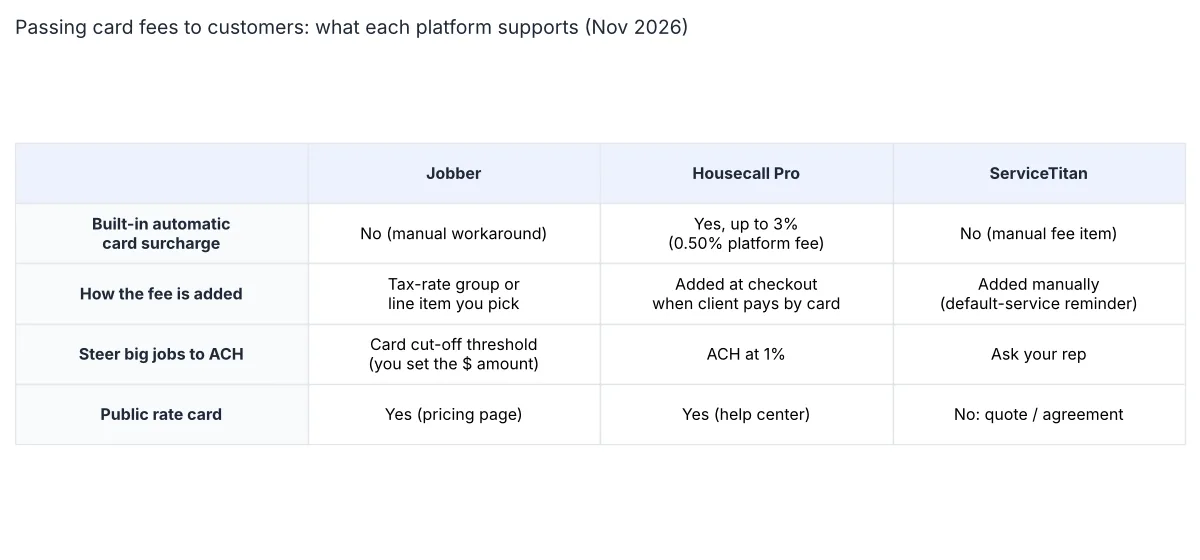
Only Housecall Pro has a built-in surcharge. In Jobber and ServiceTitan you add the fee yourself.
Housecall Pro: automatic surcharge, with limits
Per the Housecall Pro credit card surcharging FAQ, you switch it on once in invoice settings and the surcharge is calculated at checkout, after the customer chooses to pay by credit card. Key rules from that page:
- Cap of 3%, which the FAQ says comes from card-network rules; Oklahoma’s 2% cap is applied automatically.
- Not available to businesses in Connecticut, Maine, Massachusetts, New York or Canada.
- Never applied to debit or prepaid cards, ACH, PayPal, Klarna, cash or check.
- Housecall Pro takes a 0.50% fee on each surcharged transaction.
- Apple Pay and Google Pay are switched off while surcharging is on, and QuickBooks Desktop users are told not to enable it.
So on that $1,200 online card payment, a 3% surcharge adds $36 for the customer, and you still pay the processing fee plus Housecall Pro’s 0.50% fee on the surcharged transaction (about $6). Check our Housecall Pro pricing by plan for the subscription side.
Jobber: manual only
Jobber has no automatic surcharge. In a Jobber community thread on adding processing fees, Jobber support describes the process as manual and does not recommend the tax-rate workaround some users share, partly because of QuickBooks Online sync issues. What Jobber does offer is a payment method threshold in Jobber Payments settings: above a dollar amount you choose, card payment is switched off so large invoices default to ACH. For a full breakdown of plan costs see what Jobber costs in 2026.
ServiceTitan: a fee you add by hand
ServiceTitan’s help article on credit card fees states there is no option to charge card fees automatically. Its suggested workaround is to give each job type a default service, so the tech or office gets a reminder to add the fee manually.
Surcharge rules come from card networks and state law, not from the app. Before you turn anything on, check your state and tell customers on the estimate.
Why ServiceTitan shows no number
ServiceTitan’s payments page says processing fees “vary based on the payment method, transaction type, and your specific agreement” and sends pricing questions to its fintech sales team. That fits how the platform is sold: the software itself is quoted per contract, and payments are negotiated as part of that deal.
For a shop moving several million dollars a year through cards, that can work in your favor, because volume gives you room to negotiate. For a 3-truck plumbing company it means you cannot compare rates before a sales call. Ask the rep for the rate on each line of the table above, in writing, including keyed-in cards, Amex, ACH and any monthly or per-device fees. Our guide to plumbing software covers which platform fits which crew size.
Five ways to pay less, whichever app you use
- Push large invoices to ACH. At 1%, a $5,000 job costs $50 instead of $145 to $150 by card. Jobber’s card cut-off threshold does this for you.
- Take the card in person when you can. In-person rates are the lowest card rates on both platforms.
- Watch cards on file. On Housecall Pro, maintenance-plan auto-charges on saved cards are 3.49%. Offer ACH for recurring plans.
- Skip instant payout unless cash flow needs it. It adds another 1% on both platforms.
- Price the fee in, or surcharge legally. A cash or ACH discount stated on the estimate is one option; a surcharge needs state and card-network compliance.
Which one costs you less?
For most small home-service shops the processing rate is a near tie: Jobber is slightly cheaper on online card payments above about $330, Housecall Pro is slightly cheaper in person and on small tickets. Housecall Pro publishes a higher 3.49% rate for keyed-in cards, saved cards and Amex, while Jobber’s pricing page lists no separate rate for those, so confirm yours in the Processing rates panel. Housecall Pro is the only one of the three that can surcharge credit cards for you. ServiceTitan may beat both at high volume, but only a quote will tell you.
If payments are the deciding factor, start from how your customers pay today. Mostly emailed invoices: rates are close, so pick on the rest of the software. Lots of saved cards or Amex: ask Jobber for your keyed-in and Amex rate and compare it with Housecall Pro’s 3.49%. Want to pass the fee on without manual work: Housecall Pro. For the wider shortlist, see our best field service software for small crews and the field service software hub. How we research and test is explained on how we test.