Yes, Gemini can now write replies to your Google reviews. Since Google’s June 2026 update, you can connect your Business Profile to the Gemini web app, ask it to reply to your latest review, and get a draft in your own voice. It is free with a personal Google Account, but only if you manage a single verified profile, and it is not available in the UK or the EEA.
Below is who qualifies, how to connect it, the prompts that get a usable first draft, and when a review tool is still the better choice. If you are still building the habit of answering reviews at all, our review management software picks for small businesses show what a full setup looks like.
How this guide was made: it is a research guide, not a hands-on test. We read Google’s help page on managing a Business Profile in Gemini and Google’s June 10, 2026 announcement, and linked both. We have not connected a live Business Profile to Gemini ourselves, so the prompts below are starting points, not tested results. Checked October 18, 2026.
Can you use it? Five conditions
Check these five conditions from Google’s help page for Gemini and Business Profile:
| Condition | What Google requires | Who it rules out |
|---|---|---|
| Account type | A personal Google Account linked to the profile | Anyone who manages the profile from a work or school (Workspace) account |
| Number of profiles | Owner or manager of only one verified Business Profile | Multi-location businesses and agencies with several client profiles |
| Age | 18 or older | Younger account holders |
| Gemini setting | Keep Activity switched on | Owners who keep Gemini activity off for privacy |
| Where you use it | The Gemini web app at gemini.google.com | The UK and EEA, which Google’s announcement excludes |
The one-profile rule is the one that catches people. A plumber who also has manager access to a second profile, for example a sister company, is not eligible, even for the main business.
How to connect your Business Profile to Gemini
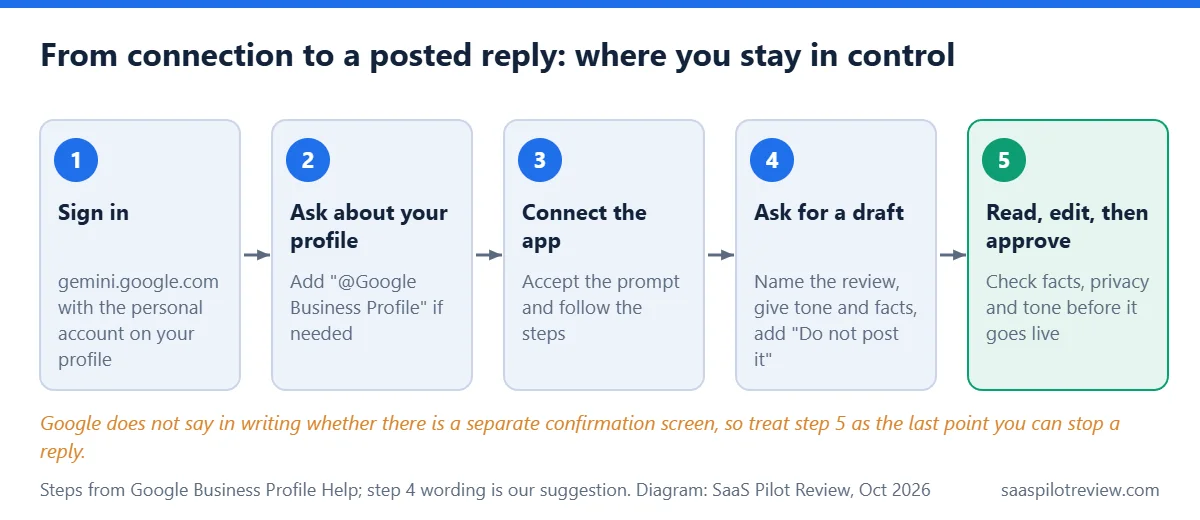
- Go to gemini.google.com and sign in with the personal Google Account that owns or manages your Business Profile.
- Ask a question about your profile, such as “Show me my newest Google reviews.” If Gemini answers without using your profile, add “@Google Business Profile” to the prompt.
- When Gemini offers to connect the Google Business Profile app, accept and follow the on-screen steps.
- Optional: create a business notebook. Google describes it as a space for your chats, your profile and your website, and says it flags things like unanswered customer questions and missing holiday hours.
You can disconnect at any time from Connected Apps in Gemini’s settings.
What Gemini can do with your reviews
According to the help page, once connected Gemini can show your star ratings and reviews (including photos), draft or delete replies, and summarize themes across your feedback. It can also edit hours, contact details and other profile fields, publish posts, and pull performance numbers such as impressions, website clicks, direction requests and bookings, plus the searches people used to find you.
Google’s announcement on the Keyword blog describes the review part as Gemini drafting “a highly tailored response in your brand’s voice.” Neither Google page says whether a reply posts the moment you approve it in chat, or whether there is a separate confirmation screen. Treat every message you send to Gemini about a reply as if it could go live, and read the final text before you agree to anything.
Prompts that get a usable first draft
Gemini only knows your voice if you tell it. A one-line request (“reply to my latest review”) gives it little to work with. These prompts give it the details a good reply needs. Swap in your own business facts.
| Review type | Prompt to use | What to check in the draft |
|---|---|---|
| 5-star with details | “Draft a reply to the newest 5-star review. Thank them by first name, mention the job they described, keep it under 50 words, sign it ‘— Mike, Rivera Plumbing’. Do not post it.” | The job named is the one the customer wrote about, not a guess |
| 3-star, mixed | “Draft a reply to the 3-star review from this week. Thank them for the positive part, apologize for the late arrival without making excuses, and invite them to call the office. Do not offer a discount. Do not post it.” | No promise you cannot keep, no admission beyond what happened |
| 1-star complaint | “Summarize the complaint in the newest 1-star review in one sentence, then draft a calm reply that moves the conversation offline to our office number. Do not post it.” | No customer details, invoice amounts or job addresses in the reply |
| Review that is not a customer | “I can’t find this reviewer in our records. Draft a short, polite reply saying we have no record of the job and asking them to contact us. Do not post it.” | Tone stays neutral; flag the review in Google separately if it breaks policy |
| Weekly sweep | “List every review from the last 7 days that has no reply yet, with its star rating.” | Nothing missed; then draft each reply one at a time |
Adding “Do not post it” to every drafting prompt is our own habit, not a Google instruction. It keeps the draft in the chat so you decide when it goes public.
Five checks before a reply goes public
An AI draft is still your public answer, read by every future customer who scrolls your profile. Before you approve one:
- Facts: the service, crew member and date match what really happened.
- Privacy: no phone numbers, addresses, prices paid or health details about the customer.
- Tone: nothing defensive on a bad review; the owner reading a reply should not hear an argument.
- Repetition: if the last five replies all open the same way, rewrite the opening. A wall of identical replies looks automated.
- Next step: on any complaint, one clear way to reach a real person.
Gemini or a review tool: it depends on locations
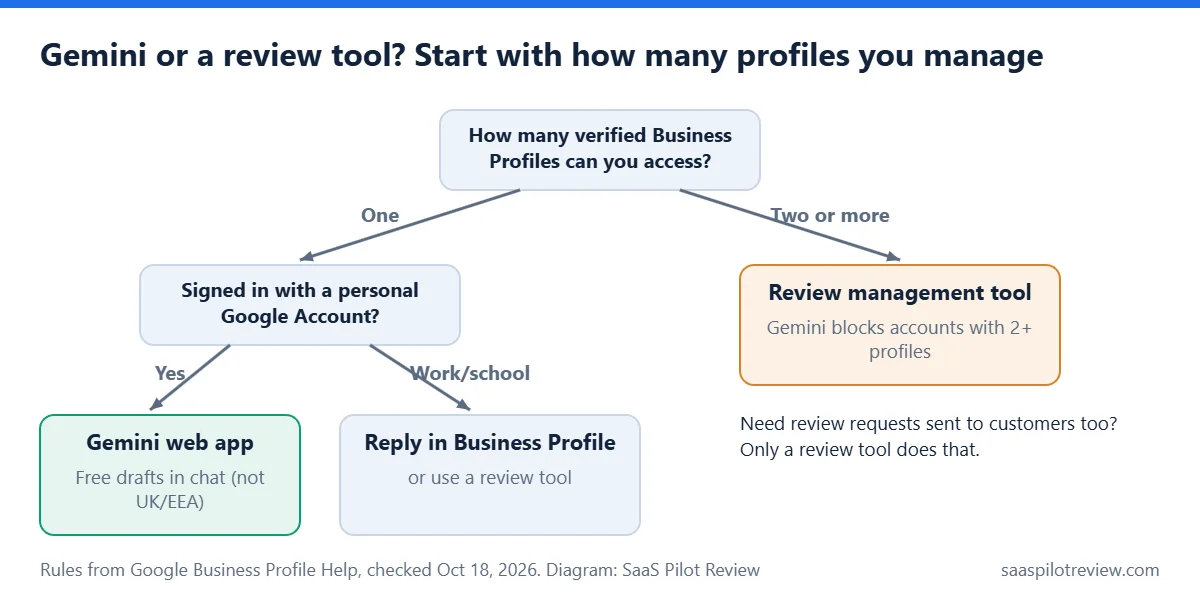
Gemini covers replying for one profile at no extra cost. It does not send review requests to customers, and it stops at one profile. Review tools handle both, for a fee. For the asking side, our guide on how to get more Google reviews for an HVAC company covers timing and message wording.
| Your situation | Better fit | Why |
|---|---|---|
| One location, owner answers reviews | Gemini web app | Free with a personal Google Account; drafts in chat, profile edits in the same place |
| Profile managed from a Workspace account | Reply in Business Profile directly, or a review tool | Gemini’s connection does not work with work or school accounts for now |
| Two or more locations, or an agency | A review management tool | Gemini’s connection is blocked for anyone with access to more than one verified profile |
| You want replies sent without you | A tool with automatic replies | For example, Trustindex lists automatic AI replies at $29 per review source per year (checked October 18, 2026) |
| You also need more reviews coming in | A review tool with text or email requests | Gemini replies to reviews; it does not ask customers for them |
If your reviews show on your website through a widget, our Trustindex vs Elfsight comparison covers how fast each one picks up new reviews.
Where it falls short today
- No multi-location support. The one-profile limit leaves out franchises, multi-branch contractors and agencies, the businesses with the most reviews to answer.
- Keep Activity must stay on. Gemini cannot connect to your profile with that setting off. If you normally keep Gemini activity off, read Google’s Gemini privacy notice before you connect.
- Web only. The help page describes the connection in the Gemini web app, not a phone app flow.
- Unclear posting step. Google has not said in writing whether there is a confirmation screen before a reply goes live.
More guides on getting and handling reviews are in our reviews and reputation hub. Read how we research and test for how guides like this one are put together.