How this page was made: researched from Jobber’s pricing page, help center and community, not hands-on tested. We have not run Jobber’s Receptionist on a live phone line. Prices checked 2026-11-15 (US, USD, before tax).
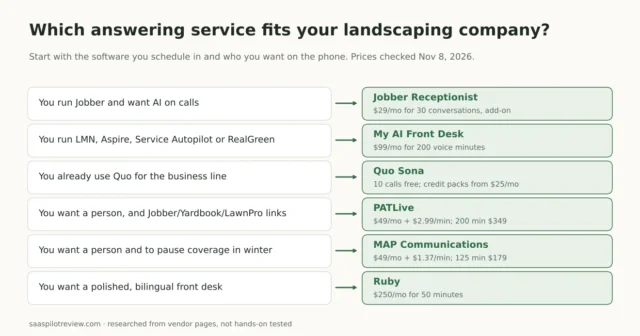
Jobber’s AI Receptionist costs $29 a month as an add-on, and it is included with unlimited usage on the Plus plan. The catch is what $29 buys. Jobber’s newest help article says 30 conversations, then $0.79 for each extra one, while an older help page still says 100. Below is the full math, the plans that can add it, and the point where upgrading to Plus is cheaper. For how it compares with Housecall Pro’s version, see Jobber Receptionist vs Housecall Pro CSR AI.
The price on one screen
| Item | Price | Source |
|---|---|---|
| Receptionist add-on | $29/month | Jobber pricing page |
| Conversations included in the add-on | 30 per billing cycle (newer help article); 100 (older help article) | Jobber help center, see below |
| Each conversation over the limit | $0.79 | Receptionist help article |
| On the Plus plan | Included, unlimited usage | Receptionist help article |
| Phone number | A dedicated phone number (DPN) in Jobber is required | Receptionist help article |
| During the 14-day free trial | Add-ons not available | Add-on features article |
The add-on sits on top of your Jobber subscription. Jobber plans run from $29 to $529 a month billed annually depending on plan and team size; our Jobber plan prices for 2026 page has the full table.
30 or 100 conversations: which number is right?
Jobber’s own pages disagree, so here is exactly what each says.
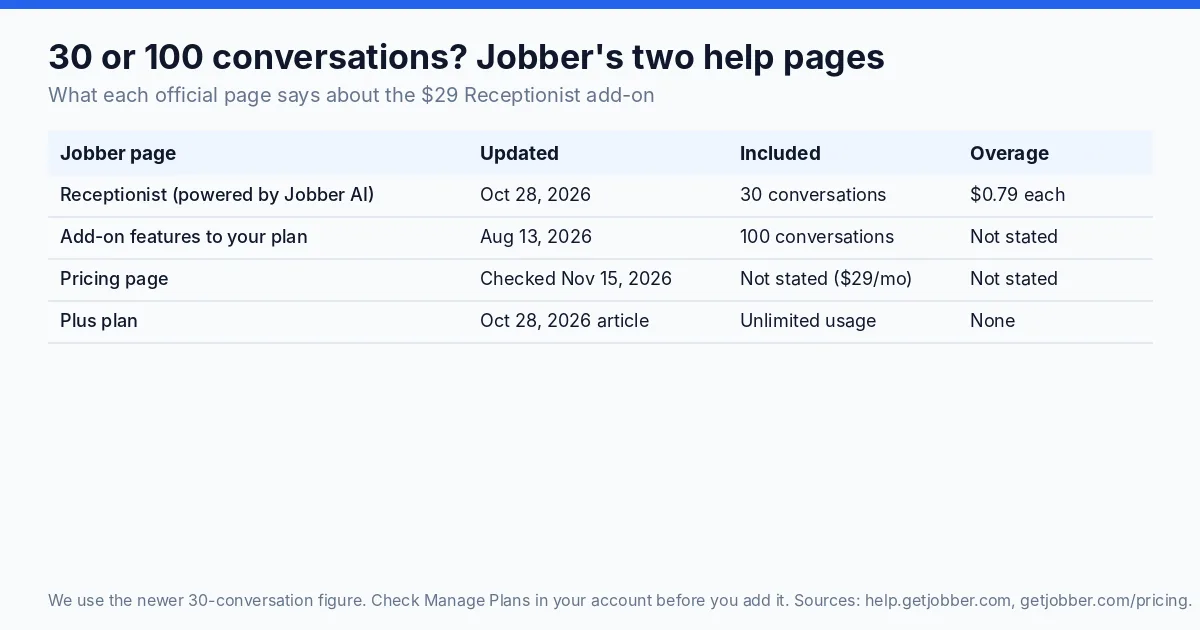
- The Receptionist (powered by Jobber AI) article, updated October 28, 2026: “Receptionist can be added-on to select plans for $29 per month, which includes 30 conversations.” And: “If you go over 30 conversations in a billing cycle, Jobber charges $0.79 per additional conversation.”
- The add-on features article, updated August 13, 2026: “Includes 100 conversations per month.” It gives no price and no overage rate.
- The pricing page lists the $29/month add-on with no conversation count.
We use the newer October figure, 30 conversations, for every number on this page. The August page reads like an earlier allowance that was not updated. Before you switch it on, open Manage Plans in your Jobber account and check the allowance shown there; Jobber’s invoice line for the add-on, per the Receptionist article, reads “Receptionist – 30 Conversations / Month at $29.”
What counts as a conversation
Usage is counted per conversation, not per minute. From the Receptionist article:
- Calls count “when AI Receptionist actively engages with the caller.” Calls it marks as spam, or with no real interaction, do not count.
- Texts start a conversation “when AI Receptionist first responds to an incoming message”, and follow-up messages within the article’s time window count as the same conversation.
- At the limit an admin chooses to allow overage or pause. If paused, “Receptionist stops responding to calls and texts at your limit. No overage charges apply,” and it resumes next billing cycle.
Pausing caps your bill at $29, but it also means after-hours callers stop getting answered mid-month. For a business that adds Receptionist to stop missing calls, that is the wrong place to save money. Work out your volume first: count last month’s missed calls and after-hours texts, not total calls, since Receptionist only engages when it picks up.
What it costs at real call volumes
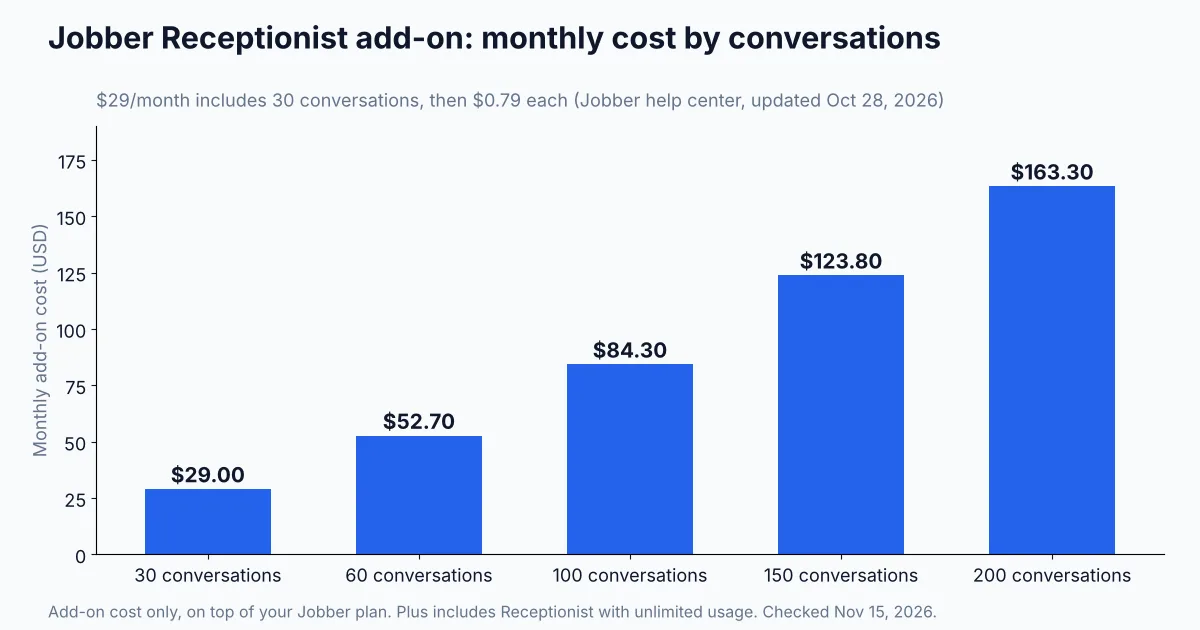
The formula is $29 + $0.79 × (conversations − 30). For a small service business:
| Conversations per month | Typical business | Add-on cost | Cost per conversation |
|---|---|---|---|
| 30 | Solo cleaner, overflow only | $29.00 | $0.97 |
| 60 | 2-person lawn crew, after hours | $52.70 | $0.88 |
| 100 | 3-truck plumbing shop, after hours + lunch | $84.30 | $0.84 |
| 150 | HVAC company in peak season | $123.80 | $0.83 |
| 200 | Busy multi-crew shop, all overflow | $163.30 | $0.82 |
The “typical business” column is an illustration of volume, not data from those businesses. The cost columns use only Jobber’s published rates.
When Plus becomes the cheaper option
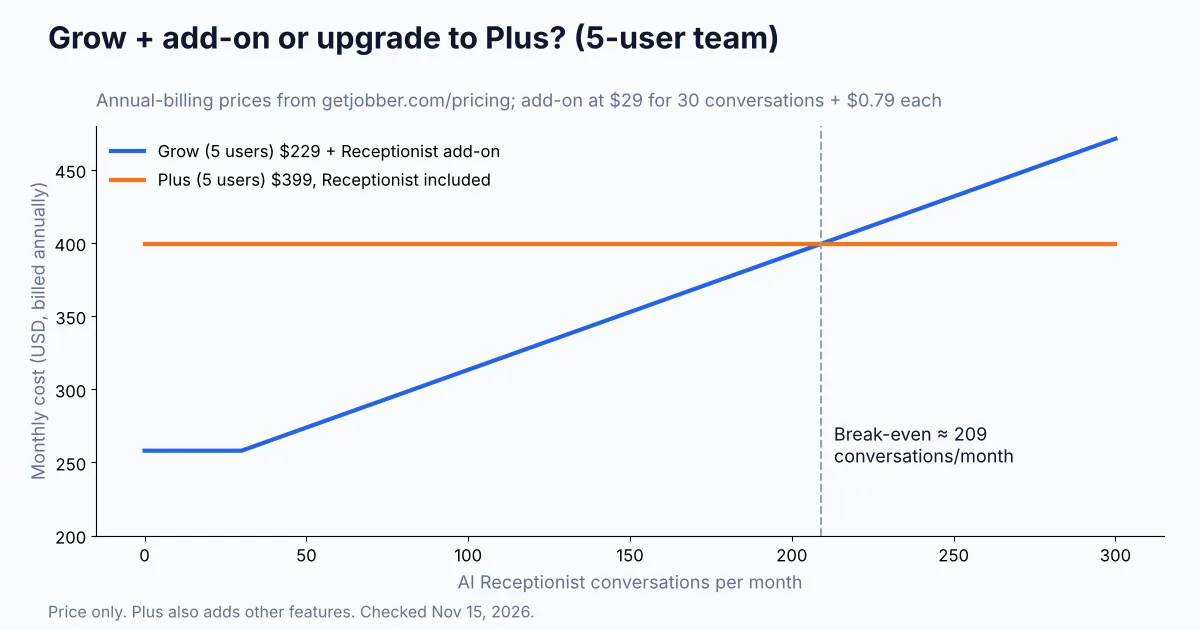
Plus includes Receptionist with unlimited usage, so at some volume the upgrade pays for itself. On the pricing page, billed annually, Grow for 5 users is $229 a month and Plus for 5 users is $399. That $170 gap equals the add-on cost at about 209 conversations a month.
| 5-user team | Grow price | Plus price | Gap | Break-even conversations |
|---|---|---|---|---|
| Billed annually | $229/mo | $399/mo | $170 | about 209 |
| 1-year commitment, paid monthly | $259/mo | $439/mo | $180 | about 222 |
| No commitment | $299/mo | $499/mo | $200 | about 247 |
Below roughly 200 conversations a month, Grow plus the add-on is cheaper on price alone. Above it, Plus wins, and you get Plus’s other features too. A 5-person Connect team pays $149 a month billed annually; Connect can also add Receptionist, per Jobber’s Connect plan help article, but the gap to Plus is much larger, so the add-on is almost always cheaper there.
Which plans can add it, and what you need first
- Plus: included, unlimited usage.
- Grow and Connect: Jobber’s plan help articles (updated October 28, 2026) say Receptionist is available as an add-on.
- Core: the pricing page table marks Receptionist as an add-on in the plan columns below Plus, but we found no help article that confirms Core. Check Manage Plans before you count on it.
- Free trial: add-ons are not available while in trial, so you cannot test Receptionist inside the 14-day Grow trial.
- Phone number: you need a dedicated phone number in Jobber. To keep your existing business number, forward calls from your current provider to the Jobber number, as Jobber’s Receptionist feature page describes.
On promotions: a Jobber staff reply in the Jobber community described a 3-month price promotion for Receptionist that ran until March 31. Jobber did not publish the promotional price, so if your account shows a lower number, ask Support when it ends.
How the price compares with standalone AI receptionists
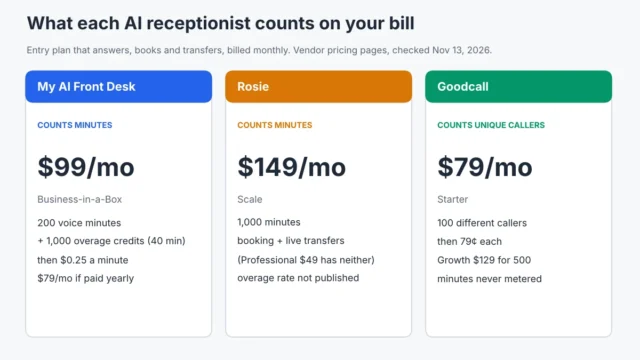
Standalone tools bill by minutes or callers, so the units differ. Treat this as a starting point, not a like-for-like comparison.
| Tool | Entry price | What is included | Billing unit |
|---|---|---|---|
| Jobber Receptionist (add-on) | $29/mo + Jobber plan | 30 conversations, then $0.79 each | Conversations |
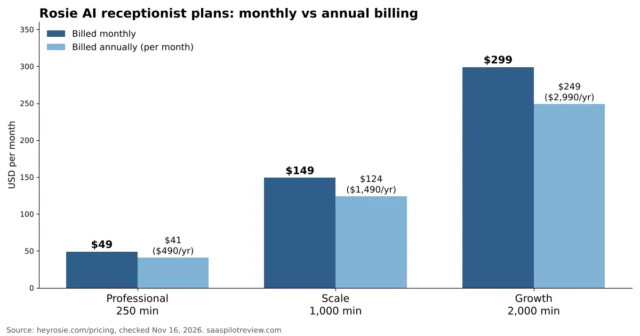
| Rosie Professional | $49/mo | 250 minutes | Minutes |
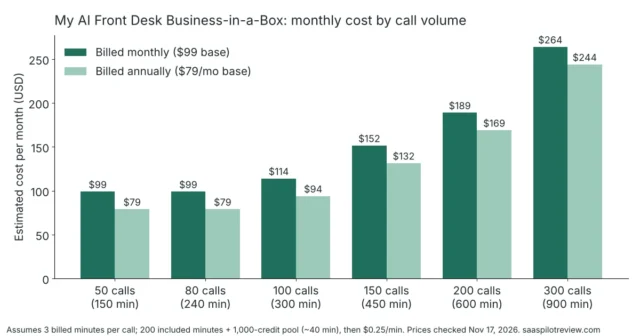
| My AI Front Desk Business-in-a-Box | $99/mo ($79 billed annually) | 200 minutes | Minutes |
| Goodcall Starter | $79/mo | 100 unique customers, then 79¢ each | Unique callers |
Jobber’s edge is that the receptionist books straight into the same schedule and client list your crew already uses. The standalone tools need an integration to do that. If you are weighing those three, our Goodcall vs Rosie vs My AI Front Desk comparison breaks down the trade-offs, and the best AI receptionists for small business covers the wider field.
Is the $29 add-on worth it?
For a Jobber user who misses a handful of calls a week, yes on price: 30 conversations for $29 is under a dollar each, and one booked repair covers months of it. It gets less clear-cut above about 100 conversations a month, when the add-on runs $84 and climbing; at that point compare Plus (on a 5-user team the break-even is around 200 conversations) and a standalone tool. If you also run Housecall Pro somewhere in the business, see what Housecall Pro’s CSR AI costs. Every plan price we track is on the home service software price tracker, and the rest of our coverage is in the AI receptionist hub. How we research and test: how we test.