The second verification video came back with “Review issues”. You filmed the van, the tools and the street, uploaded it from the Business Profile app, waited a few days, and Google still says no. Then a third screen appears: “No more ways to verify”. For a plumber, cleaner or HVAC tech who works from home, that message feels final. It is not, but the next move matters, because every random edit or rushed re-shoot makes the case harder to clear.
This guide is research, not a hands-on test: we have not verified a profile ourselves for this article. It is built from Google’s own Business Profile help pages and a Google Product Expert’s write-up, all checked on October 27, 2026. If your profile is already live and you are now tracking what it brings in, see our guide to tracking calls now that GBP call history is gone.
Why Google rejected the video
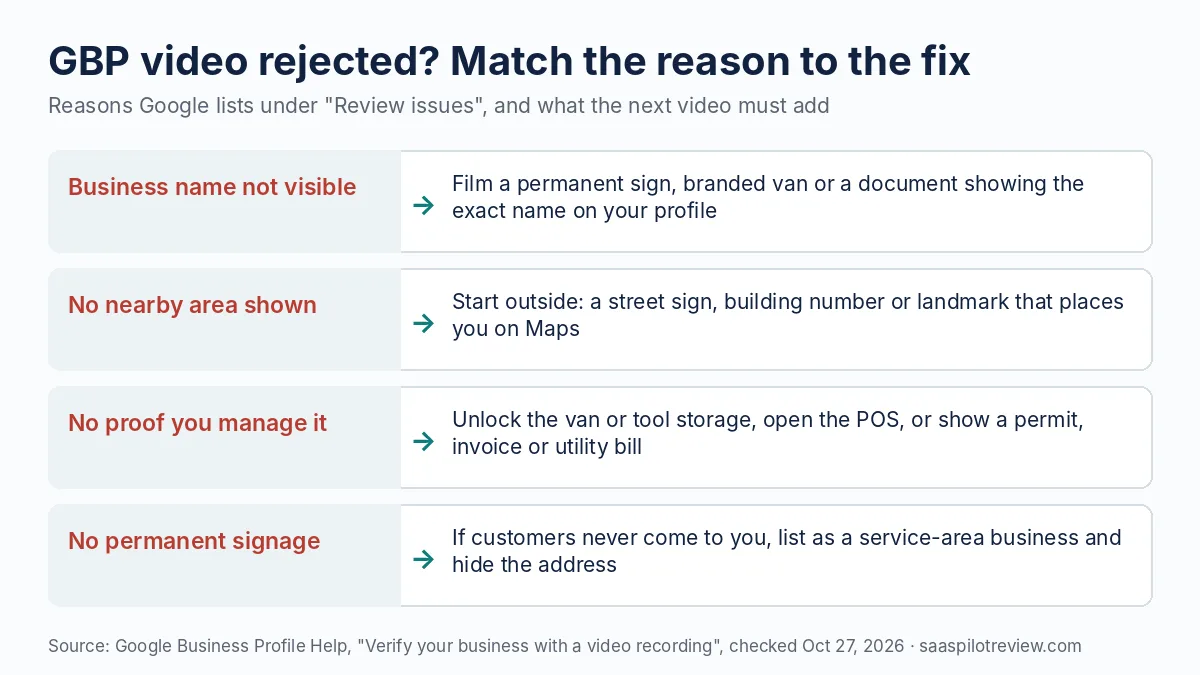
Google rejects a verification video when it does not prove three things: where the business is, that the business exists, and that you are the one who manages it. Its help page on verifying with a video recording lists those three checks, and the “Review issues” screen tells you which one you missed. Examples Google gives include a business name that is not visible, no nearby area shown, or no proof that you are authorized to run the business.
The recording rules trip up a lot of first attempts too. The video must be recorded live in the Business Profile app on a phone, unedited, in one take with no breaks, and at least 30 seconds long. You cannot record offline and upload a file later.
| What “Review issues” points to | Common cause | What the next video adds |
|---|---|---|
| Business name not visible | Unbranded truck, or a profile name that does not match the sign | A permanent sign, lettered van or document that shows the exact profile name |
| No nearby area shown | Video starts in the garage or on a blank wall | Open outdoors on a street sign, building number or landmark |
| No proof you manage it | Only exterior shots | Unlock the van or tool storage, then a permit, invoice or utility bill in the business name |
| Wrong business type | Home address listed as a storefront with no signage | Switch to a service-area profile with the address hidden before the next attempt |
| Video itself rejected | Under 30 seconds, cut, or someone else’s face in shot | One continuous take of 40 to 60 seconds, faces out of frame |
A name mismatch is worth checking first. Google’s guidelines for representing your business say the profile name should match the name you use in the real world, on your storefront and elsewhere. A Google Product Expert writing in Search Engine Land also suspects names that do not match signage or documents, and keyword-stuffed names, are a common reason videos fail. “Smith Plumbing” on the van and “Smith Plumbing | 24/7 Emergency Plumber Dallas” on the profile is exactly that problem.
Plan the re-shoot before you press record
Write the shot list down first, because the app records one continuous take and you cannot fix a gap afterwards. For a service-area business working from home, Google says you can film street signs and landmarks in your immediate neighborhood instead of a storefront, then show tools, equipment, branded clothing or business cards, and finally do something only the owner can do, such as unlocking a branded van. A business permit, invoice or utility bill with a matching name also counts as proof of management.
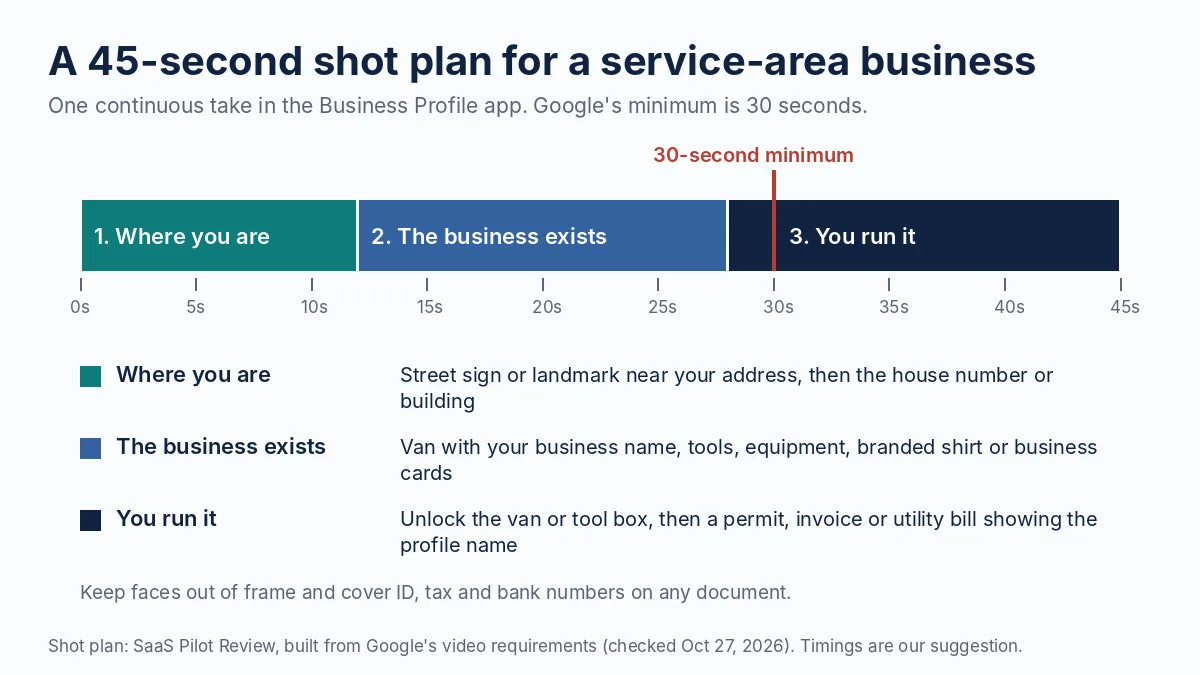
Here is how that plan looks for a two-person HVAC company run from the owner’s house:
- 0 to 12 seconds: start at the corner street sign, walk to the house number. Say the street name out loud if it helps you keep pace.
- 12 to 28 seconds: the van with the company name, then the open side door with gauges, a recovery machine and stocked parts.
- 28 to 45 seconds: unlock the van with the key fob on camera, then a recent invoice or a contractor license or permit with the business name visible and the number covered.
Storefront and hybrid businesses follow the same order with different shots: the street and nearby businesses, the permanent sign with the exact profile name, then an area only staff can reach, such as a stock room, kitchen or the point-of-sale screen. Google is explicit that a storefront needs permanent signage; without it, the business should be listed as a service-area business instead.
Do a dry run without recording. Check the battery, turn off notifications, and grant the app camera, microphone and location access before you start. Keep other people’s faces out of frame and cover bank, tax and ID numbers on any document, as Google asks.
Moves that make the next attempt harder
When video keeps failing, the instinct is to change things until something works. That usually creates more checks, not fewer.
- Opening a new profile. A second listing for the same business is a duplicate, which adds a new problem instead of clearing the old one.
- Switching to storefront to unlock other options. Google says verification methods are chosen by Google and cannot be changed by you. A home business listed as a storefront also breaks the address rules.
- Editing the name, address or category between attempts. Google notes that changes to business details can trigger a new verification check.
- Using a virtual office, P.O. box or coworking desk. Google’s guidelines say these are not eligible unless the location is staffed, signed and open to customers in business hours.
- Uploading the same video again. Google’s retry steps ask for a new video that keeps everything from the first one and adds what was missing.
- Paying someone who promises a “guaranteed” pass. Google says creating a Business Profile is free, and its fraud warning page says Google never guarantees a special spot in its products. Help preparing evidence is fine; a promise of an outcome is a red flag.
When the screen says “No more ways to verify”
Use the support link under the message and send evidence, then wait for Google to offer a live video call. Google does not publish how many failed videos lead to this screen; the Product Expert in Search Engine Land describes it as appearing after a few attempts and says the exact number is not clear. Google’s main verification help page points businesses whose verification is unavailable to contact support, and asks you to try the methods shown first.
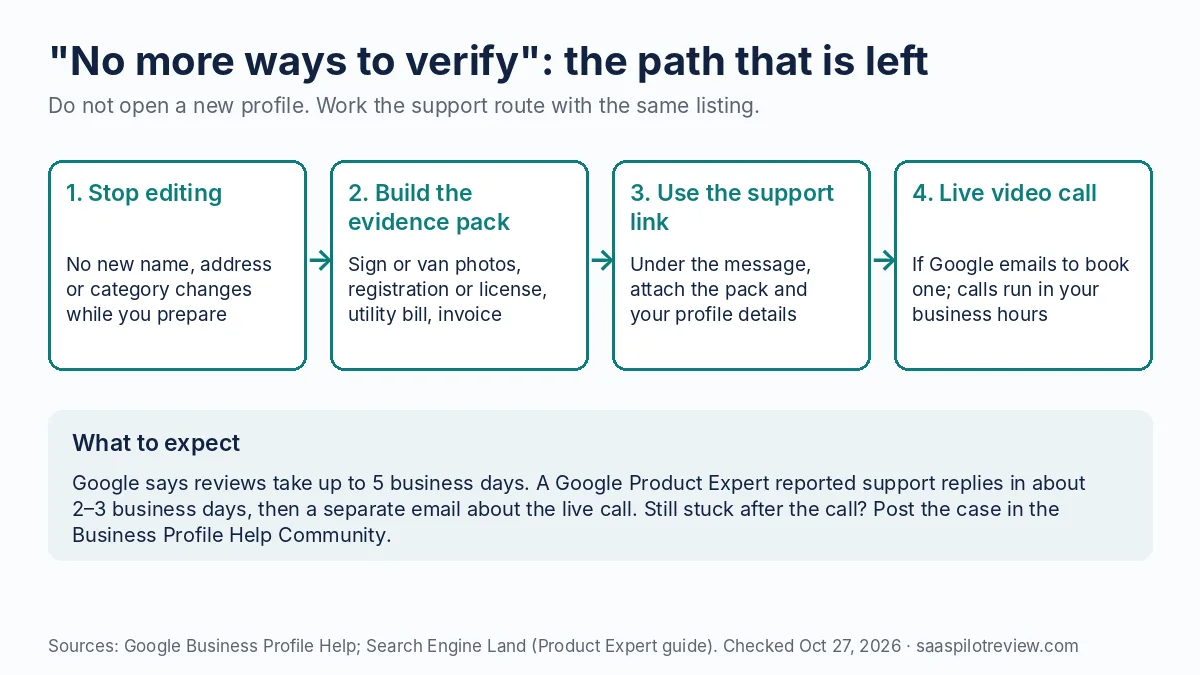
Build the evidence pack before you open the form, so the first submission is complete:
- Photos of the permanent sign or the lettered vehicle, showing the exact profile name.
- Business registration, a trade license or a permit in that name.
- A utility bill or lease for the address on the profile, even if the address is hidden.
- One recent customer invoice with the business name, customer details blurred.
- Your website’s contact page, if it shows the same name, phone and service area.
- A screenshot of the error and the dates of each failed attempt.
Per the Product Expert’s account, support tends to reply in about two to three business days, and a separate email then explains that a live video call is the remaining option. Live calls run only during your listed business hours, so set hours you can actually answer the call in before you wait for that email.
What each verification route costs and how long it takes
None of the routes cost money. Listing a business on Google is free, so what you are spending is time.
| Route | Cost | Typical wait (per Google unless noted) | Watch out for |
|---|---|---|---|
| Video recording in the app | $0 | Up to 5 business days per review | Live, unedited, one take, at least 30 seconds |
| Live video call | $0 | Booked during your business hours | You must show location, equipment and proof of management live |
| Phone or text code | $0 | Minutes, if offered | Phone menus (IVR) will not receive the code |
| Email code | $0 | Minutes, if offered | You must be able to open that inbox on the verification screen |
| Postcard | $0 | Most codes arrive within 14 days; codes expire after 30 days | Do not edit name, address or category, or request a new code, while you wait |
| Support case after “No more ways to verify” | $0 | About 2 to 3 business days for a reply (Product Expert report) | Send the full evidence pack in the first message |
Prices checked October 27, 2026. Google decides which routes your profile sees, so a method in this table may never appear for you.
After it is verified, keep it verified
Hold off on big edits for a while. The Product Expert recommends avoiding major changes to the name, address or categories in the first two weeks after verification, and Google says changes to business details may ask you to re-verify. Add photos, services and hours first; leave the name alone.
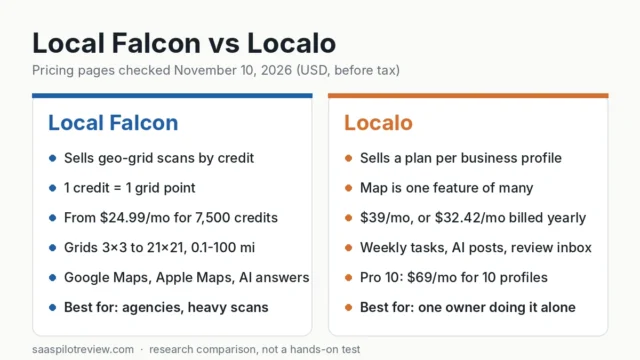
Once the listing is stable, the work moves to visibility and reviews. If you plan to manage posts, citations and rankings in one tool, our comparison of Localo and BrightLocal for profile management covers what each costs for one location. To see where the new profile shows up across your service area, start with grid rank trackers like Local Falcon and its alternatives. And the fastest way to give a fresh listing some weight is reviews from real customers; our review request text templates are written for home service jobs.
How we researched this
We did not run a verification for this article, and we have not scored any tool here. We read Google’s Business Profile help pages on video verification, verification methods, business guidelines and fraud, plus Google’s Business Profile product page and a Google Product Expert’s guide in Search Engine Land, on October 27, 2026. Where Google does not publish a number, such as how many video attempts you get, we say so rather than guess. Our general method is on the how we test page, and more listing and ranking guides are in the local SEO hub.
Sources (checked October 27, 2026): Verify your business with a video recording · Verify your business on Google · Guidelines for representing your business on Google · Manage your business address · Help protect against fraudulent calls and texts · Google Business Profile · Search Engine Land: the new GBP verification flow