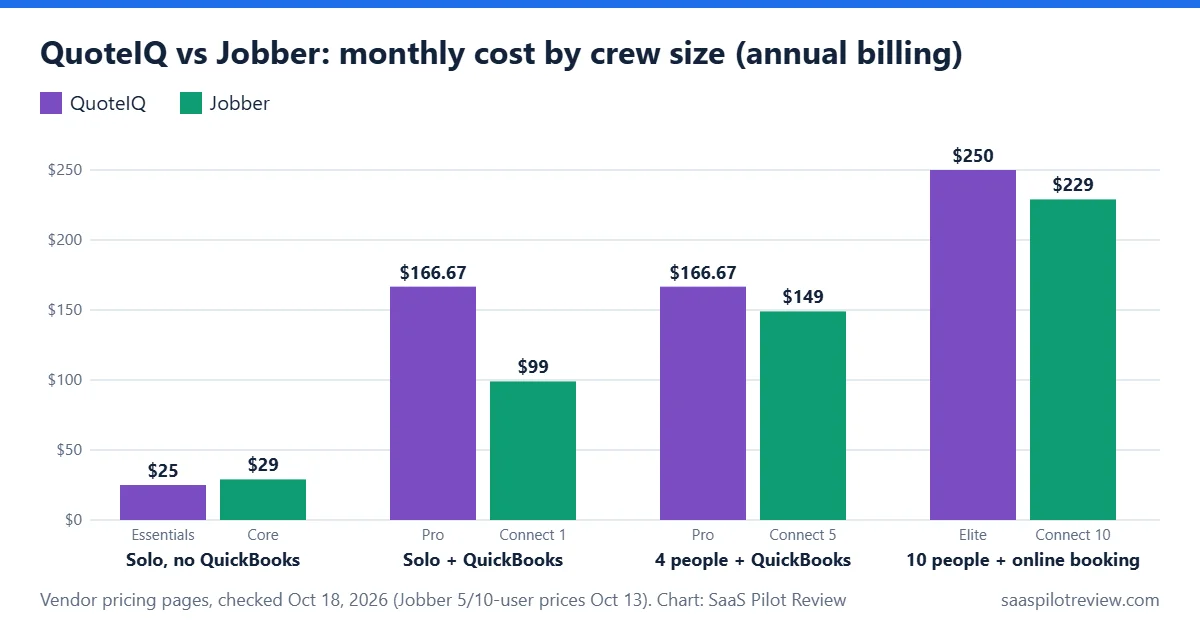
For a solo operator who quotes from the truck and does not use QuickBooks, QuoteIQ is the cheaper start: $29.99 a month against $49 for Jobber Core, month to month. Once you need QuickBooks sync, customer self-booking or more than one user, Jobber usually costs less, because those features sit on QuoteIQ’s $199.99 and $299.99 plans but on Jobber’s lower tiers.
That is the short version. Below is what each plan really costs for crews of 1, 4 and 10, which features each one locks behind a higher tier, and the jobs where QuoteIQ’s measuring tools justify the price. For the full Jobber price list, including add-ons and payment fees, see our Jobber pricing breakdown.
How this comparison was made: it is a research comparison, not a hands-on test. We used QuoteIQ’s 2026 pricing article and product overview in its help center, and Jobber’s pricing page, on October 18, 2026 (Jobber’s 5- and 10-user prices are from our October 13 check). We have not run either app on live jobs, so there is no score here. Prices checked October 18, 2026.
Monthly cost for a crew of 1, 4 and 10
Jobber is cheaper at every size except the solo plan without QuickBooks. The reason is how each tool sells users: QuoteIQ ties seats to its plans (1, 2, 4, 10 or 20 users), while Jobber sells Connect and Grow in 1, 5, 10 and 15-user bundles.
| Crew and needs | QuoteIQ plan | QuoteIQ per month (monthly / annual) | Jobber plan | Jobber per month (monthly / annual) |
|---|---|---|---|---|
| Solo, no QuickBooks | Essentials, 1 user | $29.99 / $25.00 | Core, 1 user | $49 / $29 |
| Solo, needs QuickBooks sync | Pro, 4 users | $199.99 / $166.67 | Connect, 1 user | $139 / $99 |
| Owner + 3, needs QuickBooks sync | Pro, 4 users | $199.99 / $166.67 | Connect, 5 users | $199 / $149 |
| 10 people, online booking for customers | Elite, 10 users | $299.99 / $250.00 | Connect, 10 users | $299 / $229 |
Annual prices are shown as a monthly equivalent. QuoteIQ’s annual plans are paid up front ($299.99, $1,999.99 and $2,999.99 a year for the plans above). Extra users cost $25 a month each on QuoteIQ and $29 a month each on Jobber. Sources: QuoteIQ pricing plans 2026 and Jobber pricing.
Which plan unlocks the features crews ask for
The biggest difference is not the headline price but the tier where common features start. On QuoteIQ, several things a growing crew needs only arrive on Pro or Elite.
| Feature | QuoteIQ: first plan that has it | Jobber: first plan that has it |
|---|---|---|
| Quotes, invoices, online card payments | Essentials ($29.99) | Core ($49) |
| Customers book online themselves | Elite ($299.99), InstaSchedule | Core ($49) |
| QuickBooks integration | Pro ($199.99) | Connect ($139), QuickBooks Online |
| Texting customers from the app | Pro ($199.99), ClientHub calling and texting | Grow ($199), two-way SMS |
| Job costing | Pro ($199.99) | Grow ($199) |
| Measure a property from satellite imagery | Beginner ($99.99), MapMeasure Pro | Not on the pricing page |
| Customer builds their own quote online | Elite ($299.99), InstaQuote | Not on the pricing page |
| AI phone receptionist | Not in the 2026 pricing article | Add-on, $29/month |
Prices are month-to-month for one plan. “Not on the pricing page” means we did not find the feature in that vendor’s plan list on October 18; it does not prove the feature is missing from the app.

Where QuoteIQ earns its price
QuoteIQ sells itself to more than 50 home service trades, but its standout tools are for quoting work you can measure from above. Its help center describes MapMeasure Pro, from the Beginner plan, as measuring a property from satellite imagery in square or linear feet, with an AI AutoMeasure option that traces a surface such as a roof. The measurement is saved to the property and feeds the quote.
That matters for trades that price by area or length: pressure washing, roof and gutter cleaning, lawn care, fencing, painting exteriors. If you drive to every lead just to measure, a $99.99 plan that lets you quote from the office can pay for itself in saved trips. If you would rather let customers price the job on your own site, see our guide to instant quotes for pressure washing websites. Two other extras stand out:
- Atlas lead finder (all plans): search businesses in an area for free and pay to unlock contact details, from 25 cents per business for the first 100. Useful for commercial pressure washing or window cleaning routes.
- InstaQuote (Elite): the customer builds their own quote and books it against your real availability. For simple, repeatable jobs this replaces a phone call.
Where Jobber is the safer pick
Jobber puts the office features most service teams need on its cheaper plans. Online booking is on Core, and QuickBooks Online sync plus automated quote and invoice follow-ups are on Connect. For a solo owner who needs QuickBooks sync, that is about $60 a month less than QuoteIQ Pro, month to month or on annual billing.
Jobber’s trial also starts without a credit card. QuoteIQ’s 14-day trial needs a card, and changing plans during the trial ends it and bills the card right away, so pick the plan you want to test before you start.
If you are weighing Jobber against its closest rival rather than a niche tool, our Housecall Pro vs Jobber comparison covers that matchup.
Costs that are easy to miss
| Cost | QuoteIQ | Jobber |
|---|---|---|
| Extra user | $25/month each | $29/month each |
| Website builder | $34.99/month add-on (included on Max) | Website included in Core’s feature list |
| Usage credits | IQ Credits included monthly (500 on Essentials); packs from $25 for 2,500 | None listed |
| Done-for-you setup | $299.99 or $999.99 one-time | Not listed on the pricing page |
| Marketing and sales add-ons | Review requests and campaigns on Elite | Marketing Suite $99/month, Sales Pipeline $49/month |
QuoteIQ’s pricing article does not list card processing rates, so ask for them before you move invoicing over.
Which one should you choose?

- Pick QuoteIQ if you work alone or with one helper, quote exterior jobs by area or length, and do your books outside QuickBooks. Essentials at $29.99, or Beginner at $99.99 for satellite measuring, is where it is strongest.
- Pick Jobber if you need QuickBooks sync, want customers to book online without paying for a $299.99 plan, or have 3 or more people in the field.
- Test both with your own job: quote the same real property in each trial and time it. Measuring from satellite versus on site is the difference most likely to matter.
Still comparing more than two tools? Our best field service software for small business guide covers the wider field, and every tool we track is in the field service software hub. Read how we research and test for how comparisons like this one are put together.