A homeowner who lands on a pressure washing website at 9 p.m. usually wants one thing: a number. If the site only says “call for a free estimate”, many of them close the tab and try the next company on the map. The fix is to put prices or bookings on the site, but there are three very different ways to do it, and the right one depends on how your jobs are priced, not on which app has the slickest widget.
This guide is research, not a hands-on test: we have not run a pressure washing website on any of these tools. Features and prices come from each vendor’s own pricing pages, help articles and product updates, checked on October 27, 2026. If you are still choosing a job tracker, start with our QuoteIQ vs Jobber comparison, because the website piece usually comes from the same app.
The three setups, side by side
Every option below ends with a job in your calendar. What changes is how much work the visitor does, how much you do, and what the software costs.
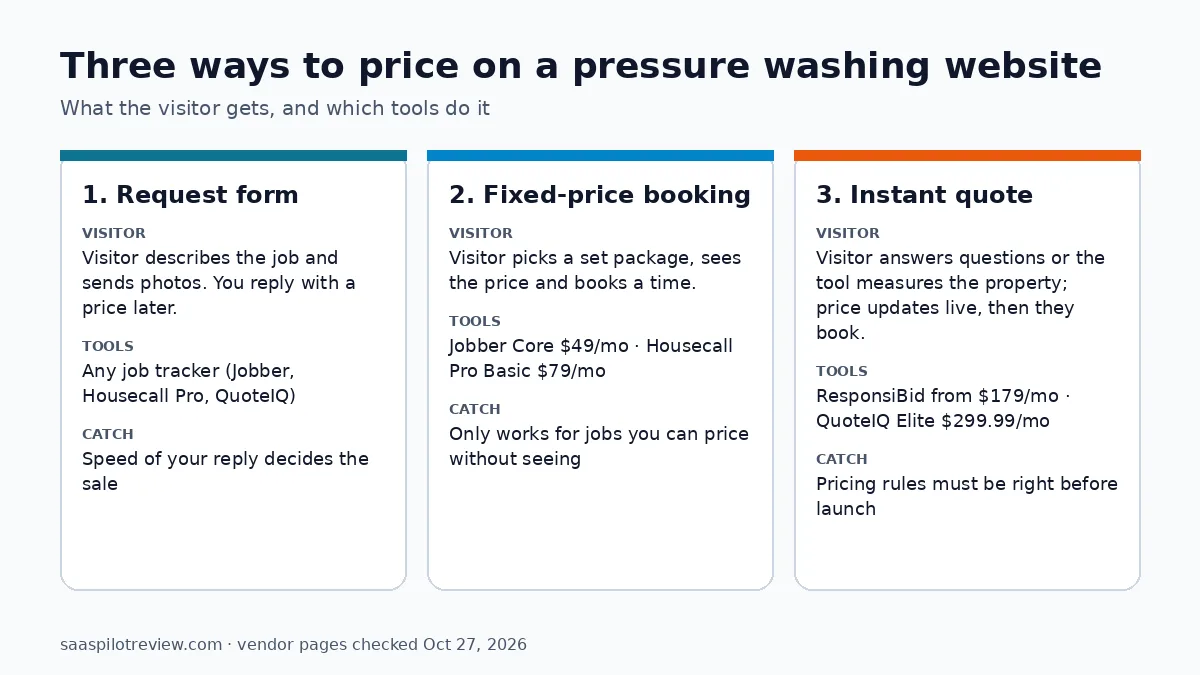
| Setup | What the visitor does | Price shown on the site | Example tools (monthly list price) | Fits |
|---|---|---|---|---|
| Request form | Describes the job, adds the address and photos | No, you reply with a quote | Request forms in Jobber, Housecall Pro or QuoteIQ | Roofs, commercial work, anything you need to see first |
| Fixed-price booking | Picks a service, sees its price, books a time slot | Yes, the price you set per service | Jobber Core $49; Housecall Pro Basic $79 ($59 billed yearly) | Set packages such as a house wash by home size |
| Instant quote | Answers questions or enters the address; the total updates live | Yes, calculated per property | ResponsiBid $179 or $229; QuoteIQ Elite $299.99 | Flatwork and house washing priced by measured area |
Prices are month-to-month list prices for one user, before promotions. Jobber and Housecall Pro both run intro discounts that change often, so check the live page before you sign up.
Option 1: a request form that gets a fast reply
A request form is the cheapest setup and the one most pressure washing sites already have. It is also the right answer for work you should not price blind: roof soft washing, rust or oil stain removal, commercial flatwork, fleet washing. The visitor fills in the job, the address and ideally two or three photos, and a request lands in your job tracker.
Jobber says its custom request forms can be shared on your website, social media or client hub, and most job trackers offer something similar. The software is rarely the weak point here. The weak point is the wait: a homeowner comparing three companies tends to book the first one that answers with a price. Two habits close most of that gap:
- Ask for photos and the rough size on the form, so you can send a price without a site visit for most residential jobs.
- Answer the same day, by text if you can. If you also miss calls while you are on a ladder, a missed call text back setup covers the phone side of the same problem.
Option 2: fixed-price online booking
If most of your residential work fits a short menu, you can publish it. A typical menu is a house wash by home size, a driveway, a patio and a fence. The visitor picks a service, sees the price you set, and books a slot that fits around jobs already on your calendar. No quote round trip, no phone tag.
Jobber. Jobber’s online booking lets you mark services as bookable and set an estimated price and duration for each. In Jobber’s own product update, customers then “see the name, description, duration, and estimated price you set” and pick a time based on your team’s calendars. You control how soon people can book and the buffer between jobs, and both you and the customer get an automatic notification. Jobber’s current pricing page lists booking and scheduling jobs online among the Core plan’s key features; Core is $49 a month for one user on monthly billing. An older 2023 update tied online booking to Connect and Grow, so confirm it is switched on during the 14-day trial. Our Jobber pricing breakdown covers what Connect adds and the extra-user cost.
Housecall Pro. Housecall Pro’s online booking works from a Book Online button on your site, a direct link or Google, and the visitor can book and pay online. Its booking settings include a “Show service prices in online booking” toggle, so you choose whether prices appear. Booking hours and service durations decide which time slots show up, and a Manual mode hides time selection and turns bookings into unscheduled jobs and estimates, which is handy for services you still want to check first. Online booking is listed on Basic, the entry plan at $79 a month billed monthly or $59 billed yearly. More on the upper plans is in our Housecall Pro pricing guide.
The catch with both: the price is fixed per service. Both tools let you set it, and neither measures the property for you. If your driveway price really depends on square footage, a single “driveway” button either overcharges small driveways or loses money on big ones. A common workaround is to book a time slot with an “estimated” price and confirm the final number on arrival, but say so plainly on the booking page.
Option 3: an instant quote calculator on your site
An instant quote tool goes one step further: the price is calculated for each property. This suits pressure washing better than most trades, because so much of the work is priced by area.
ResponsiBid is built for this job. It puts a quote form on your site with questions you write for each service, and the price is calculated as the visitor answers. Its pricing page lists instant quoting on your website, a quoting calculator and customer self-scheduling, with one admin user and unlimited sub-users. The two published plans are Scaling at $179 a month and Pro at $229 a month. The page does not split features by plan, so ask on the demo which one includes the website quoting you need. There is no free trial on the page, only a demo. Seasonal businesses should note the pause option: monthly customers can pause up to four months a year at $50 a month, but bidding stops while paused.
ResponsiBid is not a full job tracker, so most owners pair it with one. It lists Jobber and Housecall Pro among its CRM connections. Housecall Pro’s help article explains that scheduling a bid in ResponsiBid creates a job in Housecall Pro. The sync is one way, though: later changes in either app do not update the other. Budget for both subscriptions, for example $179 plus Jobber Core’s $49, or $228 a month.
QuoteIQ does it inside the job tracker. Its InstaQuote widget sits on your website: the homeowner enters the address, selects services, watches the total update, then approves and e-signs the quote. InstaSchedule lets them pick an open time on your calendar. On the Elite plan, MapMeasure Pro pulls square footage from satellite imagery, and InstaQuote prices from that measurement. The visitor does not measure anything. The limit is the plan: QuoteIQ says InstaQuote and InstaSchedule are only on Elite ($299.99 a month, 10 users) and Max ($699.99). The cheaper plans have map measuring for you, not for the customer. QuoteIQ offers a 14-day trial and asks for a card to start it.
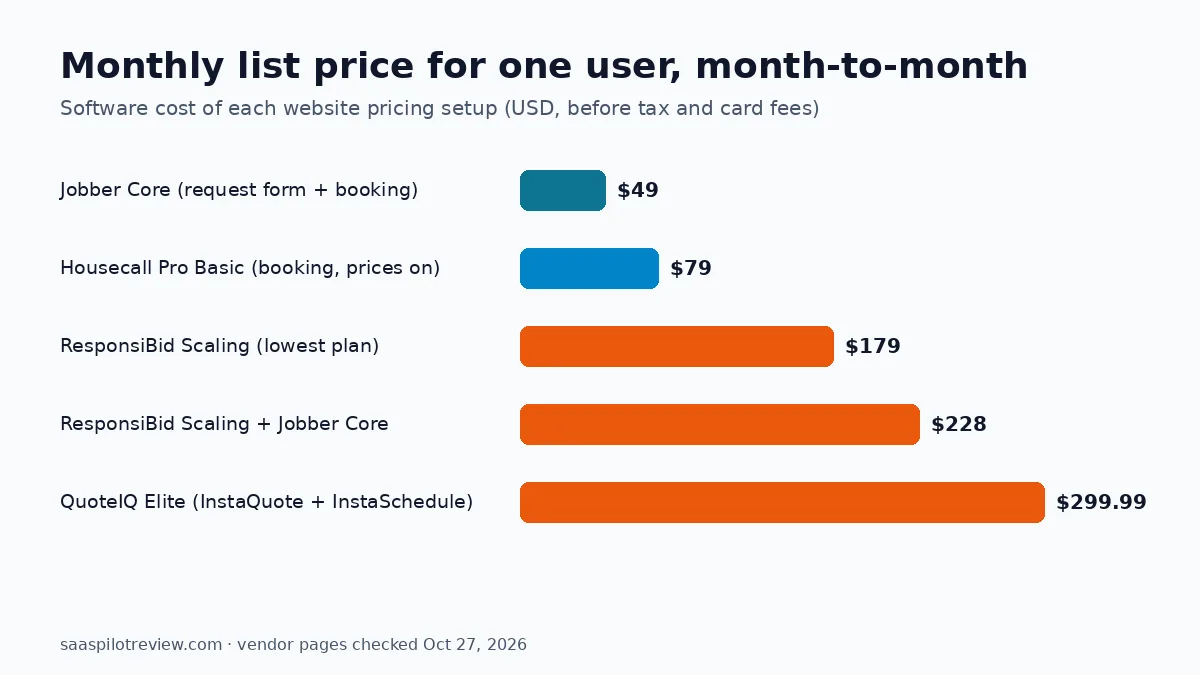
What each setup costs a one-truck business
| Setup | Monthly software cost | What you still do by hand |
|---|---|---|
| Jobber Core: request form + fixed-price booking | $49 | Quote custom jobs; keep the service menu current |
| Housecall Pro Basic: booking with prices on | $79 ($59 billed yearly) | Same as above |
| ResponsiBid Scaling + Jobber Core | $228 | Build and tune the pricing questions; fix job changes in both apps |
| QuoteIQ Elite: InstaQuote + InstaSchedule | $299.99 | Set price per square foot and minimums for each service |
The gap between the first two rows and the last two is roughly $150 to $250 a month. Whether that pays back depends on how many website leads you get and how many you lose to slow quotes, numbers only your own records can answer. A reasonable test: if fixed-price booking already converts most of your website traffic, an instant quote tool adds little. If visitors leave because your menu cannot price their property, the calculator is the upgrade worth paying for.
Set your prices up before you switch anything on
Whichever tool you pick, the website will publish your pricing rules exactly as you enter them. A few checks before launch:
- Set a job minimum. A small patio priced purely by square foot can come out below what it costs to roll the truck.
- Price by the unit you actually measure. Use square feet for flatwork, home size or stories for house washing, and linear feet for fences. Mixing units in one service confuses customers.
- Keep “needs a look” services off the instant menu. Roofs, heavy staining and commercial jobs go to the request form.
- Write what is included next to each price: surfaces, chemicals, whether windows are rinsed. It cuts the “I thought that was included” call afterwards.
- Test it as a customer on your phone with three real addresses before the link goes on your Google Business Profile.

Our take for small pressure washing companies
For a one- or two-person company, fixed-price booking in the job tracker you already pay for is the best first step. It costs nothing extra and covers the house washes and standard driveways that make up most residential calls. Keep a request form for everything else. Move to an instant quote tool once you have steady website traffic and your jobs vary too much for a short menu. Choose QuoteIQ Elite if you want quoting, measuring and booking in one app. Choose ResponsiBid if you want to keep Jobber or Housecall Pro and add a question-based calculator in front of it. For general job software beyond the website, see our picks for the best field service software for small crews.
How we researched this
We did not hold an account in any of these tools for this article and have not scored them. We read each vendor’s pricing page, help articles and product updates on October 27, 2026, and built the cost tables from list prices. Where a vendor page did not say which plan includes a feature, we say so rather than guess. Our general method is on the how we test page, and more scheduling and quoting tools are in the field service software hub.
Sources (checked October 27, 2026): Jobber online booking · Jobber online booking update · Jobber pricing · Housecall Pro online booking · Housecall Pro online booking FAQ · Housecall Pro pricing · ResponsiBid pricing · ResponsiBid and Housecall Pro integration · QuoteIQ pricing plans 2026 · QuoteIQ InstaQuote