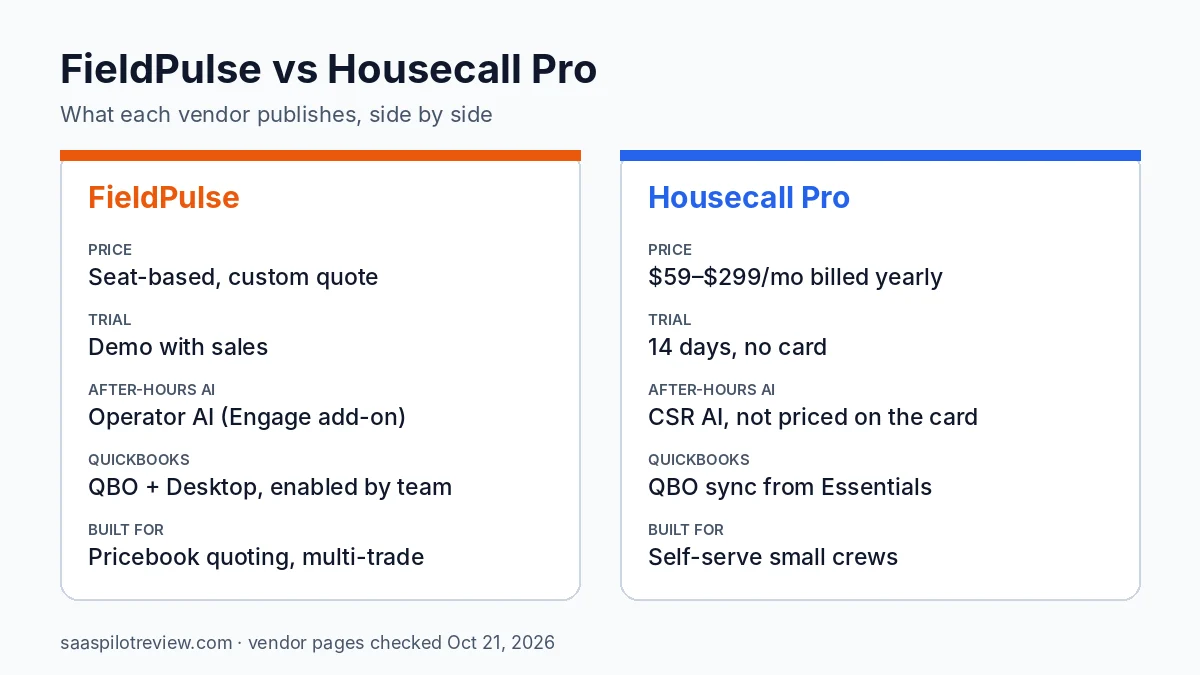
FieldPulse and Housecall Pro do the same core jobs for a trade business: schedule and dispatch, estimates, invoices, payments and a mobile app for the crew. The real difference shows up before you ever log in. Housecall Pro prints its prices and lets you start a free trial tonight. FieldPulse prices every account by seat after a sales conversation, and leans harder into pricebook quoting, phone lines and an AI dispatcher.
This comparison is based on research, not a test account: we have not used either product with a live crew. Everything below comes from each vendor’s pricing, feature and help pages, checked on October 21, 2026. If Jobber is also on your list, start with our best field service software for small crews roundup, which ranks eight tools side by side.
FieldPulse vs Housecall Pro in one table
| FieldPulse | Housecall Pro | |
|---|---|---|
| Published prices | No. Seat-based, custom quote | Yes. $59, $149 and $299 a month billed yearly |
| Users in the price | Set in your quote | 1 (Basic), 5 (Essentials), 8 (Max); extra Max users $35 a month |
| Free trial | Not described; the pricing page offers a demo | 14 days, no credit card, full Max access |
| Contract | Not published | No long-term contract |
| Pricebook / flat rate | Pricebook, listed as an optional premium product | Price book on Basic; flat-rate pricing from Essentials |
| After-hours AI on the phone | Operator AI, an add-on to the Engage phone system | CSR AI, no price on the pricing page |
| QuickBooks | QuickBooks Online and Desktop; the team enables it for you | QuickBooks Online sync from Essentials |
| Recurring maintenance | Maintenance agreements with auto-scheduled visits | Recurring service plans on Max |
Sources: FieldPulse and Housecall Pro pricing, feature and help pages listed at the end. Prices checked October 21, 2026.
Price: a public card against a sales call
Housecall Pro is the only one of the two you can price without talking to anyone. Its pricing page lists three plans: Basic at $59 a month billed yearly or $79 billed monthly for 1 user, Essentials at $149 or $189 for 5 users, and Max at $299 or $329 for 8 users. Only Max lets you add users, at $35 a month each. Card payments run from 2.59% and bank payments cost 1%.
FieldPulse’s pricing page says the product is seat-based and priced around what your team needs, then asks for your trade and headcount to book a quote. It names no plans and no numbers, and the Engage phone system is priced by line and license on top. Premium products such as Operator AI, ClearPath, Custom Forms, Pricebook and Fleet Tracking are listed as optional, also without prices.
Here is what Housecall Pro costs at common crew sizes. We cannot put FieldPulse in the same table because it does not publish a number.
| Crew size | Housecall Pro plan | Billed yearly | Billed monthly | FieldPulse |
|---|---|---|---|---|
| 1 user | Basic | $59/mo | $79/mo | Quote |
| 2 to 5 users | Essentials | $149/mo | $189/mo | Quote |
| 6 to 8 users | Max | $299/mo | $329/mo | Quote |
| 10 users | Max + 2 users | $369/mo | $399/mo | Quote |
Our math from list prices on October 21, 2026: Max plus $35 per extra user. Excludes payment fees and add-ons.
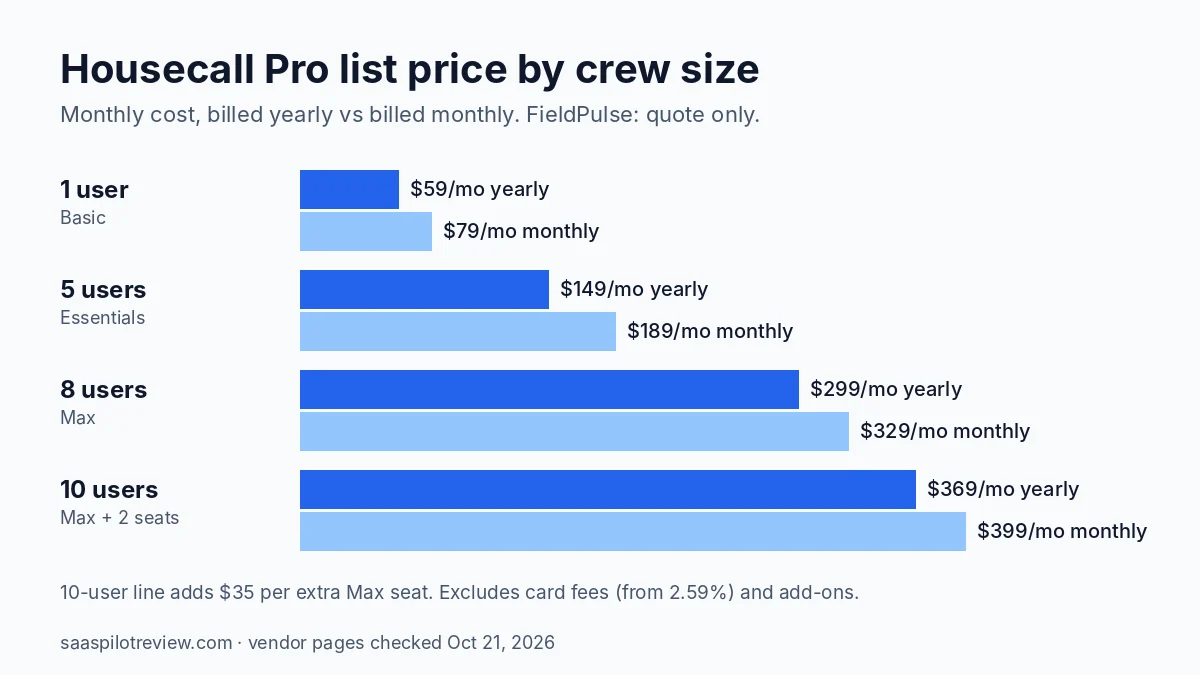
The jump that catches people is the sixth user: a 6-person crew cannot stay on Essentials and has to move to Max. Our Housecall Pro pricing breakdown by plan walks through that jump and the add-ons that never show on the card. When you take a FieldPulse demo, ask for the price at your current headcount and at two more seats, so you can line it up against the table above.
Quoting from a pricebook on site
FieldPulse puts more weight on quoting from fixed prices. Its Pricebook page describes preset prices for services with material and labor costs, custom categories so techs can find items, line items you can edit per job, and estimates sent by email or text. That suits electrical, HVAC and plumbing shops where a tech prices a repair in the driveway. The catch is that Pricebook sits in the premium list on the pricing page, so confirm it is in your quote.
Housecall Pro includes a price book and job costing on every plan, including Basic, and adds flat-rate pricing from Essentials. A sales proposal tool, valued at $40 a month on the pricing page, comes with Max. For a small crew that quotes a handful of standard jobs, the Basic or Essentials tools are usually enough.
Who answers the phone after 5 PM
Both vendors now sell an AI voice that picks up when nobody in the office can. FieldPulse calls its version Operator AI: a 24/7 dispatcher for after-hours, declined or busy calls that captures the time, location and service type and books the job into the FieldPulse calendar, then alerts the tech by text or email. It is an add-on to Engage, FieldPulse’s own phone and messaging system, which lets you port your number or buy one, logs calls and texts on the customer record, keeps call recordings and works with SIP phones.
Housecall Pro’s CSR AI answers calls and chats around the clock and books jobs into your Housecall Pro schedule using your services, hours and availability. The pricing page does not list its price; our Housecall Pro CSR AI cost guide sets out what is published and what you have to ask.
The practical difference: FieldPulse wants to be your phone system as well as your job software, while Housecall Pro’s AI sits on the number you already have. If you are not sure an AI answering service is worth paying for yet, put a number on it first with our missed call cost calculator.
QuickBooks: what syncs and how long setup takes
Housecall Pro lists QuickBooks Online sync as an Essentials feature, so a one-person Basic account does not get it.
FieldPulse’s QuickBooks Online help article says customers, invoices and payments sync both ways, and that you need your own QuickBooks Online Essentials, Plus or Advanced subscription with admin rights. You request the connection and the FieldPulse team turns it on. The first sync is not instant: the article estimates 24 to 48 hours for up to 5,000 data points and about two weeks for 20,000 to 50,000. FieldPulse also has a separate QuickBooks Desktop integration, which matters if your bookkeeper never moved to the cloud.
Maintenance agreements and repeat visits
If service contracts are a big part of your revenue, look at this row closely. FieldPulse’s maintenance agreements schedule visits from the contract terms, remind customers and techs before each visit, can invoice recurring work automatically and flag contracts coming up for renewal. The page does not say which plans include it.
Housecall Pro lists recurring service plans on Max only. A 3-person HVAC company that sells tune-up plans would therefore pay the 8-user Max price ($299 a month billed yearly) to get them, even with seats left over.
Which one fits your crew
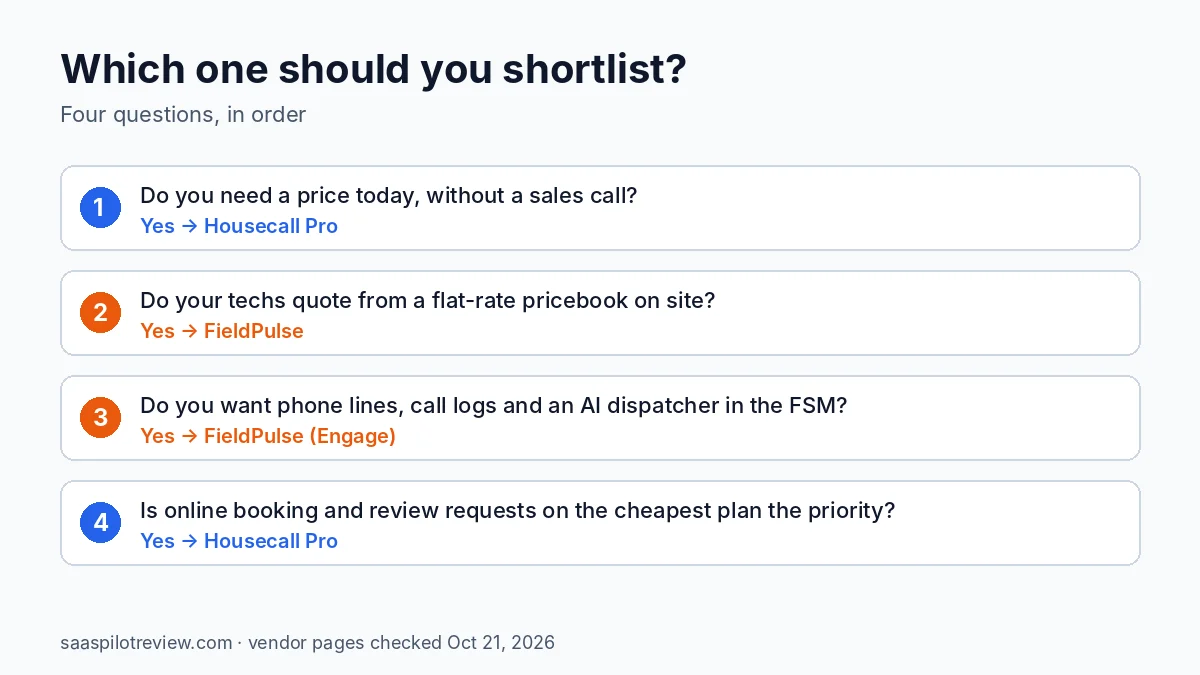
Pick Housecall Pro if you want a known price today, a free trial without a sales call, and online booking and review management on the cheapest plan. It fits owner-operators and crews of up to five who are happy on Essentials. If you are also weighing Jobber, read our Housecall Pro vs Jobber comparison.
Pick FieldPulse if your techs build quotes from a flat-rate pricebook on site, you want phone lines, call logs and an AI dispatcher inside the same system, or you need QuickBooks Desktop. Be ready for a demo before you see a number, and get the seat price, the Engage line price and every premium product you need in writing.
The weak spot for each: Housecall Pro’s recurring plans and extra users are locked to its top tier, and FieldPulse gives you nothing to compare until sales replies. Neither problem is fatal, but both change the price you end up paying.
How we put this comparison together
We read both vendors’ pricing pages, feature pages and help center articles on October 21, 2026, and only list a price or limit when the vendor’s own page states it. We did not run jobs through either app, so there is no score here. Our testing and research method explains how research comparisons differ from hands-on reviews. More tools in this space are on our field service software hub.
Prices checked October 21, 2026.