For a few years, a contractor could open their Google Business Profile and see a list of the calls it had sent them: who rang, when, and whether anyone picked up. Google switched that list off. If you are reading this because the call log you used to check is gone, the short version is that you cannot get it back inside Google, but you can rebuild most of it for free or for a modest monthly fee.
This guide is based on research, not a test account: everything below comes from Google’s own help pages and the call tracking vendors’ pricing pages, checked on October 20, 2026. If your calls come from Local Services Ads rather than your free profile, read our separate guide on how to track Google LSA calls instead; the setup is different. Google also bills some missed LSA calls since October 1, 2026; here is what changed with LSA missed-call charges.
What Google actually removed, and when
Google’s help page says that as of July 31, 2024 the chat and call history features are no longer available in Business Profile. Past records could be downloaded through Google Takeout until August 30, 2024; after that date the history was gone for good. Chat was shut down in the same change.
What did not change matters just as much. Customers still see your phone number on Search and Maps, the call button still rings your phone, and the Performance report still counts calls. The difference is the level of detail: Google now gives you a number, not a list.
| Call data | Before July 31, 2024 | Now, inside Google |
|---|---|---|
| Total calls in a date range | Yes | Yes: “Calls” in the Performance report counts taps on the call button |
| Caller’s number and time of each call | Yes, in call history | No |
| Missed vs answered calls | Yes, in call history | No |
| Export of old call history | Google Takeout | Not available after August 30, 2024 |
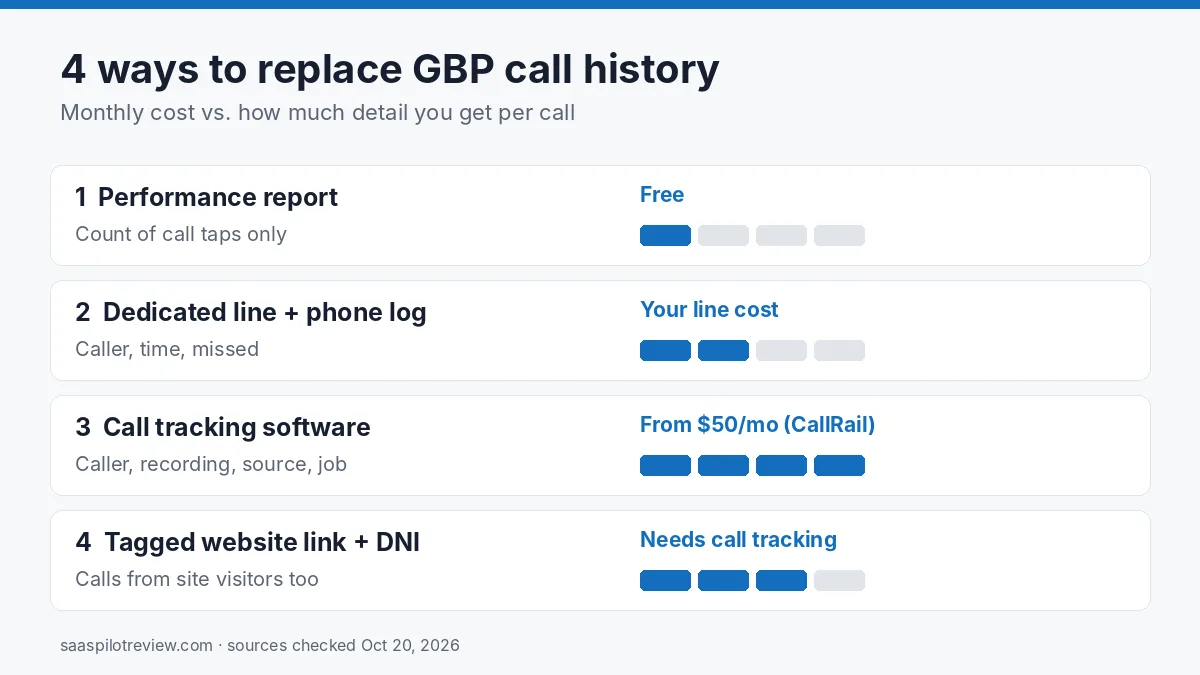
Option 1: the Performance report (free, but counts taps, not calls)
The quickest replacement is already in your profile. Open Performance, pick a date range and look at “Calls”. Google defines this metric as the number of times a customer clicked the call button on your Business Profile, and it only works if your profile has a phone number. Performance data also needs a verified profile, so if your GBP video verification failed, fix that first.
Use it to answer one question: is the profile sending more or fewer people to the phone than last month? It cannot tell you whether a tap turned into a real conversation, whether you missed the call, or which job it became. Someone who reads your number off the listing and dials it by hand is not counted at all.
Option 2: give the profile its own line and read your phone system’s call log
If your business phone app already keeps a call log (most VoIP and business texting apps do), the cheapest way to get call history back is to give your Google profile a number nobody else uses. Every call to that number then came from Google, and your phone app shows the caller, the time and whether it was missed.
Google’s rules shape how you do this. Its guidelines ask for a phone number that connects to your individual business location, a local number rather than a central call center line where possible, and a number that is under the direct control of the business. They also say not to list numbers that redirect or refer callers to numbers other than the business’s own. A second local line on your own phone account fits those rules; a number you rent from a lead seller does not.
You can list your primary number plus up to two more on the profile. Keep the same number on your website, invoices and directories only if you want those calls mixed in; the point of a dedicated line is that it shows up in one place.
The weak spot is missed calls. A log tells you a call was missed, not what happened next. Pair the line with an auto text so a missed Google caller hears back in a minute: our missed-call text back setup guide covers the tools and the message.
Option 3: call tracking software
Call tracking tools give you a forwarding number that rings your real phone, then log every call with the caller, duration, a recording if you turn it on, and the source. This is the closest thing to the old call history, plus answers Google never gave: which calls became booked jobs, and how Google calls compare with your ads or website.
Many local SEOs put the tracking number in the primary phone field and keep the main business number as an additional number, so the listing stays tied to your real line. Google’s help pages do not spell out a rule for call tracking numbers, so treat this as common practice rather than official guidance, and keep the tracking number local and in your own account, in line with the guidelines above.
| Tool | How it bills | Entry price (published) | Trial |
|---|---|---|---|
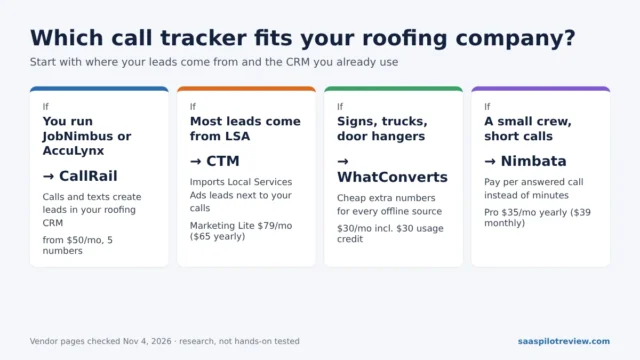
| CallRail | Monthly plan plus usage | Lead Tracking: $50/month on the monthly toggle, 5 local numbers and 250 local minutes; extra local numbers $3, extra local minutes $0.05 | 14 days, no card |
| Nimbata | Flat rate per answered call, not per minute | No plan price on the pricing page; quote or sales call | Free trial offered (length not stated) |
Prices checked October 20, 2026 on each vendor’s pricing page. CallRail says a yearly plan saves up to 10% but does not list yearly prices, and parts of its comparison tables disagree on minute rates, so confirm with them before you budget. For a closer look at two of them, see Nimbata vs CallRail.
If you also run Local Services Ads and tracked calls drop suddenly, first check whether LSA is showing your Business Profile number instead of your tracking line.
Option 4: tag the website link so calls from your site count too
A lot of Google traffic never taps the call button. People click your website from the profile, read for a minute and then call the number on the page. To see those visitors, add UTM tags to the website link in your profile (for example utm_source=google, utm_medium=organic, utm_campaign=gbp) using Google’s own campaign URL builder. In Google Analytics they then appear as a separate source instead of blending into regular search traffic.
A tag tells you about visits, not calls. To connect the two you need a call tracking tool that swaps the phone number on your website for visitors who arrived from the tagged link. That is the same software as Option 3, so this option is mainly worth it if you already pay for call tracking or your website gets more calls than your profile does.
Which setup fits your business
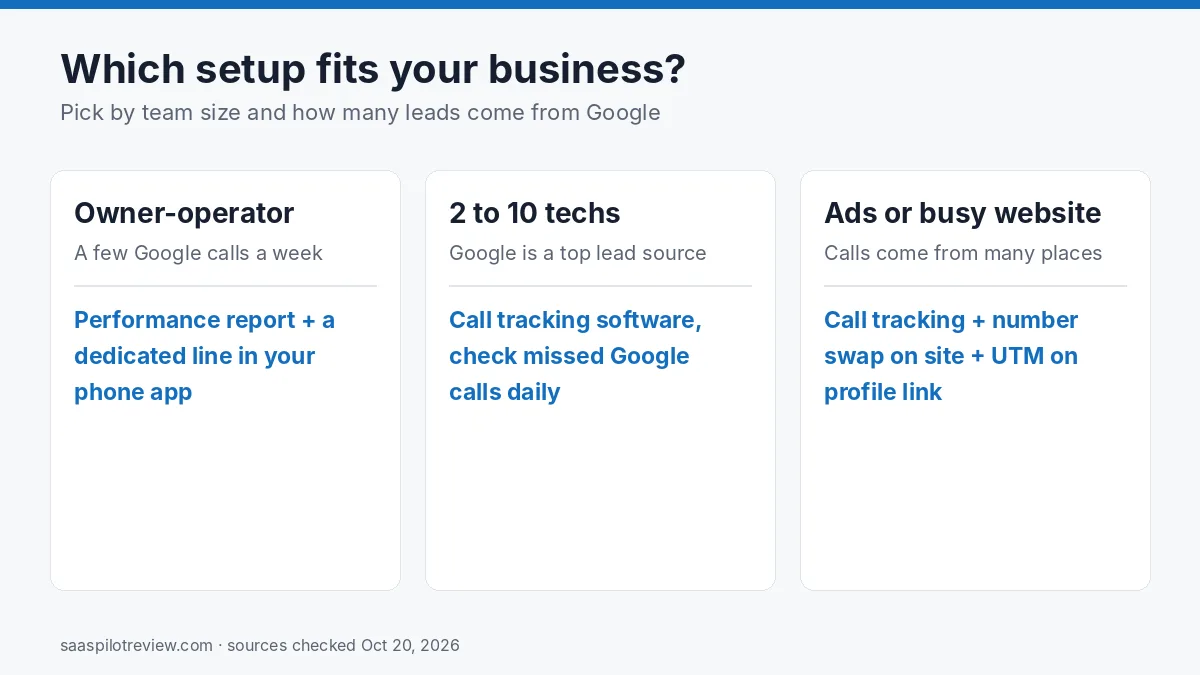
- Owner-operator, a few calls a week from Google: watch the Performance report monthly and add a dedicated line in the phone app you already pay for. Cost: usually nothing extra beyond that line.
- Two to ten techs, Google is a top lead source: call tracking software, so the office can see missed Google calls the same day and tie them to jobs. Budget from about $50 a month on CallRail’s published entry plan.
- You also run ads or a busy website: call tracking with website number swapping and UTM tags on the profile link, so Google, ads and site calls are counted separately.
Whatever you pick, compare the totals with the Performance report once a month. If your log shows far fewer Google calls than the taps Google reports, people are tapping and hanging up, or calling a different number; both are worth a look. If you also want to see how your profile ranks around your service area, our Localo vs BrightLocal comparison covers two local SEO tools that track that. More call tools are in the call tracking and lead gen hub.
Questions owners ask
Can I still download my old Google call history? No. Google kept past records available through Google Takeout until August 30, 2024. If you did not export them by then, they are no longer available.
Will a call tracking number hurt my local ranking? Google does not publish a rule on this. The guidelines that do exist ask for a local number that reaches your location and that you control, so a local tracking number in your own account, with your main number listed as an additional number, is the setup most local SEOs use. We cover this in more detail in dynamic number insertion and local SEO.
Does Google still send me calls? Yes. Google’s help page says you continue to receive calls from your Business Profile; only the history list was removed.
How we put this guide together
We read Google Business Profile help pages and the vendors’ pricing pages on October 20, 2026. We have not set up these options on a client profile for this page, so we do not score the tools. Our full process is on the how we test page.
Sources
- Google Business Profile Help: changes to chat and call history
- Google Business Profile Help: understand your performance and insights
- Google Business Profile Help: guidelines for representing your business
- Google Business Profile Help: add your phone number
- Google Analytics Help: collect campaign data with custom URLs
- CallRail: pricing
- Nimbata: pricing