How this page was made: researched from Google Business Profile Help, Google’s Maps content policy, Search Engine Roundtable coverage and case data published on the Sterling Sky blog, not hands-on tested. We did not recover or remove reviews on a client profile for this article. Where a cause comes from practitioner observation rather than Google, we say “reported”. Sources checked November 19, 2026.
Google deletes reviews mainly because its automated spam filter decides they do not look like a real customer experience: too many at once, posted from your shop’s Wi-Fi, from far away, tied to a discount or a staff quota, or part of a fake-review attack on your profile. Most removals are made by software, not a person, and some catch genuine reviews. If you lost reviews, first check whether they were removed or only hidden, then contact Google support with screenshots; the reviewer can also appeal from the email Google sends them. If a fake review is the problem, report it in the Reviews Management Tool. Expect delays: in October 2026 Google said review appeals are taking longer than usual. Many owners first notice the loss when a review widget on their site goes quiet, which is the same signal behind our guide to the Google Maps sign-in change for reviews.
Deleted, filtered or blocked? Check this first
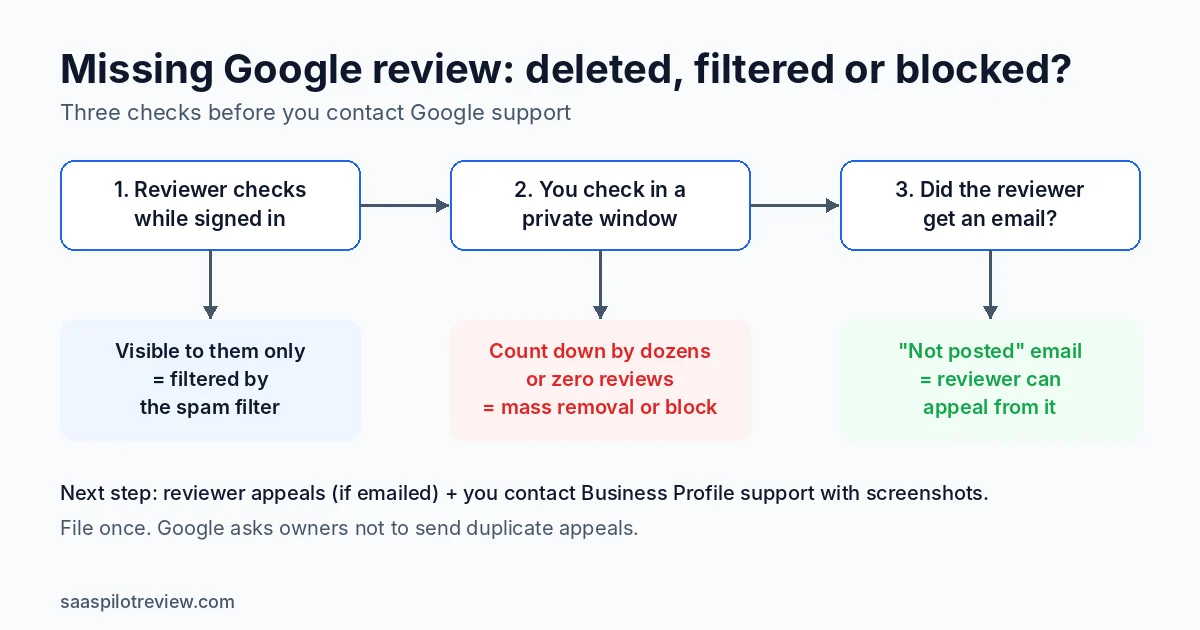
Before you contact anyone, find out which of three things happened, because each one has a different fix.
- Ask the customer to look while signed in. Joy Hawkins of Sterling Sky notes that a filtered reviewer can usually still see their own review when logged in, while nobody else can. If they see it and you do not, the review was filtered, not deleted by the customer.
- Look at your profile in a private browser window. If your review count dropped by one or two, single reviews were filtered. If it dropped by dozens, or the rating shows no reviews at all, you are probably dealing with a mass removal or a review block (next section).
- Ask whether the reviewer got an email. Since July 2026, Search Engine Roundtable reports that Google emails some reviewers to say their review was not posted because its automated systems decided it may break the Maps content policies. That email includes an appeal option for the reviewer.
Also check your business category. Sterling Sky points out that Google has not shown reviews for schools in the US and UK since 2019, and the reviewer gets no error. That rarely affects a trade business, but it explains some “my review never appeared” reports.
Why Google removes reviews: the usual causes
Google’s Maps prohibited and restricted content policy sets the rules, and its review removal help page admits that automated spam detection can occasionally remove a legitimate review. These are the causes owners run into most, with where each one comes from:
| Cause | What it looks like | Source |
|---|---|---|
| Reviews tied to an incentive | Discount, gift card or free service for a review; also offers to revise or remove a bad one | Google policy (prohibited) |
| Unusual volume or pattern | A burst of reviews in a short time, far above your normal pace | Google policy; Sterling Sky case data (reported) |
| Conflict of interest | Reviews from staff, family, contractors or a competitor | Google policy (prohibited) |
| Pressure or quotas | Asking customers to review on the spot, staff targets for review counts, asking for specific words | Google policy (prohibited) |
| Selective asking | Only asking happy customers, or screening people before sending the link | Google policy (prohibited) |
| Shared Wi-Fi or on-site posting | Customers post on your shop network, at the counter or on a review kiosk | Sterling Sky (reported) |
| Reviewer far away or not recent | The account has no sign of being near your service area | Sterling Sky (reported) |
| Links or contact details in the text | A phone number, email or web address inside the review | Google policy (prohibited) |
The table mixes two kinds of cause. Rows marked “Google policy” are written rules: break them and removal is expected. Rows marked “reported” come from practitioners watching which reviews disappear. Google does not publish its filter signals, so treat those as patterns, not rules.
What changed in 2026: mass removals, review blocks and slower appeals
If your reviews vanished this year, you were not alone. The timeline below covers the events behind most of the “Google is deleting my reviews” posts in owner forums.
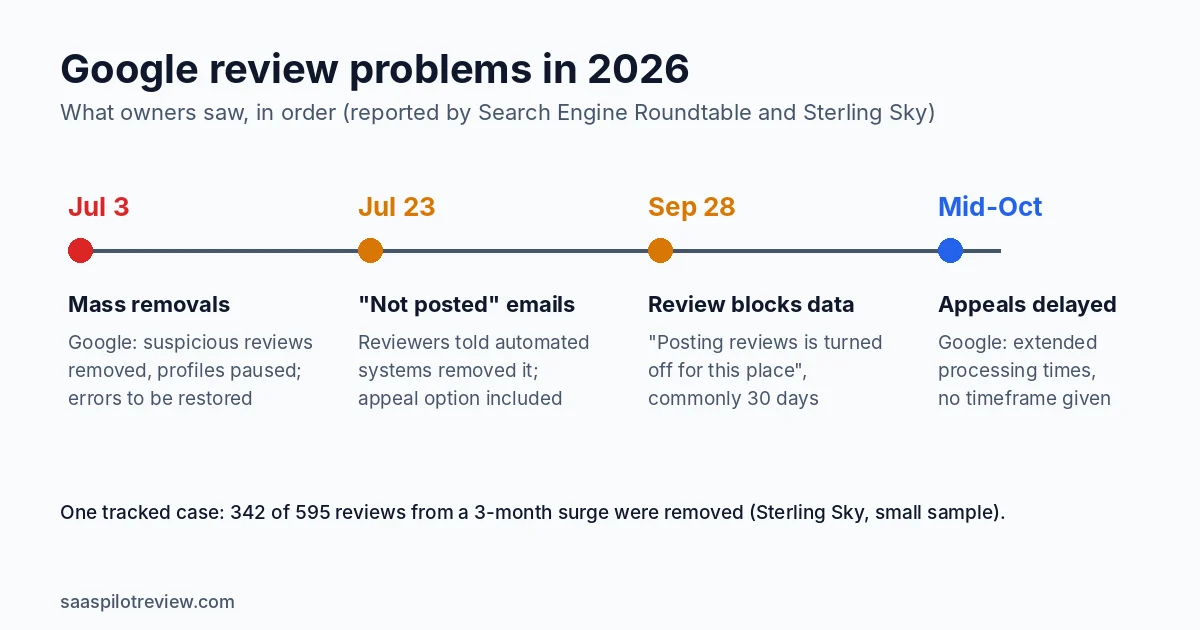
- July 3: reviews disappeared from many profiles, some losing thousands. A Google spokesperson told Search Engine Roundtable that when its systems detect suspicious reviews it removes reviews and temporarily pauses reviews on the profile, and that it would restore any reviews removed in error. A later update said Google considered the issue resolved.
- July 23: reviewers started getting the “not posted” email with an appeal option (see above).
- September 28: a Sterling Sky post on review posting blocks described profiles that stop accepting reviews, commonly for 30 days, with the message “Posting reviews is turned off for this place.” In one tracked case, 342 of 595 reviews gathered during a three-month surge were removed. The author linked blocks to reviews left on site, counter QR codes and bursts of ten or more in a day, while stressing it was a small sample.
- Mid-October: a Google team member posted in the Business Profile Help forum that review-related appeals have extended processing times and gave no timeframe, as Search Engine Roundtable reported on October 20. Google asked owners not to file duplicate appeals.
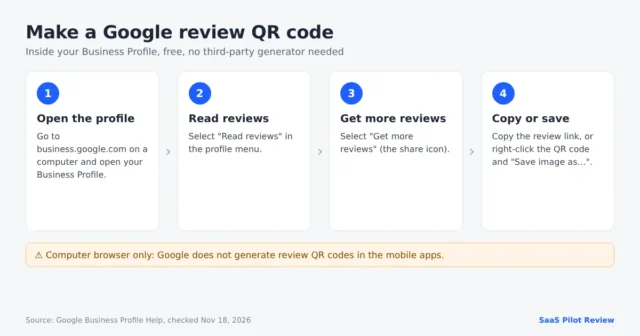
The block pattern is worth reading twice if you use review QR codes. Our Google review QR code guide covers where a code still makes sense; the short version is that a code on a paper invoice the customer takes home is safer than one at a counter they scan while standing in front of you.
How to get genuine reviews back
Google will not restore a review because you liked it, but it does reverse mistakes. Two routes run in parallel:
- The reviewer appeals. If they got the “not posted” email, ask them to use its appeal option. It is their review, so their appeal carries the most weight.
- You contact Business Profile support. Sterling Sky’s steps: sign in with the Google account that manages the profile, open Google Business Profile support, describe the issue as missing reviews and choose email contact. Attach screenshots of the missing reviews (the reviewer can send theirs from the signed-in view). Sterling Sky reports replies typically take 5 to 7 business days and that one HVAC client got more than 100 reviews back, but not every case succeeds.
File once and wait. Google’s appeals help page says not to submit several appeals for the same issue before you get a decision, and the October notice repeated that. If the profile itself is suspended, it has to be reinstated before any content decision can be appealed.
If a review block is on, Sterling Sky still recommends filing an appeal so the case is logged, but in every case it tracked over 60 days the block lasted the full 30 days anyway. Use the time to change how you ask (below) rather than pushing more requests out.
How to remove a fake or policy-breaking review
The other side of the problem: a review that should be deleted and is not. Google only removes reviews that break its policies, and its help page says plainly not to report one just because you disagree with it.
- Open your Business Profile, choose Read reviews, then Report next to the review, pick a reason and send. Or use the Reviews Management Tool and choose to report a new review for removal.
- Check progress in the same tool under the option for reviews you reported before. Statuses are Decision pending, Report reviewed – no policy violation or Escalated – check your email for updates.
- If the answer is no violation, you get one appeal, and you can include up to 10 reviews in it. Google says evaluation typically takes several days; with the current backlog, expect longer.
Pick a reason that matches the policy: conflict of interest for an ex-employee or competitor, fake engagement for someone who was never a customer, off-topic for a review about something that did not happen at your business. A calm public reply still matters while you wait, because future customers read it. Our guide to replying to Google reviews with Gemini covers drafting those replies quickly.
Ask for reviews so the filter has nothing to flag
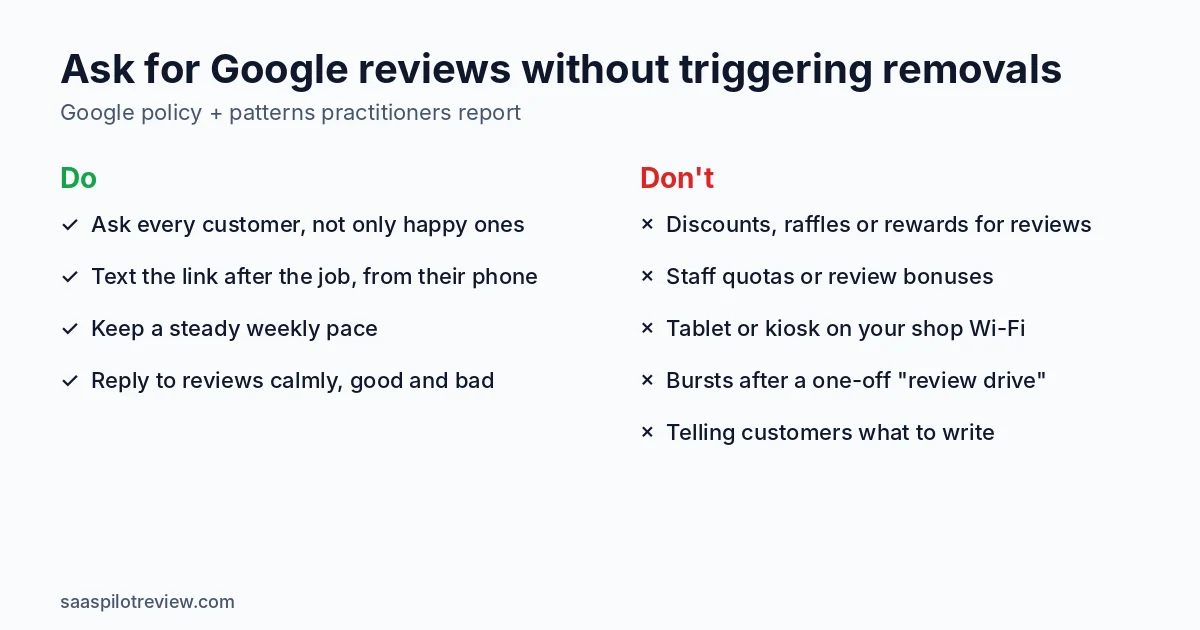
For a plumbing, HVAC, cleaning or landscaping company, the safest habit is also the simplest: text every customer the review link after the job, from their own phone at their own home. That avoids the three things most linked to removals: on-site posting, bursts and incentives.
- Ask everyone, not just happy customers. Screening is selective solicitation under Google’s policy.
- Keep a steady pace. Ten requests a week, every week, looks normal. Two hundred in a weekend after a “review drive” does not.
- No rewards of any kind, including raffles or a discount on the next visit, and no review quotas or bonuses for techs.
- Do not hand customers your tablet or ask them to post on your office Wi-Fi.
- Never tell people what to write. Asking for specific words is on Google’s list too.
Our review request text templates follow these rules, and the guide on getting more Google reviews for an HVAC company covers timing and who on the crew should ask. If you send requests through software, check that it does not gate reviews by asking for a star rating first; our list of review management software for small businesses compares the main tools by budget, and the reviews and reputation hub collects everything else on the topic.
Questions owners ask
Can I see which reviews Google deleted?
Not from your profile. Google does not list filtered or removed reviews for the owner. Your best record is your own: the job software or text history showing who you asked and when, plus screenshots from customers who say they posted.
Will deleted reviews come back on their own?
Sometimes. Google restored reviews after the July 2026 removals and has said it restores reviews removed in error, but there is no automatic schedule. Contacting support with evidence is the reliable route.
Does replying to a review stop it being removed?
No. Your reply does not change how the filter treats the review. Reply because people read replies, not to protect the review.
For how we research and what we do and do not test, see how we test.