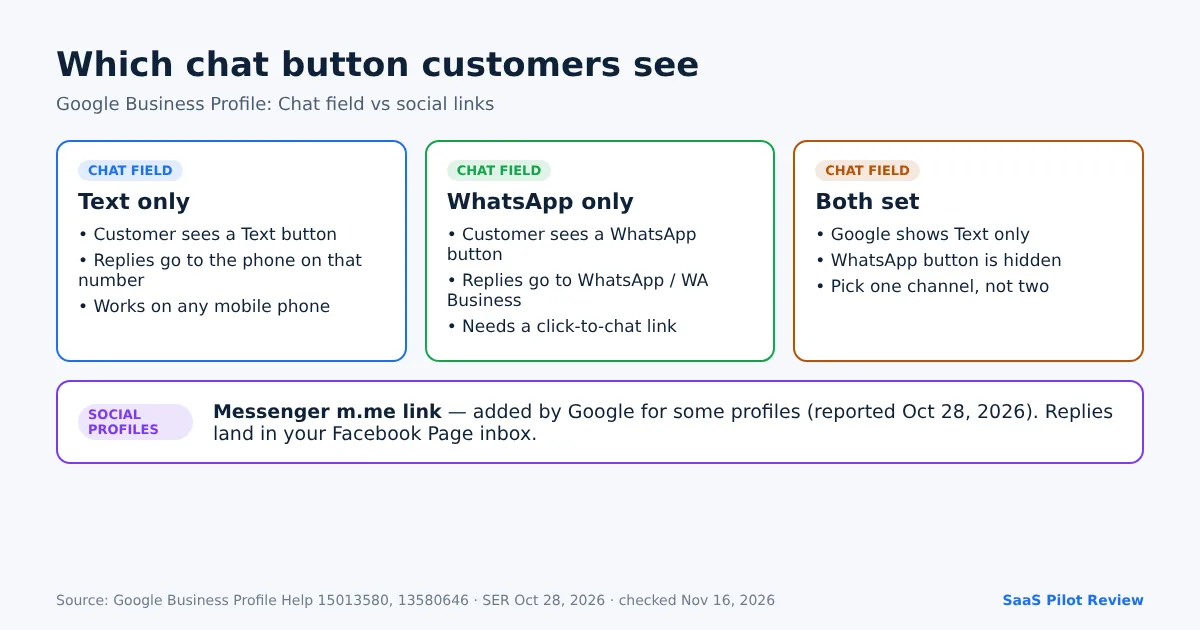
November 16, 2026 · What changed: Since early October, Google has been showing a WhatsApp button on some local results, and on October 28 it began emailing owners that it is adding Facebook Messenger (m.me) links to their Business Profiles on its own. Text messaging is still an option, and it wins if you set up both.
How this page was made: researched from Google Business Profile Help pages and public reports, not hands-on tested. We did not set up these buttons on a test profile. Anything Google has not confirmed in its help center is labelled “reported”.
A homeowner with a leaking water heater will often tap the first button that does not involve a phone call. If your profile now sends that tap to WhatsApp or Messenger, the message lands in an app you may not open during a job. This guide covers the WhatsApp button on a Google Business Profile, the Messenger link Google may have added for you, and how to pick the one channel your team will actually answer. If you are also being asked for an EIN when you turn on messaging, read what the Business Profile EIN request means first.
Three buttons, two places in the editor
The short version: WhatsApp and text sit in the Chat field, while the Messenger link is a social-profile link that Google can fill in without asking you.
| Button | Where you set it | Who added it | Where replies land | Status |
|---|---|---|---|---|
| Text message | Edit profile › Contact › Chat | You | The phone that receives texts on that number | Google help page; select regions |
| Edit profile › Contact › Chat | You (Google also added WhatsApp numbers for some businesses, reported) | WhatsApp or WhatsApp Business on your phone | Google help page; button seen in local panels Oct 7, 2026 | |
| Messenger (m.me link) | Edit profile › Contact › Social profiles (check Chat too) | Google, automatically, for some profiles | Your Facebook Page inbox | Reported Oct 28, 2026; no Google help article yet |
Sources: Google’s Chat with customers from your Business Profile and Manage your social media links; Search Engine Roundtable on the WhatsApp button (Oct 7, 2026) and the Messenger m.me links (Oct 28, 2026).
What Google actually confirms
Google’s help center confirms two chat options, WhatsApp and text, for claimed and verified profiles. The page says businesses with a verified profile “can add a WhatsApp or text messaging option”, and warns that chat options “are currently available for select regions and might not be available for your Business Profile.” A second help page in Google’s contact-info series, Add text & WhatsApp messaging options, repeats the same steps.
Two details on that page change how you should set things up:
- Text beats WhatsApp. If you add both a WhatsApp link and a text number, customers only see the text message option. You cannot show both.
- One link can serve many locations. Several Business Profiles can use the same WhatsApp link, which helps a two-branch company that answers from one office phone.
Messenger is not in either help article. Google’s social-links page lists Facebook, Instagram, LinkedIn, Pinterest, TikTok, X and YouTube, and says some profiles “may display social links automatically”. That is the only official text that covers links Google adds for you.
What is only reported so far
Three changes come from screenshots and emails, not from a Google announcement:
- WhatsApp button in local panels (Oct 7, 2026). Search Engine Roundtable reported WhatsApp buttons “in place of chat or in addition to the other action buttons”, first spotted by Sachin Patel, and could replicate it. No country was named.
- Automatic Messenger links (Oct 28, 2026). An owner shared a Google email saying it was adding Facebook Messenger m.me links to profiles. The report rests on that email; Google has not posted about it.
- A review step before messages arrive (Oct 28, 2026). A commenter setting up the message button saw a request for an EIN and a privacy policy URL, with a note that “a Google partner will review your details” in “about three to four working days” (Search Engine Roundtable). We cover that in our EIN request explainer.
Earlier, Near Media reported that the US rollout of WhatsApp on mobile browser search began in early 2025, with the text option at first showing an error (Near Media, Feb 4, 2025). Treat placement as something that keeps moving.
Set up the WhatsApp or text button, step by step
You need a verified profile and either a WhatsApp click-to-chat link or a number that can receive texts. Then, from Google’s help page:
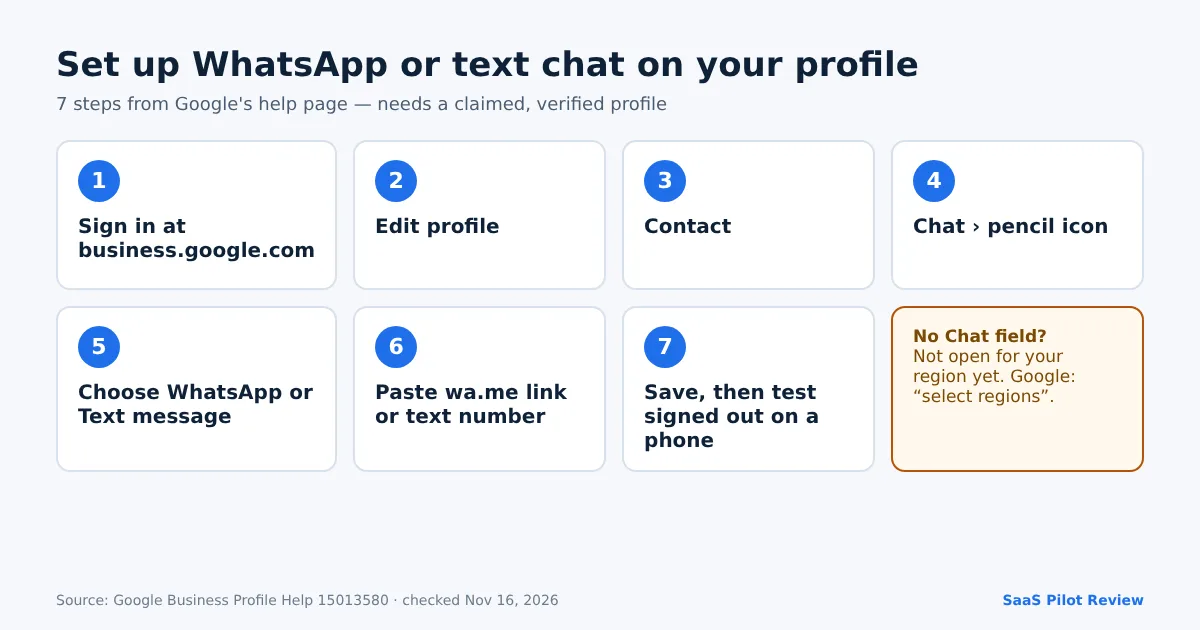
- Sign in at business.google.com and open your profile.
- Choose Edit profile, then Contact.
- Next to Chat, select the pencil icon.
- Open the Chat dropdown and pick WhatsApp or Text message.
- Paste your WhatsApp click-to-chat URL, or type the number that receives texts.
- Select Save.
- Open your profile on a phone, signed out, and tap the button to confirm it opens the right chat.
For the WhatsApp link, WhatsApp has its own guide to linking WhatsApp from a Google Business Profile. Use the business number your office actually carries, not a technician’s personal phone. If the Chat field is missing from your editor, the feature is not open for your region or category yet; there is nothing to fix on your side.
Check the Messenger link Google may have added
If you got the Google email, or you never set up Messenger and still see it on your listing, check it this week. An m.me link opens a Messenger conversation with a Facebook Page, so a wrong or abandoned Page means leads go nowhere.
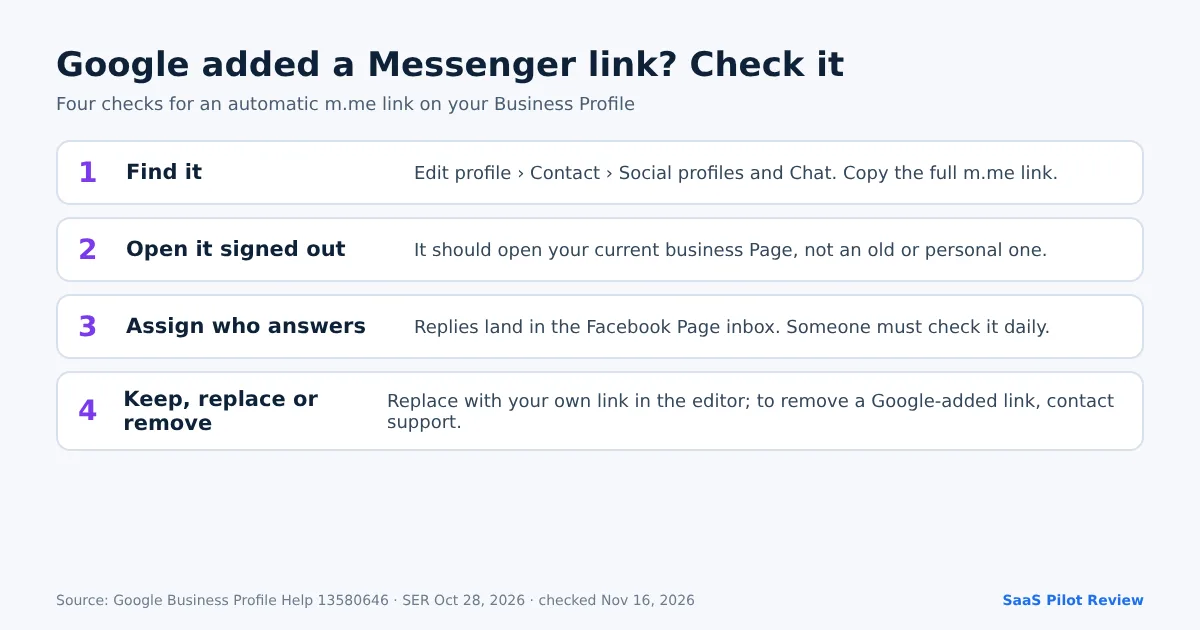
- Find it. Go to Edit profile › Contact and read the Social profiles list and the Chat field. Note the full link.
- Open it signed out. It should open a chat with your current business Page, not an old Page from a previous owner or a personal account.
- Decide who answers. Messenger replies arrive in the Facebook Page inbox. If nobody opens that inbox daily, the link is costing you leads.
- Replace or remove. Google’s help page says that if Google added a link automatically you can replace it with your own; to remove it entirely you have to contact Business Profile support.
Which channel should a service business pick?
Pick text unless most of your customers already message you on WhatsApp. Text is the option Google shows when both are set, and any mobile phone can receive it without installing an app. WhatsApp makes sense when your customers already message you there, and only if the office keeps the WhatsApp Business app open all day.
| Your situation | Use | Why |
|---|---|---|
| Office phone already gets texts, one dispatcher | Text message | One inbox; Google shows text first anyway |
| Customers ask “do you have WhatsApp?” every week | WhatsApp, and do not add text | Adding text would hide the WhatsApp button |
| Facebook Page is active and someone answers Messenger | Keep the m.me link | It adds a channel without touching Chat |
| Facebook Page is old or unmonitored | Replace the m.me link or ask support to remove it | An unanswered Messenger chat is a lost job |
| Your landline cannot receive texts | Text-enable the number first, or use WhatsApp | A text to a landline fails silently |
If you want a missed call to turn into a text automatically, our missed call text back setup guide covers that, and texting from a business number in the US means registering for A2P 10DLC (see 10DLC for sole-prop contractors without an EIN).
Track what these buttons bring in
Google’s chat help says you can review chat activity in your Business Profile performance metrics. Its social-links page says Google does not provide performance metrics or click tracking for social links, so a Messenger link has no Google-side count. Two simple ways to fill the gap:
- Ask “how did you find us?” on the first reply and log the answer in your job software.
- Count new Messenger and WhatsApp conversations each Monday for four weeks, then compare with calls. If one channel brings nothing, remove it so customers go to the one you answer.
Google removed the old call history feature in 2024, so calls need their own tracking too; see four ways to track Business Profile calls.
What we still do not know
- Which countries and categories get the WhatsApp button in the local panel. Google says only “select regions”.
- Whether Messenger will become a third Chat option or stay a social link.
- Whether the EIN and privacy-policy review applies to every business that turns on messaging.
We will update this page when Google adds Messenger to its help center or names the regions. More Business Profile changes are in the local SEO hub, and how we research is on how we test.
Sources: Google Business Profile Help: Chat with customers, Add text & WhatsApp messaging options, Manage your social media links. Search Engine Roundtable: WhatsApp button, Messenger m.me links, EIN request. Near Media. Checked November 16, 2026.