How this page was made: researched from Joist’s help center articles on cancelling, refunds, data storage, exports and the AI Receptionist, plus the Joist terms of service, not hands-on tested. We have not cancelled a Joist account ourselves, and every step below links to the Joist page it comes from (see how we research and test). Help pages checked November 28, 2026. We do not earn a commission from Joist.
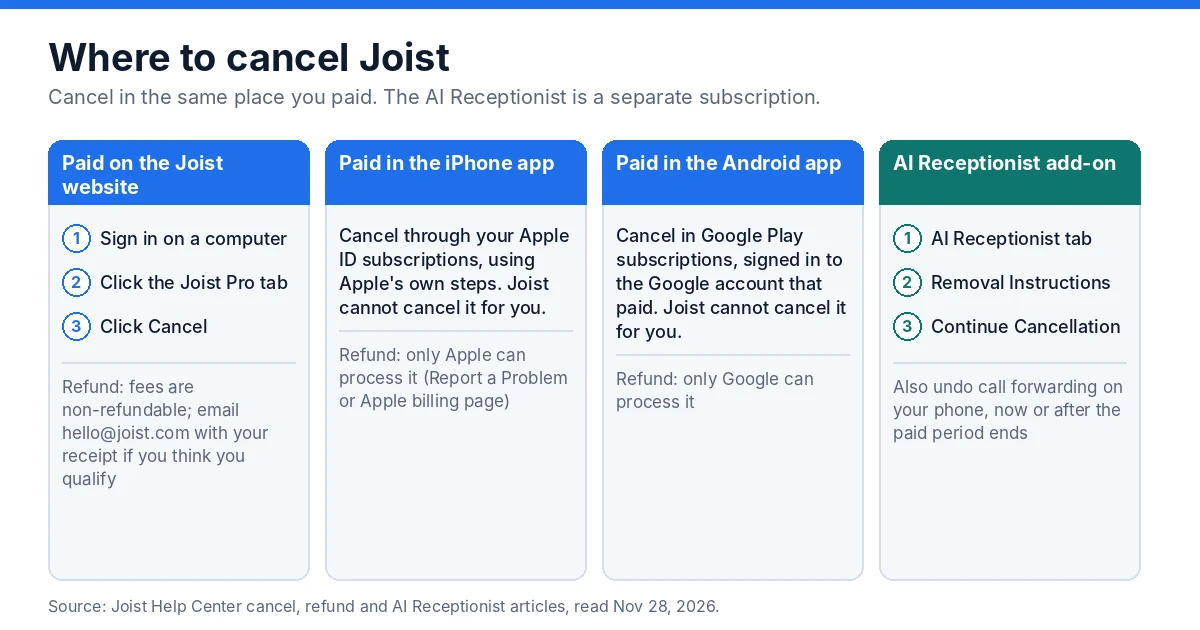
How to cancel Joist depends on where you paid. Bought on the Joist website: sign in on a computer, open the Joist Pro tab in the left column and click Cancel. Bought in the iPhone or Android app: cancel through your Apple ID or Google Play subscriptions, because Joist cannot do it for you. The AI Receptionist is a separate subscription with its own cancel button, and you also have to undo call forwarding on your phone. In every case the plan keeps working until the paid period ends, and Joist says fees are non-refundable.
If cost is the reason, check our Joist pricing breakdown by plan first: moving down a tier may solve it. Before you work out how to cancel Joist, plan the export. Joist’s own help page says that without a paid subscription your data “may be deleted.”
Where did you pay for Joist? Start there
Joist sells the same plans (Basics, Pro, Elite and Run) on the web, in the App Store and in Google Play, and each channel keeps its own billing. Joist’s cancel or downgrade article asks you to “use the same device that you originally used to purchase your plan.” Not sure which? Look for a Joist receipt in your email, then check your Apple ID or Google Play subscriptions.
| Where you subscribed | Where you cancel | Refund route, per Joist | When access ends |
|---|---|---|---|
| Joist website (computer) | Joist Pro tab, then Cancel | Fees are non-refundable; if you think you qualify, email hello@joist.com with your account email and receipt | When the paid period expires |
| iPhone or iPad app | Your Apple ID subscriptions, using Apple’s steps | Only Apple can process it: “Report a Problem” on the receipt, or Apple’s billing page | When the paid period expires |
| Android app | Google Play subscriptions, signed in to the paying Google account | Only Google can process it, from Play’s Payments & Subscriptions page | When the paid period expires |
| AI Receptionist add-on | AI Receptionist tab, Removal Instructions, Continue Cancellation | Not covered in the add-on’s cancel article; the general policy says subscription fees are non-refundable | End of the billing period; call forwarding must be removed separately |
Example: a remodeling owner who paid on the website, then switched from Android to iPhone, still cancels on a computer. Billing follows the purchase, not the phone.
Cancelling a plan you bought on the Joist website
The current cancel article gives two clicks for a web purchase:
- Sign in to Joist on a laptop or desktop computer.
- Click the Joist Pro tab in the left-hand column.
- Click the Cancel button.
Joist adds that “after you cancel, you will continue to have access to your plan until it expires.” Joist’s terms of service (Section 11.1) say paid plans renew automatically for a period equal to the first one, so an annual plan renews for another year if you do nothing.
Watch for one mismatch. The older “What happens if I cancel Joist Pro?” article sends web users to Settings > Joist Pro and a cancel option “near the bottom of the page” instead. If the tab is not where the first article says, try that path before you contact support.
Want a cheaper plan, not zero? Joist has no direct downgrade: cancel, wait for the billing cycle to end, then pick the new plan. Switching monthly to annual on the same plan works the same way. If you are comparing a cheaper invoicing app instead, our Invoice Simple vs Joist comparison lays out the costs at different invoice volumes.
Cancelling Joist on an iPhone or Android phone
Joist does not list in-app steps for app store plans. For iOS it links to Apple’s cancel-a-subscription instructions, and for Android to Google Play’s. The Joist Pro article states it plainly: if you subscribed through the mobile app, the App Store or Google Play “manage your subscription and the cancelation process.” Deleting the app from your phone does not cancel anything.
- Google account mix-ups. Joist’s refund article reminds Android users to make sure they are signed in to the right Google account.
- You changed phones. The cancel article does not cover this. Joist’s upgrade article says plan changes only work on the original platform and tells anyone who moved from Android to iPhone to email hello@joist.com or use the in-app live chat. That is the sensible route for a cancellation too.
How to cancel Joist AI Receptionist (and stop the forwarding)
The AI Receptionist runs on Zyratalk and is billed apart from your plan: $49, $99 or $199 a month for up to 50, 150 or 300 AI-answered calls, per Joist’s subscription article. Cancelling your Joist plan does not cancel it, and cancelling it does not stop your phone forwarding calls. The steps from the AI Receptionist cancel article (updated July 31, 2026):
- Open the Joist app and go to the AI Receptionist. On the web: left-side menu, AI Receptionist, then Go To Your Assistant. On iOS: More, then AI Receptionist. On Android: Manage, then AI Receptionist.
- Click Removal Instructions in the top-right corner.
- Follow the on-screen instructions to disconnect call forwarding.
- Click Continue Cancellation at the bottom of the pop-up and confirm.
You can skip the forwarding step and keep the receptionist answering until the paid period runs out. Joist shows a banner saying the subscription stays active until the end of the billing period. When that period is over, you must go back in: AI Receptionist dashboard, Make Changes, then Live call capture on the Review Setup page, and follow the disconnect steps there. Forget it and calls keep forwarding to a line nobody answers. Put the renewal date in your calendar the day you cancel.
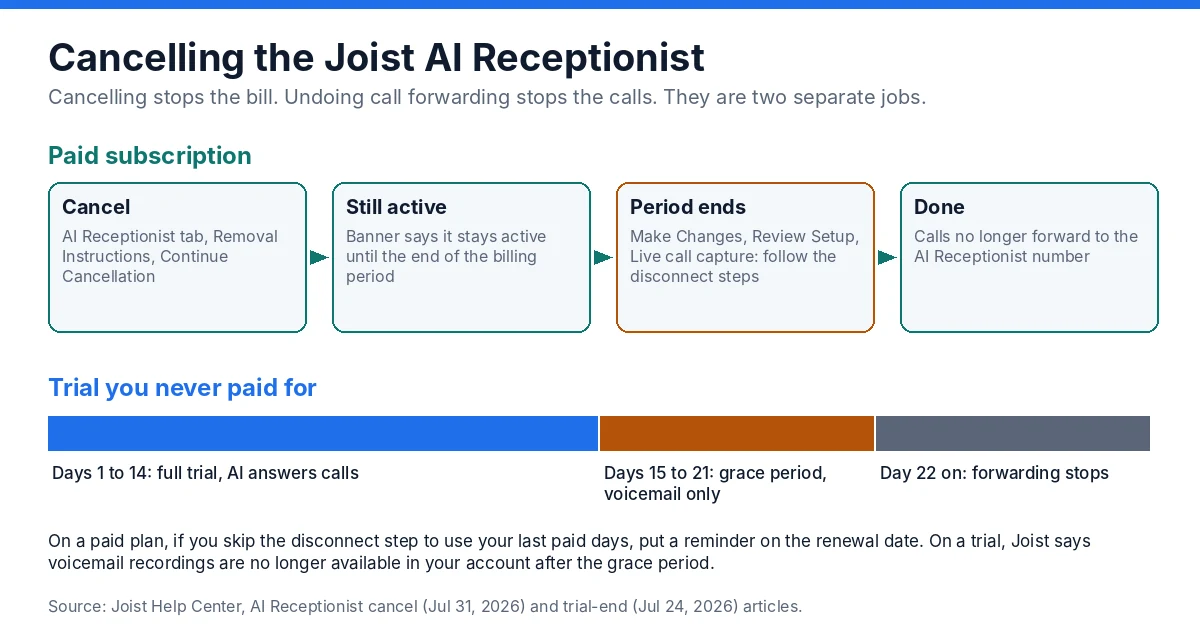
If you only ran the 14-day trial, Joist’s trial-end article says the service enters a 7-day grace period starting on day 15, where calls go to voicemail. After that, forwarding stops and voicemail recordings are “no longer available in your account,” so listen to them before day 22. And if you bought extra call bundles, the manage article has an automatic reload toggle in Billing. Turn it off so no new bundles ($10 to $35 each) are bought in your last weeks; Joist does not say what happens to unused add-on calls when you cancel. If you are replacing the add-on rather than dropping it, see our AI receptionist picks for small businesses.
What happens to your estimates, invoices and clients after you cancel?
Nothing changes until the paid period ends. After that, Joist describes three outcomes:
- Pro features switch off. Logo, photos, contracts and file attachments stay on documents you already made, but new documents cannot use them. Documents already synced to QuickBooks stay in QuickBooks, and the sync stops.
- Access to the app ends. The Basics cancel article says you keep your documents until the end of the term, then “will lose access to the Joist App” and need to resubscribe. The Run article says the same in other words: full access to features and data “as long as you are a current paid subscriber.”
- Data can be deleted. The data storage article says that without a current paid subscription “your data may be deleted.” Section 8.1 of the terms says Joist may deactivate the account and delete any data after expiration or termination, and keeps content only for a period consistent with its “standard business processes.” We found no fixed number of days in any Joist page.
What to download before your last paid day
Joist’s export tools are basic and mostly computer-only. Treat your last paid day as the last day you can count on your records.
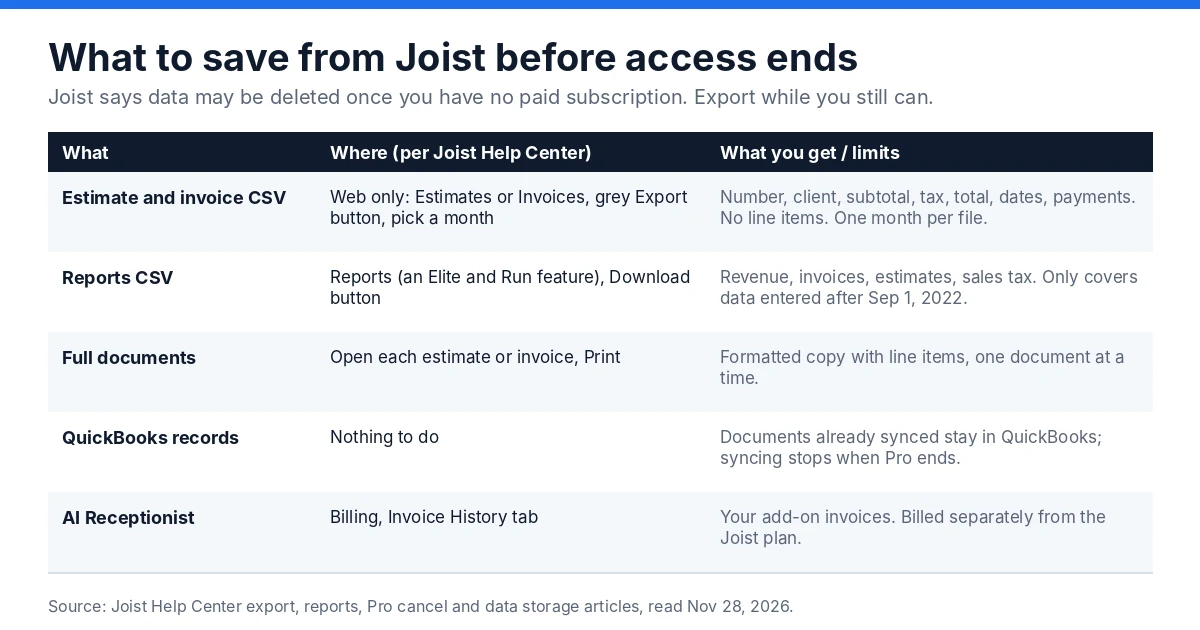
- Monthly estimate and invoice CSV. On the Joist website, open Estimates or Invoices, click the grey Export button and pick a month. Each file holds one month with the document number, client name, subtotal, tax, total, dates and payments received. It has no line items, and there is no yearly export, so a contractor with three years of history repeats this 36 times per section. Steps from Joist’s export article.
- Reports CSV. On Elite and Run, the Reports section has a Download button for revenue, invoices, estimates and sales tax. The Reports article says it only covers data entered after September 1, 2022.
- Full documents. The CSV is accounting data only. To keep a formatted estimate or invoice with line items, open it and use Print, one document at a time. Start with open jobs and unpaid invoices.
- AI Receptionist invoices. In the receptionist’s Billing section, the Invoice History tab lists what you paid.
Do not clear out the account to “tidy up” before leaving. Joist says a deleted estimate or invoice cannot be recovered, and there is no “delete all” option anyway. The help center does not say whether payment links on invoices you already sent keep working after access ends, so collect open balances before your last day.
Will Joist refund any of it?
Usually not. The refund policy article and Section 10.1 of the terms both say subscription fees are non-refundable. For a web purchase, Joist still invites a request if you think you are eligible: email hello@joist.com with the email address on the Joist account and a copy or screenshot of the Joist receipt. The receipt may have gone to a different “payer” email than your login. For App Store or Google Play purchases, only Apple or Google can process a refund.
Unused time is credited only when you upgrade on the same platform, never when you cancel. If you are leaving Joist for a bigger field service app, compare how others handle the exit too: our guides to cancelling Jobber and cancelling Housecall Pro cover their notice periods and exports.
Where Joist’s own help pages disagree
Reading the cancel-related articles side by side turned up three conflicts. We followed the most recently updated page.
| Topic | One Joist page says | Another Joist page says |
|---|---|---|
| Web cancel path | Joist Pro tab in the left column, then Cancel (cancel article, updated Mar 10, 2026) | Settings > Joist Pro, cancel option near the bottom (Joist Pro article, updated Mar 11, 2026) |
| Is there a free fallback? | “Basic version of Joist” with 5 estimates and invoices a month, implying you drop back to it (Pro FAQ article, updated Apr 2024) | Basics is listed as one of the plans you subscribe to, and cancelling it means losing app access until you resubscribe (Basics cancel article, Jul 2024; plans article, Oct 27, 2026) |
| Your data after the plan ends | Logo, photos and contracts stay on documents created before Pro ended (Joist Pro article) | Without a current paid subscription, data may be deleted (data storage article; terms Section 8.1) |
The middle row matters most. Some third-party guides still say you can cancel Pro and keep a free version; Joist’s current pages do not support that. For other estimating and invoicing apps to move to, start with our field service software shortlist for small businesses.
Sources (all read November 28, 2026): Joist Help Center: How do I cancel or downgrade my plan?; What happens if I cancel Joist Pro?; What happens if I cancel Joist Basics?; What is Joist’s refund policy?; Where is all my data being stored?; How do I export my Joist data?; Reports; How do I upgrade my Joist plan?; Is the cost of my existing plan included when I upgrade?; What is Joist Run?; Can a deleted estimate or invoice be recovered?; How do I cancel my AI Receptionist subscription?; How do I subscribe to an AI Receptionist once my trial is done?; How do I upgrade and manage my AI Receptionist subscription?; What happens when my AI Receptionist free trial ends?. Joist Terms of Service, Sections 8.1, 10.1, 11.1 and 11.2 (marked “Last Modified: 11/04/26”).