How this page was made: researched from the ServiceTitan and Housecall Pro pricing pages and Housecall Pro’s own comparison page, not hands-on tested. We have not run an HVAC shop on either tool. Prices checked November 21, 2026. We do not earn a commission from either company.
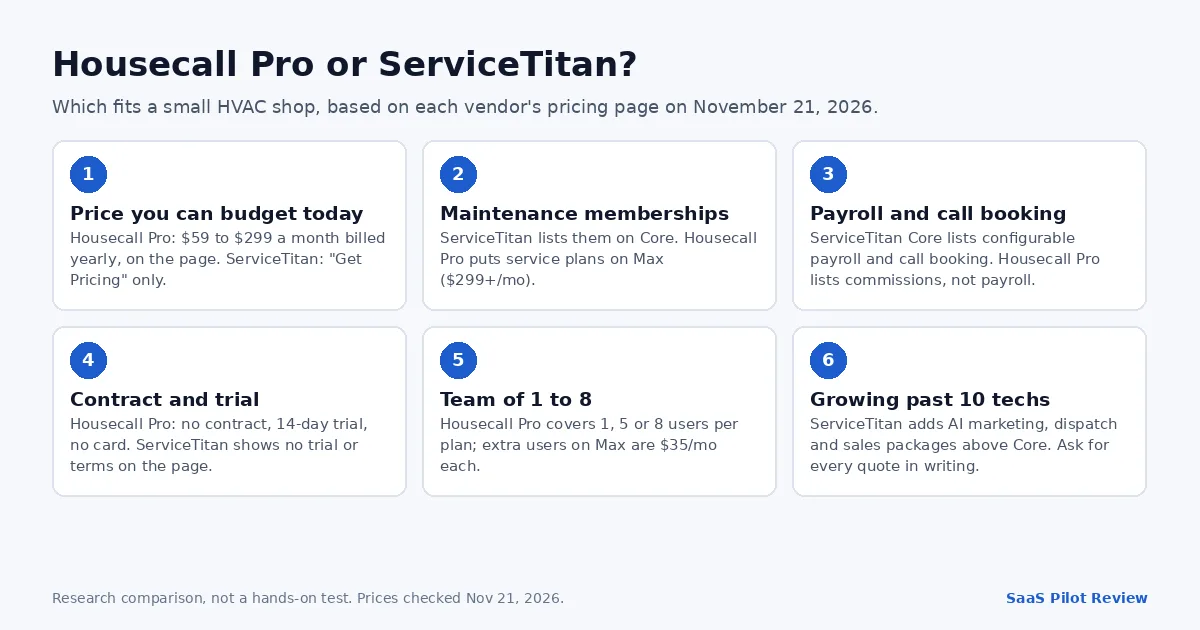
If you own a small HVAC company with somewhere between one and eight trucks, the Housecall Pro vs ServiceTitan question usually comes down to one thing first: can you see the price? Housecall Pro publishes it: $59 to $299 a month billed yearly ($79 to $329 paid monthly) for 1 to 8 users, with no contract and a 14-day trial. ServiceTitan does not: every package on its pricing page ends in a “Get Pricing” button. ServiceTitan’s entry package does list more of what a growing HVAC shop runs on (maintenance memberships, configurable payroll, call booking), so the right pick depends on whether you need those now or later. If neither feels right, our list of ServiceTitan alternatives for small HVAC and plumbing shops prices four more options.
Price: one list you can budget, one quote you have to ask for
Housecall Pro’s pricing page shows three plans, each with a user count. ServiceTitan’s shows four packages (Core, Demand AI, Field AI and MAX) and says its pricing “is built to drive ROI for your individual business”, but no dollar figure appears anywhere on the page when we checked.
| Plan | Paid monthly | Billed annually (per month) | Users included | Source |
|---|---|---|---|---|
| Housecall Pro Basic | $79 | $59 | 1 | Housecall Pro pricing |
| Housecall Pro Essentials | $189 | $149 | 5 | Housecall Pro pricing |
| Housecall Pro Max | $329 | $299 | 8 (extra user $35/mo) | Housecall Pro pricing |
| ServiceTitan Core | Quote only (“Get Pricing”) | Not stated | ServiceTitan pricing | |
| ServiceTitan Demand AI, Field AI, MAX | Quote only | Not stated | ServiceTitan pricing | |
Two extra notes on the Housecall Pro side. During our check the page ran a Black Friday offer of 50% off the first three months on monthly billing (Essentials at $94.50 a month, for example); budget for the full price from month four. And payments cost extra on both platforms: Housecall Pro lists card processing “as low as 2.59%” and a 1% fee on bank payments. We compare what each tool charges per card payment in card processing fees for Jobber, Housecall Pro and ServiceTitan.
The full plan-by-plan breakdown, including first-month promotions and what a crew of 10 or 15 pays, is in our Housecall Pro pricing guide. Every number on this page is also logged with its check date in the home service software price tracker.
What a 1 to 10 person HVAC team pays for Housecall Pro
For most owner-plus-techs shops the answer is Essentials at $149 a month billed yearly. Basic covers one login only, so the day a second tech or a dispatcher needs the schedule, you move up.
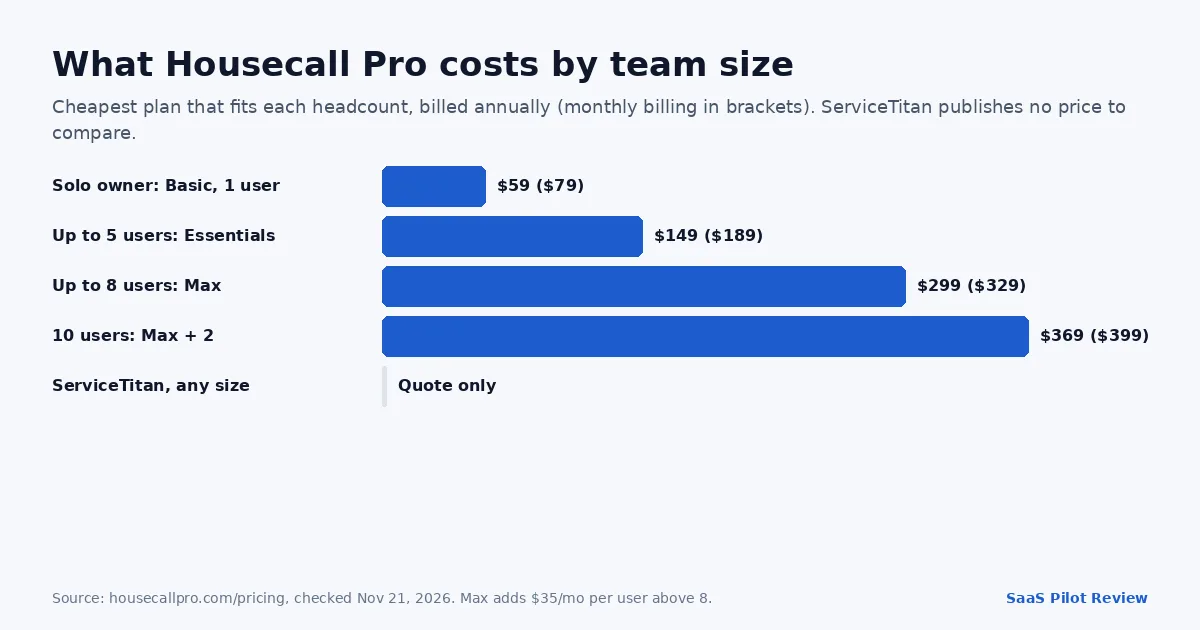
The jump that catches HVAC owners is Max. Housecall Pro puts Recurring Service Plans (its name for maintenance agreements) only on Max, which includes eight users. A five-tech shop that sells spring and fall tune-up plans therefore pays $299 a month billed yearly, not $149, and gets three seats it may not use yet. At ten users we add two extra seats at the listed $35 each, which gives $369 a month on annual billing; the page lists that add-on price once, so confirm it applies to your billing term.
ServiceTitan gives you nothing to put in this chart. Its pricing page does not say whether the quote is per technician, per office user or per location, so ask for the price for your exact headcount and how it changes when you hire.
The HVAC features each plan lists
Here is where ServiceTitan earns its reputation. Its Core package lists, in one line: “Scheduling, dispatching, call booking, invoicing, pricebook, reporting, mobile estimates, configurable payroll, commission tracking, and customizable memberships.” Housecall Pro spreads the equivalent features over three plans.
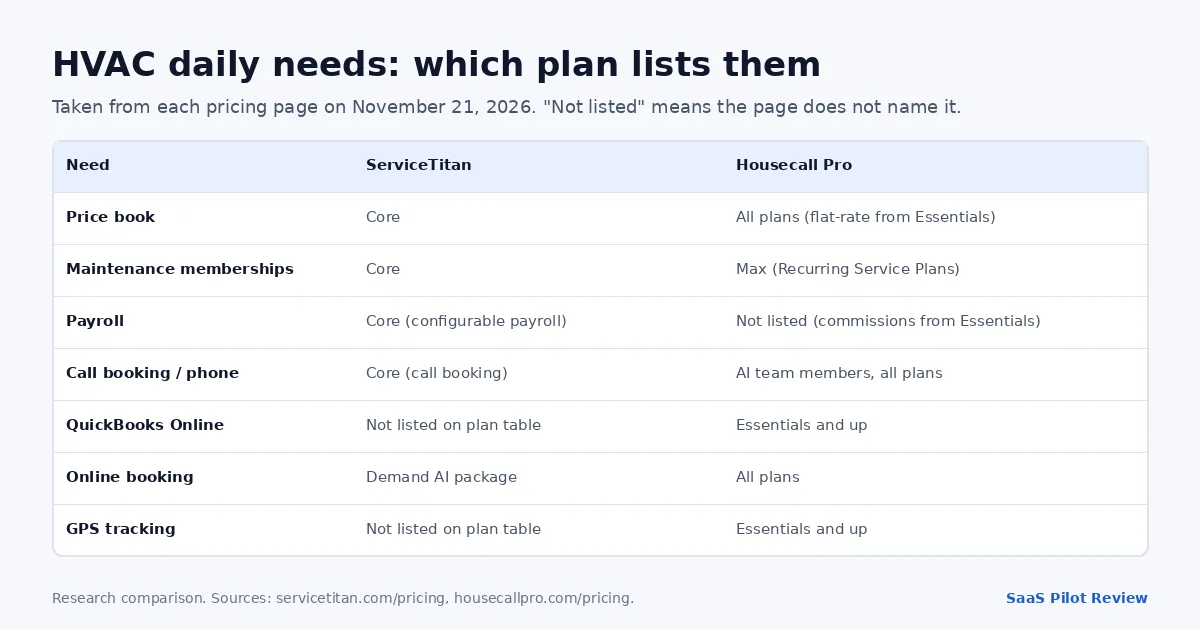
- Price book and flat-rate pricing. Both have a price book on the entry plan. Housecall Pro adds flat-rate pricing with built-in profit margins from Essentials.
- Maintenance memberships. ServiceTitan lists customizable memberships on Core. Housecall Pro: Max only.
- Payroll. ServiceTitan Core lists configurable payroll and commission tracking. Housecall Pro lists commissions (“pay different rates by item, service, or job type”) from Essentials, but no payroll.
- Answering and booking calls. ServiceTitan Core lists call booking; its Demand AI package adds voice and SMS agents and online scheduling. Housecall Pro lists online booking on every plan and “AI team members” on all plans. For a side-by-side of the AI call tools at the small end, see Jobber Receptionist vs Housecall Pro CSR AI.
- QuickBooks and GPS. Housecall Pro lists QuickBooks Online sync and employee GPS tracking from Essentials. ServiceTitan’s plan table names neither, so ask.
Where ServiceTitan pulls ahead
ServiceTitan is built for the shop that already runs like a small company: a call-taker or dispatcher, techs on commission, a membership program that carries the slow months, and an owner who reads reports. Everything in that sentence sits in its entry package, so you do not climb tiers to get it. Above Core, the packages add the tools a larger shop grows into: Demand AI (AI ad targeting, campaign automation, smart dispatching), Field AI (AI sales coaching, equipment intelligence, AI estimates) and MAX, which adds AI payment collection, accounts-payable approvals and owner analytics.
The ecosystem is also bigger. ServiceTitan is building ways for homeowners to book through AI assistants, which we covered in ServiceTitan Homh and booking jobs through ChatGPT. If you plan to be a 15-truck operation in three years, that roadmap matters more than this year’s price.
Where Housecall Pro is the easier fit
Housecall Pro suits the HVAC owner who still runs calls and wants to be live this week. The pricing page says “No contracts. No credit card required. Cancel anytime.” and the 14-day trial gives full access to the Max plan, so you can test service plans before paying for them. Its own comparison page claims faster onboarding (“Launch in days”) and a higher App Store rating than ServiceTitan (4.6 vs 3.0 as of November 2025). Those are vendor claims, but the trial lets you check the first one yourself.
The trade-off is the Max wall described above, and no payroll. If your techs are paid hourly through a separate payroll service anyway, that second gap may not matter. If you are torn between Housecall Pro and the other mid-market name, our Housecall Pro vs Jobber comparison covers it.
Questions to get answered before you sign with ServiceTitan
Because ServiceTitan’s page shows no price, terms or trial, the sales call is where you learn the real cost. Get these in writing:
- The monthly price for your exact number of techs and office users, and what one more hire adds.
- Which package you are being quoted (Core alone, or Core plus Demand AI or Field AI), and which “Pro” add-ons are included.
- Contract length, renewal terms and the cost to cancel early.
- Any onboarding, implementation or data-migration fee, and how long setup takes.
- Card processing rates, and whether you can use your own processor.
Ask Housecall Pro two of the same questions: the extra-user price on Essentials (the page lists it only for Max) and processing rates for your average ticket size. Then compare the two quotes over 12 months, not month one.
Our shortlist call for a small HVAC company
- 1 to 3 trucks, owner on the tools, no membership program yet: Housecall Pro Basic or Essentials. Published price, no contract, and you can leave if it does not fit.
- 4 to 8 trucks selling maintenance plans: price both. Housecall Pro Max is $299 a month billed yearly; ask ServiceTitan for a Core quote at your headcount and compare.
- Dispatcher, commissioned techs and payroll in-house, growing past 8 trucks: ServiceTitan is the one built for that shape of business, provided the quote and contract terms work.
For more HVAC-specific picks, including tools cheaper than both, see the best field service software for HVAC, or browse all our field service software guides.