Updated November 17, 2026. What changed: OpenAI opened a beta called Businesses in ChatGPT on November 10, 2026, with a Business Hub where owners can claim a listing, edit it and see how often ChatGPT mentions them.
How this page was made: researched from OpenAI’s announcement and help center, Search Engine Roundtable’s launch report and early claim walk-throughs published by other users, not hands-on tested. We have not claimed a business in ChatGPT. Where a detail comes only from early user reports, we say so.
If you run a plumbing, HVAC, cleaning or landscaping company, the short version is this: you can probably claim a listing ChatGPT already shows for you, but you cannot build the new Business Agent chat yet, and claiming does not move you up in answers. The rest of this page sorts out which parts of the ChatGPT Business Hub apply to a local service business today, how verification works when your main line is answered by software, and what to do while the beta widens. If you have not yet checked how ChatGPT finds local businesses at all, start with our guide to getting cited in AI Overviews and ChatGPT.
What OpenAI launched on November 10
Businesses in ChatGPT is a beta program with three parts. The Business Hub is a dashboard where an owner or authorized representative claims the business’s listing in ChatGPT. Once claimed, you can edit the website, description, category, logo and cover photo; OpenAI reviews edits before they go live. The hub also shows insights for the last 28 days: mentions, website clicks and “discovery topics,” which are grouped themes from conversations where your business came up. The third part, the Business Agent, is a labelled chat inside ChatGPT that answers customer questions from the business’s own information.
OpenAI pitched the launch at the “1.2 billion people who use ChatGPT each week,” according to Search Engine Roundtable’s report. The announcement itself is on OpenAI’s site, and the claim steps are in the help article on setting up your business. Claiming is free at launch; there is no fee on OpenAI’s pages, and ChatGPT ads are a separate product.
Can a local service business claim its listing yet?
Partly. The launch wording splits businesses into groups, and a trades company sits awkwardly between them.
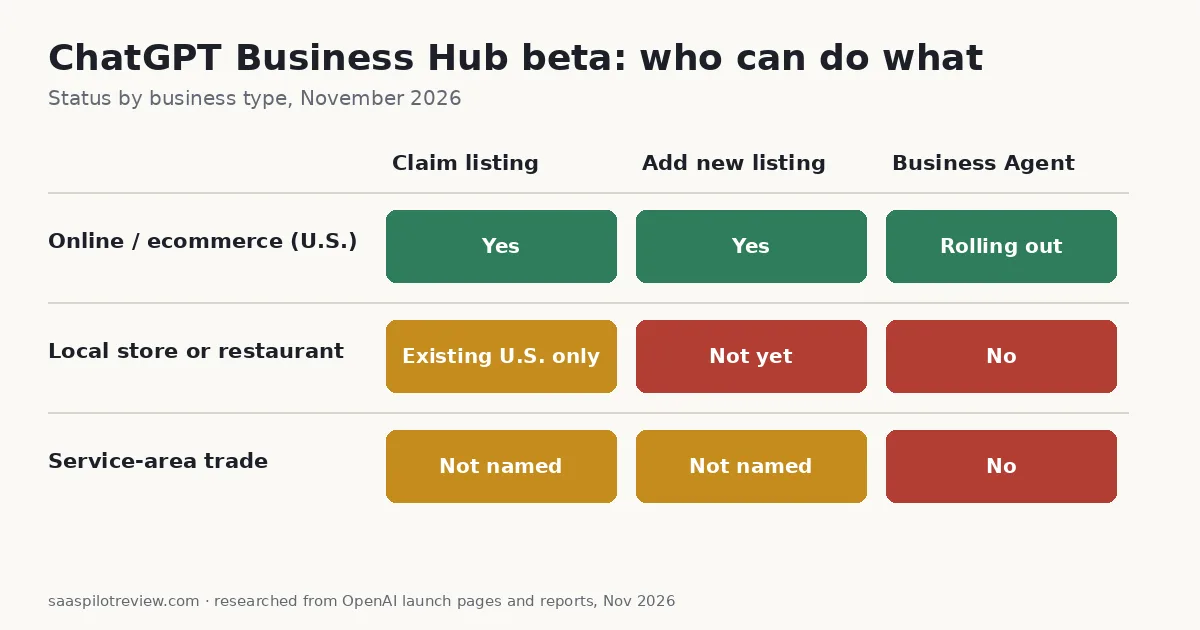
| Type of business | Claim a listing | Add a new listing | Business Agent chat |
|---|---|---|---|
| Ecommerce and online service business (U.S.) | Yes | Yes | Yes, rolling out gradually |
| Local store or restaurant | Only an existing listing, U.S. only for now | No, not yet | No |
| Service-area trade (plumber, HVAC, cleaner) with no storefront | Not named; treat it like a local business | Not named | No |
Two rules apply to everyone. You need a website to start a claim, and you must be the owner or someone authorized to represent the business. OpenAI also says it can turn down businesses that raise safety or integrity concerns and is holding some categories back without listing them.
For a two-van plumbing company, that means: if ChatGPT already shows a result for your business when someone asks for a plumber in your town, you can try to claim it. If ChatGPT does not know you, there is no way yet to add yourself through the hub. The Business Agent is limited to “eligible ecommerce and online service businesses in the U.S.” and, per early walk-throughs, it cannot take bookings anyway. For booking inside an AI answer, Google is further along: see how AI Mode books home-service jobs through Jobber and Housecall Pro.
How verification works, and the catch for businesses with an AI receptionist
The claim has two checks. First you prove you control the business. Options reported by early users and summarised from the help page are a text or automated call to the business phone number on the listing, a code to a business email address, a TXT record on your website’s domain, or connecting a Shopify store. After the claim is approved, OpenAI checks your identity through a verification partner and may ask for a government-issued ID, business registration details and proof you can represent the business. The blue verified badge comes from that identity step, not from the claim alone.
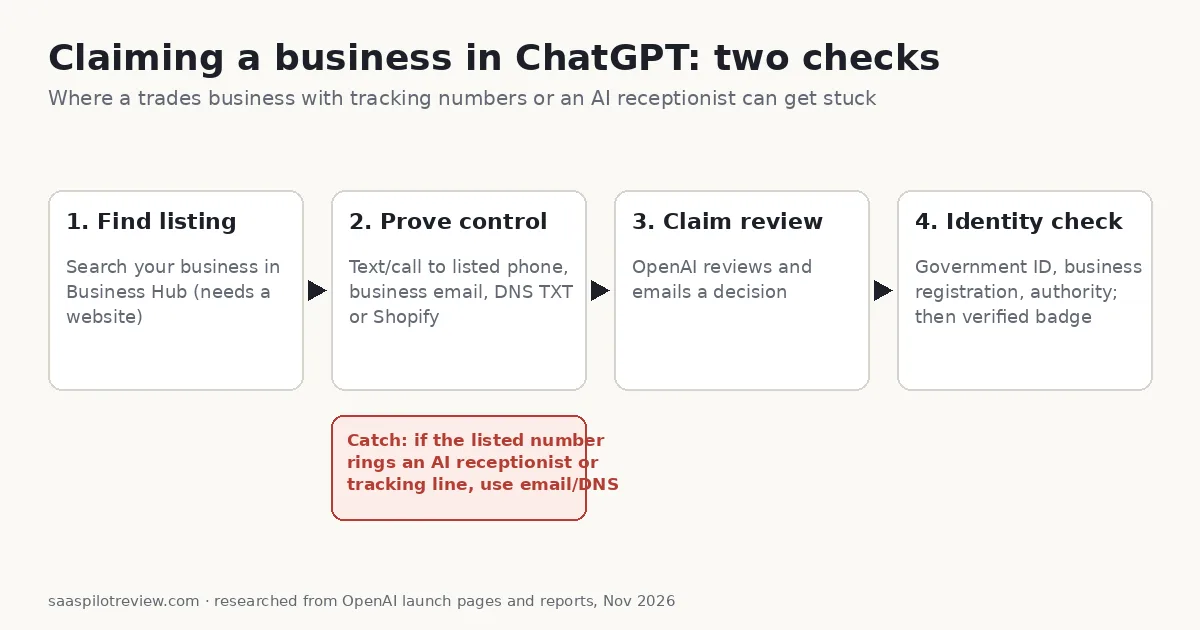
Here is the catch for home-service owners. The phone option texts or calls the number ChatGPT has on file. If that number is a call tracking number, rings an answering service, or is picked up by an AI receptionist, the automated call may be answered by software or a person who never passes the code on, and a text may land on a line that cannot receive SMS. Before you start, check which number ChatGPT shows for you, and either be ready to take the verification call yourself or use the email or DNS route instead. DNS is usually the cleanest for a business whose web person can add a TXT record; Search Engine Roundtable’s Barry Schwartz used DNS for his own test.
The same habit helps with Google. Our notes on Google Business Profile ID verification cover the identity documents Google asks for, which overlap with what OpenAI’s partner requests.
What the insights show, and what they do not
For a local business, a mention counts when ChatGPT shows a result for your location; for an online business it counts when ChatGPT references your website. Website clicks are clicks on links in ChatGPT, and the hub’s own tooltip says clicks “don’t confirm website visits or conversions.” Discovery topics are themes, not the prompts people typed, and OpenAI does not share conversations with businesses.
So the insights will not tell you which customer asked about a water heater replacement. They will tell you roughly how often ChatGPT puts you in front of people and whether that is rising. Insights also need enough activity to appear, and Schwartz saw no data right after claiming. To see whether ChatGPT clicks turn into calls, tag your website links and watch the referrals in your own analytics, the same way you would for any other source.
Does claiming help you rank in ChatGPT?
No, not by itself. OpenAI says claiming does not guarantee higher placement or sales, and that ChatGPT keeps making its own recommendations. What a claim does is let you correct the facts ChatGPT shows, such as your website, category and description, and stop someone else from claiming you first. Schwartz wrote that he was nervous about people hijacking businesses through the hub, which is the strongest reason for an owner to claim early rather than wait.
What decides whether ChatGPT recommends you is still the web it reads: your website, your Bing and Yelp listings, reviews and how consistent your name, address and phone number are. Google has its own version of this problem, including AI that calls businesses to ask for prices, so the clean-up work pays off in both places.
A 20-minute checklist while you wait for full access
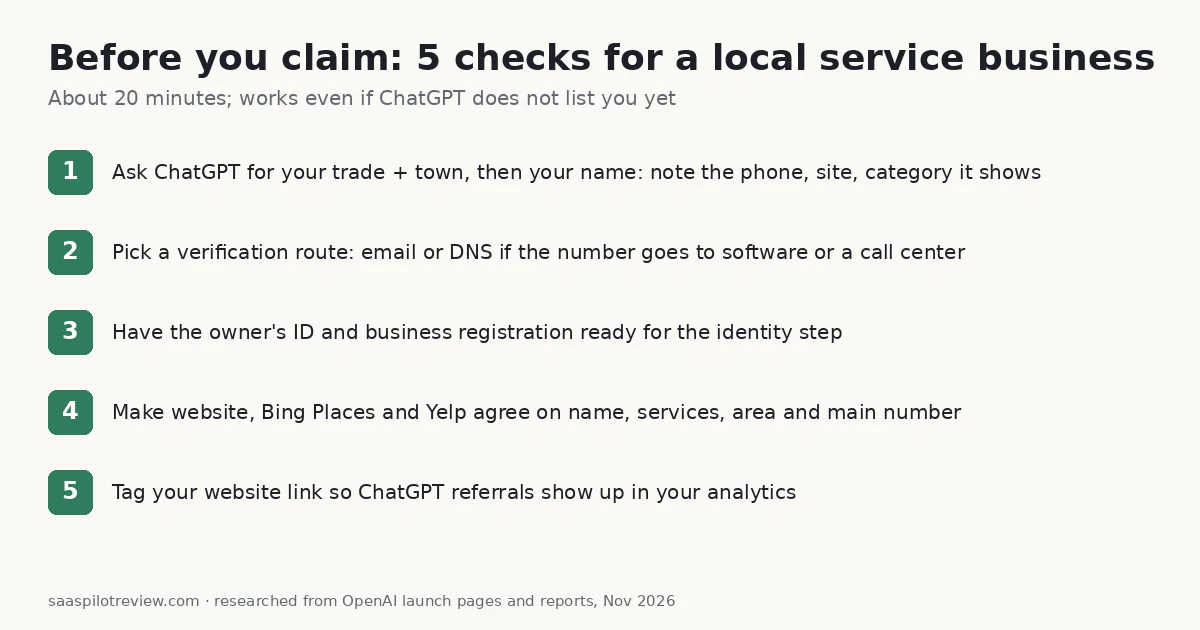
- Ask ChatGPT what it knows. Search for your trade and town, for example “emergency plumber in Dayton, Ohio,” and then your business name. Note whether a result for your business appears and what phone number, website and category it shows.
- Decide how you will verify. If the listed number goes to tracking, an answering service or an AI receptionist, plan to use email or DNS, or take the call yourself.
- Get your ID and registration papers ready for the identity check, in the owner’s name.
- Fix the sources ChatGPT reads. Make sure your website states your services, service area and main number, and that your Bing Places and Yelp listings match it.
- Tag your website link so you can see ChatGPT referrals in your analytics once you edit the listing.
If ChatGPT shows nothing for your business today, steps 4 and 5 are the useful ones; the hub cannot add a local listing yet. Check back when OpenAI widens the beta, and we will update this page when it does. More guides like this are in our local SEO hub, and how we research topics like this one is on our how we test page.
Sources
- OpenAI: Introducing Businesses in ChatGPT (November 10, 2026)
- OpenAI Help: Setting up your business on ChatGPT
- Search Engine Roundtable, “ChatGPT Business Hub” launch report by Barry Schwartz (November 10, updated November 11, 2026), linked above
- Early claim walk-throughs by Gaurav Tiwari and Mobilize Cloud (November 2026), used only for the verification options and editable fields