An HVAC shop’s year has two rushes and two lulls. The first heat wave fills the phones with no-cool calls, the first cold snap does the same for furnaces, and in between you are selling tune-ups to keep the trucks moving. The software that fits that rhythm is not always the one that tops a general list of field service software for small crews. It has to handle maintenance plans, good-better-best options on a replacement quote, equipment notes per unit, and a crew that grows every June.
How we researched this: researched from vendor pricing, feature and help pages, read on November 5, 2026, not hands-on tested. We did not run these apps on a live HVAC account, so we do not score them. Where a pricing page does not mention a feature, we say “not listed” rather than guess. Our research and testing method explains how we work.
The five options at a glance
Prices checked November 5, 2026, billed annually unless noted. Card processing and add-ons are extra.
| Software | Best for | Published price | One limit to know |
|---|---|---|---|
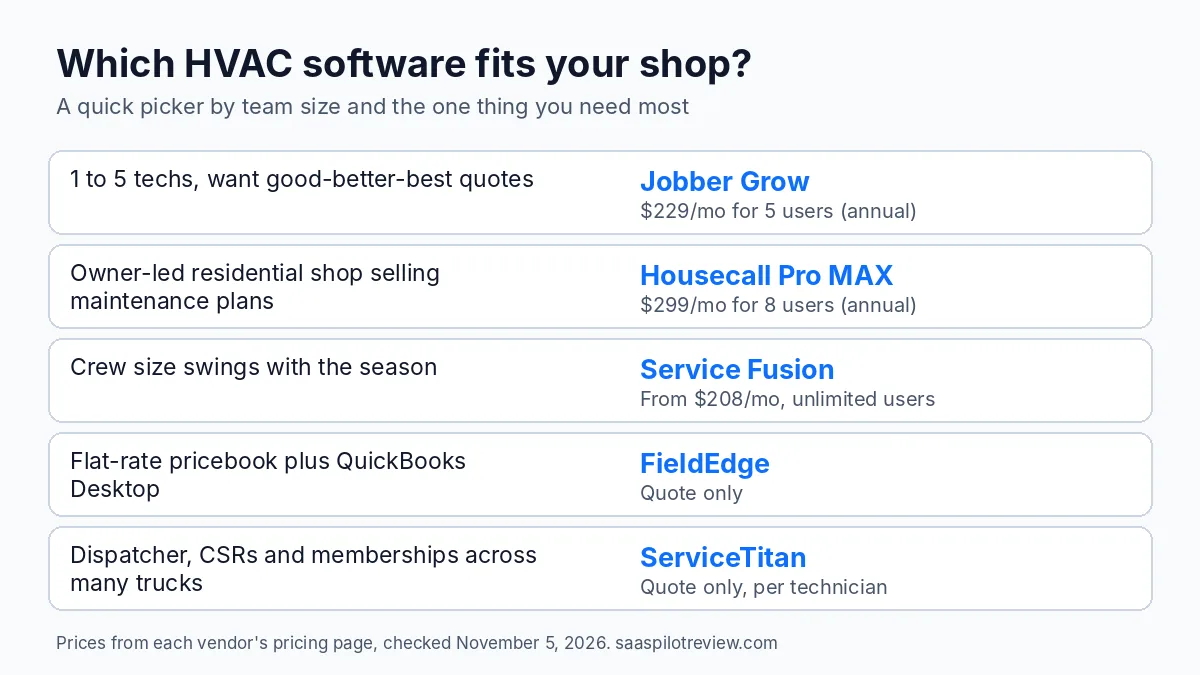
| Housecall Pro | Owner-led residential shops that sell maintenance plans | Basic $59/mo (1 user), Essentials $149/mo (5 users), MAX $299/mo (8 users) | Recurring Service Plans are on MAX only |
| Jobber | 1 to 5 techs who want good-better-best quotes | Core $29/mo (1 user), Connect $149/mo (5 users), Grow $229/mo (5 users); $29 per extra user | Pricing page does not list maintenance agreements |
| Service Fusion | Shops whose crew size swings with the season | Starter $208/mo, Plus $325/mo, Pro $533/mo, unlimited users | Flat-rate pricebook is a separate product |
| FieldEdge | Shops that price flat rate and run QuickBooks Desktop | Quote only | No published price; mobile licenses 2, 4 or 6 by plan |
| ServiceTitan | Multi-truck shops with a dispatcher and CSRs | Quote only, priced per technician | No published price or minimums |
What HVAC work asks of the software
Four things set HVAC apart from most trades, and they decide which features you will actually use.
Peaks that bring on extra techs
The Bureau of Labor Statistics notes that HVAC technicians may work overtime or irregular schedules during peak heating and cooling seasons, and that 68% of the 440,900 HVAC jobs in 2025 were at plumbing, heating and air-conditioning contractors. In practice that means a summer crew bigger than the winter one. Per-user pricing charges you for that swing. Unlimited-user pricing does not.
Maintenance plans that fill the slow months
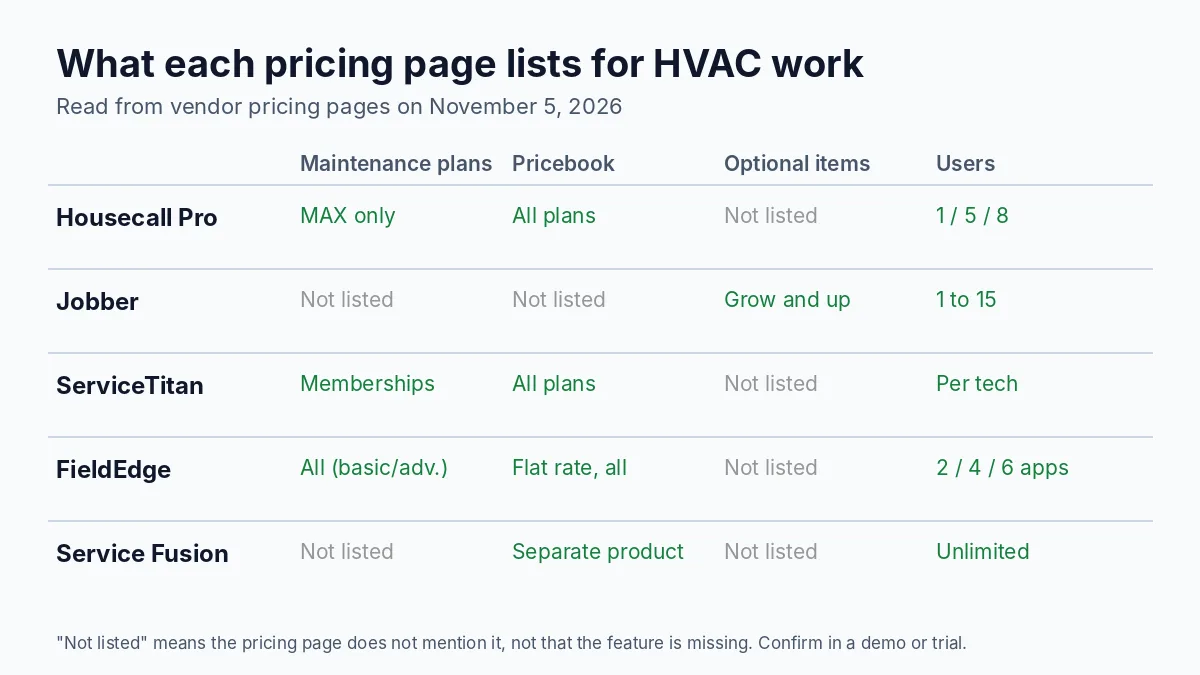
Spring and fall tune-ups sold as a yearly plan keep techs busy between the rushes. You want the software to schedule the visits on its own, bill the plan, and show the tech that the customer is a member when they call. This is where the options split most: Housecall Pro puts Recurring Service Plans on MAX only, FieldEdge includes service agreements on every plan (basic on Select, advanced on Premier and Elite), and ServiceTitan lists customizable memberships.
Big-ticket quotes with options
A typical HVAC repair costs about $350, according to Angi’s cost guide, with service calls of $100 to $250 and after-hours work adding $40 to $80 an hour. A replacement is several times that, and homeowners decide faster when they see three clear options. Jobber adds optional line items on Grow for exactly this, and Housecall Pro includes a price book from Basic up.
Refrigerant records on commercial units
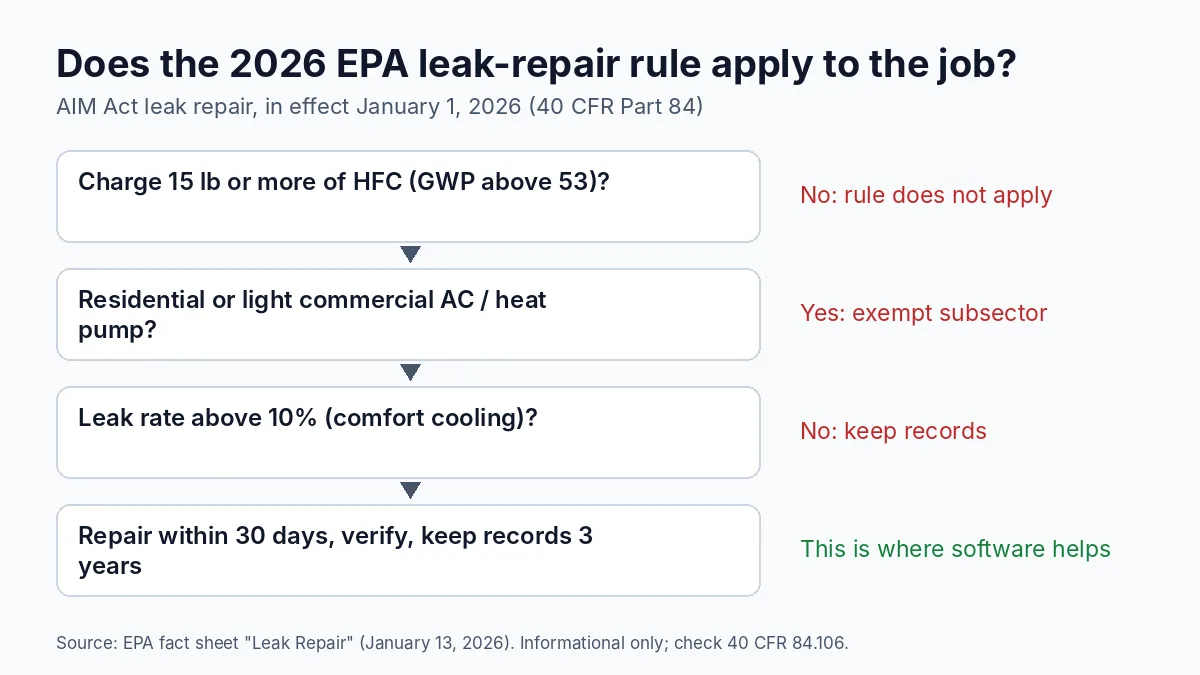
Since January 1, 2026, EPA’s leak-repair rule under the AIM Act covers appliances holding 15 pounds or more of HFC refrigerant. Comfort cooling units leaking more than 10% a year must be repaired within 30 days, verified, and documented, with records kept for three years, per EPA’s leak repair fact sheet. Residential and light commercial AC and heat pumps are exempt. If you service rooftop units or VRF systems, a job record with charge, refrigerant added and the repair date per unit saves you from a separate spreadsheet.
Housecall Pro: best for residential shops selling maintenance plans
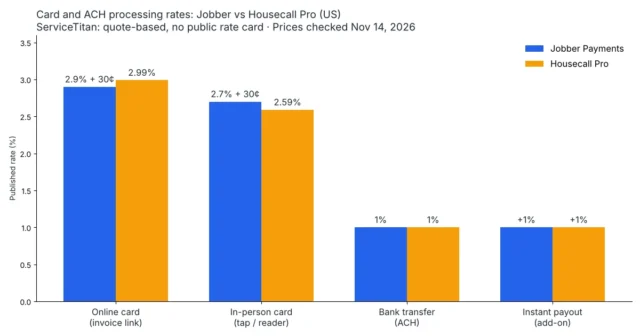
Housecall Pro suits an owner-operator or small residential shop that wants maintenance plans and a price book in one app with published prices. Basic is $59 a month billed annually ($79 monthly) for one user, Essentials is $149 ($189) for five, and MAX is $299 ($329) for eight, with extra MAX users at $35 a month, per Housecall Pro’s pricing page. Card payments start at 2.59% and bank payments cost 1%.
The limit: Recurring Service Plans sit on MAX only, so a shop that runs a membership program starts at $299 a month. The pricing page also does not list equipment tracking or an extra-user price for Basic and Essentials. Our Housecall Pro pricing by plan breaks down what each tier adds.
Jobber: best for small crews quoting good-better-best
Jobber fits a one-to-five tech shop that sells mostly from quotes and wants follow-ups to run on their own. On Jobber’s pricing page, Core is $29 a month billed annually for one user, Connect is $149 for five users, Grow is $229 for five users, and Plus is $399 for five, with each extra user at $29. Grow is the tier that adds optional line items, so a customer can tick the 16 SEER system instead of the base unit right on the quote, plus job costing and two-way texting.
The limit: the pricing page does not list maintenance agreements or recurring service plans, so check how you would run tune-up memberships during the free trial before you commit. For a side-by-side on this exact question, see Housecall Pro vs Jobber, and for every tier and the 2026 price change, what Jobber costs in 2026.
Service Fusion: best when summer doubles the crew
Service Fusion charges per company, not per seat. Starter is $208 a month billed annually ($245 monthly), Plus is $325 ($382) and Pro is $533 ($627), all with unlimited users, per Service Fusion’s pricing page. For an HVAC shop that adds helpers and seasonal techs every summer, that removes the monthly math of adding and removing seats.
The limit: the plan lists do not mention service agreements, and flat-rate pricing shows up as a separate product rather than a plan feature. Job costing and inventory are add-ons on Starter, and add-on prices are not shown.
Year-one cost when the summer crew arrives
Here is how the pricing models play out for a shop with six users from September to May and nine users from June to September. We used published annual prices and assumed extra users can be added by the month; ask each vendor how mid-contract changes are billed.
| Plan | September to May (8 months) | June to September (4 months) | Year one |
|---|---|---|---|
| Service Fusion Starter (unlimited users) | $208/mo | $208/mo | $2,496 |
| Jobber Grow, 5 users plus extra users at $29 | $258/mo (1 extra) | $345/mo (4 extra) | $3,444 |
| Jobber Grow, 10 users | $299/mo | $299/mo | $3,588 |
| Housecall Pro MAX, 8 users plus $35 per extra | $299/mo | $334/mo (1 extra) | $3,728 |
| Service Fusion Plus (unlimited users) | $325/mo | $325/mo | $3,900 |
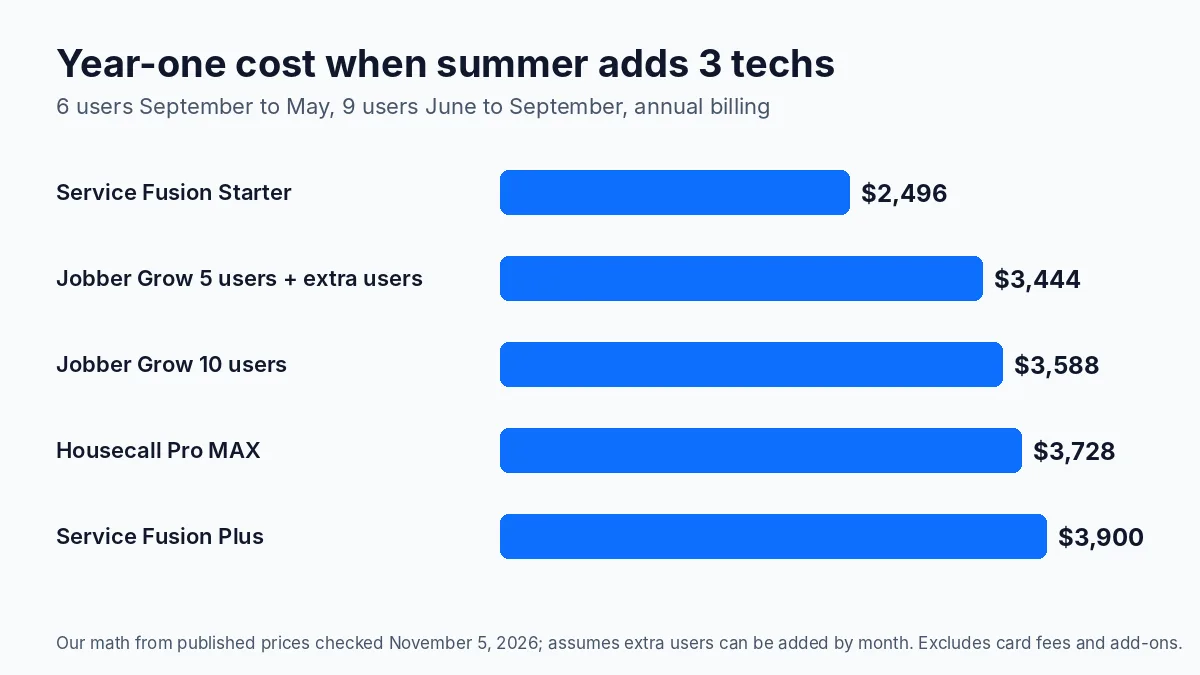
The cheapest line is not automatically the right one. Service Fusion Starter wins on seats, but if you need memberships built in, Housecall Pro MAX bundles them for about $1,200 more a year in this scenario. Run the same math with your own head count before you sign an annual plan.
FieldEdge: best for flat-rate shops on QuickBooks Desktop
FieldEdge targets HVAC, plumbing and electrical contractors and includes a pricebook with flat-rate pricing, service agreements and QuickBooks Online and Desktop sync on all three plans, per FieldEdge’s pricing page. Select includes 2 mobile app licenses, Premier 4 and Elite 6, and the higher plans add advanced service agreements and saved reports.
The limit: no prices are published. FieldEdge quotes based on technicians, employees and add-ons, so you will need a demo before you can compare it with the three above.
ServiceTitan: best for multi-truck shops with a call center
ServiceTitan is built for shops with a dispatcher, customer service reps and a membership program across many trucks. Its three packages, Starter, Essentials and The Works, all list call booking, dispatching and a pricebook, and the page shows customizable memberships, per ServiceTitan’s pricing page.
The limit: pricing is per technician and only available on request, with no published minimums or onboarding fees. Ask for the total first-year cost, including onboarding, before you compare it with the published prices above.
Also considered
FieldPulse does not publish prices either; our FieldPulse vs Housecall Pro comparison covers where it differs. We left out apps that do not handle scheduling and dispatch, since HVAC shops need both.
How to choose in one afternoon
- Count your peak head count, not your winter one, and price each option at that number.
- Decide whether memberships are core. If they drive your slow months, shortlist only the apps that list them on the plan you can afford.
- Build one real replacement quote with three options in each trial. If it takes more than a few minutes, your techs will not use it in a customer’s kitchen.
- Check the phone side. Missed calls in July are the most expensive ones you have; our missed call cost calculator shows what they add up to.
- Plan reviews from the first job. Most of these apps send review requests; our guide to getting more Google reviews for an HVAC company covers timing by job type.
Browse more in field service software.
Sources: Housecall Pro pricing · Jobber pricing · Service Fusion pricing · FieldEdge pricing · ServiceTitan pricing · BLS Occupational Outlook Handbook: HVAC mechanics and installers · Angi: HVAC repair cost · EPA fact sheet: leak repair. Prices checked November 5, 2026.