CallRail no longer sells or runs Lead Center. The company announced the shutdown on October 7, 2025, and began removing Lead Center from accounts on January 27, 2026, mobile app included. If you used it as your business phone, CallRail’s own recommendation is RingCentral, which now shows the CallRail lead source when a call rings. If you mostly used it to text leads, CallRail Messaging is now part of every Call Tracking plan, so you may not need to buy anything new.
How this guide was made: it is research, not a hands-on test. We read CallRail’s sunset and migration articles, CallRail’s RingCentral page and the pricing pages of each option on October 29, 2026. We have not run any of these setups for a client, so there is no score here. Your tracking numbers and call history stay in CallRail whichever way you go; what changes is where the phone rings. If you are still deciding on the tracker itself, our CallTrackingMetrics vs CallRail comparison covers the plan math.
What Lead Center did, and what disappeared with it
Lead Center was CallRail’s virtual phone system and shared inbox. CallRail’s overview describes it as a lead management system, communications hub and virtual phone system in one: unlimited softphone minutes, agents and teams, call queues with hold music, and one inbox for calls, texts, chats and form submissions.
The removal article spells out the risk if you did nothing: once Lead Center is removed, any call flow that still points at Lead Center agents or queues forwards every call to your company’s primary phone number. CallRail says it stopped selling new Lead Center accounts months before the final decision, and that it will not move you to anything automatically.
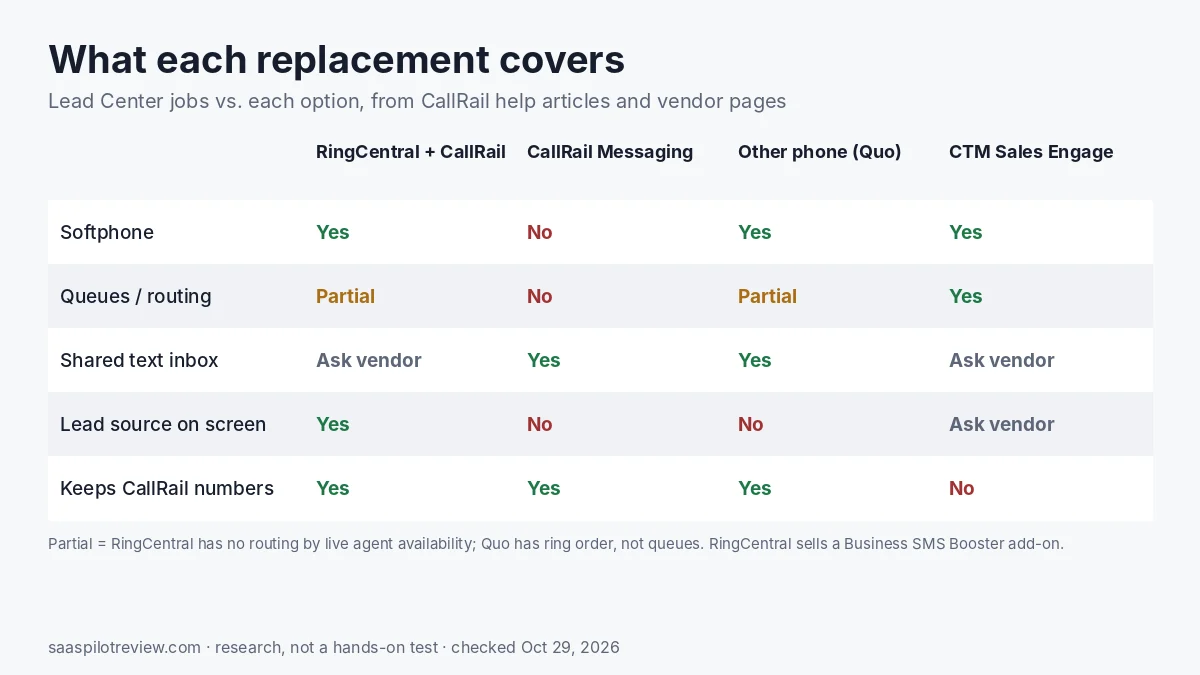
So the real question behind “Lead Center alternative” is which of these jobs you still need covered:
- A softphone so the office can answer and place calls from a laptop.
- Queues and routing so a call waits for the next free person.
- A shared text inbox for leads, including fast replies to Google Local Services Ads.
- Seeing the lead source before you say hello.
- Web chat, which CallRail has dropped with no direct replacement.
The four realistic options side by side
| Option | Best for | What it costs | What you give up |
|---|---|---|---|
| CallRail + RingCentral (RingEX) | Teams that answered calls in Lead Center and want queues, transfers and a real phone system | RingCentral is billed separately; CallRail’s page offers 25% off annual RingEX (20% off monthly) for new RingCentral customers. RingCentral’s pricing page does not show a per-user price until you pick a user count. | Routing by live agent availability; old calls and texts stay in CallRail, not RingCentral |
| CallRail Messaging + mobile dialer | Owners who mainly texted leads and called back from a cell phone | Included in Call Tracking plans: 25 messages, then 3 cents per extra outbound message, no per-agent fee | No softphone, no queues, no web chat |
| Forward CallRail numbers to another phone system (for example Quo) | Small shops that want a cheap app-based phone and do not need the source on screen | Quo: $19, $33 or $47 per user a month billed monthly; $15, $23 or $35 billed yearly | No CallRail source pop-up; RingCentral is the only phone system CallRail has built an integration with |
| Move tracking and calling to CTM | Sales teams that want tracking, softphone and skills routing in one bill | CTM Sales Engage: $329 a month billed monthly, $274 billed yearly | A full tracking migration: new numbers or a port, new reports, retraining |
Prices checked October 29, 2026.
Option 1: keep CallRail, answer calls in RingCentral
This is the path CallRail built for heavy Lead Center users. Your CallRail call flows forward to RingCentral numbers, so you do not port anything or change the numbers on your website, ads or Google profile. CallRail’s sunset article says its migration team will move your agents and call flows and work with RingCentral’s professional services team at no charge.
What you get back: RingCentral’s call pop-up shows the campaign or source that drove the caller, and outbound calls placed in RingCentral show up in CallRail’s timeline. RingCentral covers the phone-system jobs Lead Center did, with unlimited calling inside the US and Canada and add-ons such as a $35 Call Queues Booster and an AI Receptionist that starts at $39. If an AI front desk is the part you care about, compare it with the dedicated tools in our best AI receptionist for small business guide before you add it.
What you lose, per CallRail’s migration article:
- Routing by which agent is active right now. Round robin and simultaneous ringing still work.
- History in one place. Past calls, recordings, texts and contacts stay in CallRail; you cannot search them by agent in RingCentral.
- Live call monitoring moves to RingCentral’s own tools.
- Two sets of numbers: a RingCentral number for the phone system and a CallRail number for tracking.
The discount on CallRail’s RingCentral page applies only to businesses that are not already RingCentral customers. Ask for a written quote for your user count; RingCentral says paying yearly saves up to 33%, but the page does not list the yearly rates.
Option 2: use what CallRail already includes
If Lead Center was mostly a texting tool for you, start here, because it costs nothing extra. CallRail added a Messaging tab for former Lead Center accounts. It has a shared inbox, automatic message flows, read and unread status, spam marking and number blocking. The sunset article points to message flows as the fast way to answer Google Local Services Ads leads; if LSA is your main source, our guide on how to track Google LSA calls covers the call side.
For calls, the CallRail mobile app and the call log can place outbound calls. CallRail rings your own phone first, then connects the lead, who sees your tracking number. Inbound calls follow your call flow to whatever number you choose.
The limits are real. There is no softphone, no queue, and no web chat: CallRail suggests click-to-text on your site instead. CallRail’s migration article says the dialer suits customers “who do not need a dedicated softphone platform”, which is a fair way to put it. A two-person office that answers on cell phones will be fine. A front desk taking ten calls an hour will not.
Option 3: forward CallRail numbers to another phone system
Nothing forces you onto RingCentral. A CallRail call flow can forward to any number, so you can keep CallRail for tracking and answer in a cheaper app-based phone such as Quo (formerly OpenPhone). Attribution still lands in CallRail because the call passes through your tracking number first.
Quo’s pricing page lists Starter at $19 per user a month, Business at $33 and Scale at $47 on monthly billing, or $15, $23 and $35 billed yearly. Ring order, transfers and phone menus start on Business; extra numbers are $5 a month; the trial is 7 days. Quo’s integration list does not include CallRail.
The trade-off: whoever answers will not see the lead source on screen, which was one of Lead Center’s best features. CallRail says RingCentral is the only phone system it has built an integration with, so with any other provider the source lives only in CallRail’s call log. Each forwarded call still uses CallRail tracking minutes, the same as before, on top of whatever the phone system charges.
Option 4: switch trackers to one that includes a phone
If you are going to rebuild your calling anyway, it is fair to ask whether the tracker should change too. CTM’s Sales Engage plan, $329 a month or $274 billed yearly, lists a customizable VoIP softphone for inbound and outbound teams and skills- and weight-based routing alongside call tracking. That puts tracking, attribution and the phone in one product and one bill.
It is the most work of the four. You would move numbers (or port them), rebuild reports and retrain staff. For an agency or a sales team that already outgrew CallRail it can make sense; for a 3-truck HVAC shop that only needed Lead Center for texting, it is overkill. Our Nimbata vs CallRail page covers a cheaper tracker if price is the reason you are looking.
Before you change anything: a five-step check
- Open Number options in CallRail and read the Forward Calls To column for every tracking number. Any number still pointed at a Lead Center agent or queue is now ringing your primary line.
- Export what you need. CallRail’s sunset FAQ says exports run one month at a time, so start with the months you report on.
- Remove Lead Center from billing if it is still listed: Account Settings, Billing, Manage Plan, then No Plan under Lead Center.
- Tell your team which app to install. The Lead Center app no longer works; the CallRail app handles messaging and outbound calls.
- If Lead Center sent call data to a CRM or another integration, test one inbound and one outbound call end to end after the switch. CallRail warns that integrations sending outbound call data from Lead Center are affected.
Which replacement should you pick?
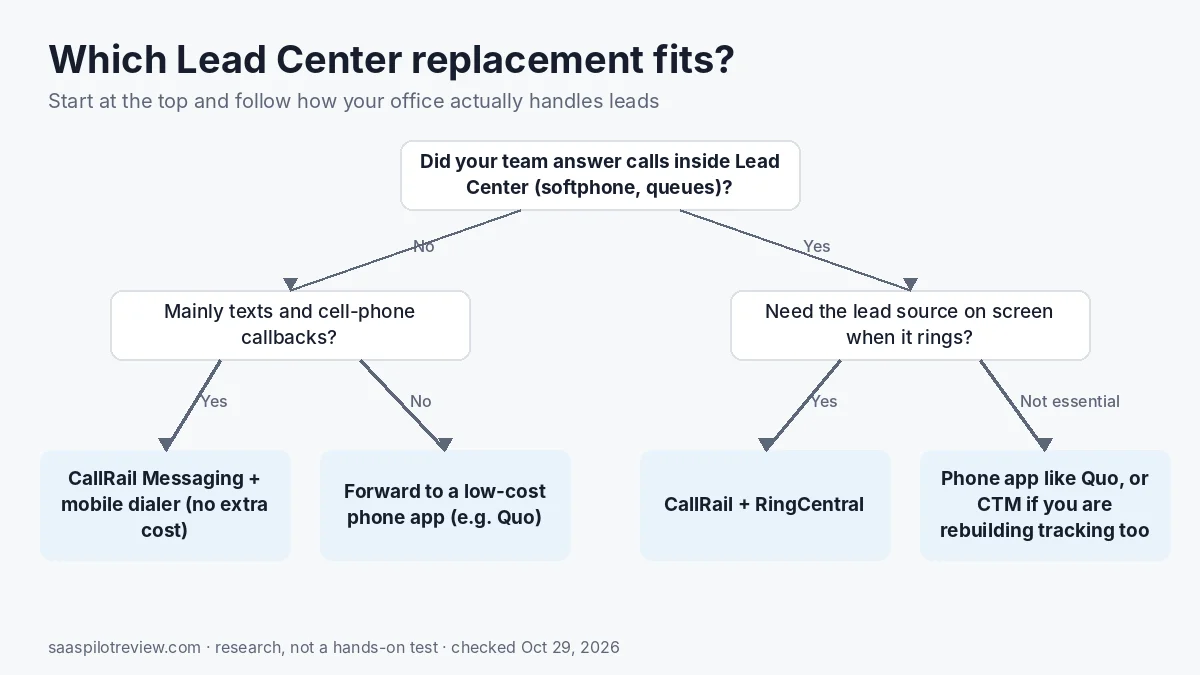
Pick RingCentral if your office answered most calls in Lead Center, uses queues or transfers, and wants the lead source on screen. Stay on CallRail Messaging and the mobile dialer if you mainly texted leads and answer on cell phones. Forward to a lower-cost phone system such as Quo if budget matters more than the source pop-up. Look at CTM only if you were planning to rethink your tracker anyway.
Sources
- CallRail Help Center: Lead Center sunset, what you need to know
- CallRail Help Center: Lead Center overview
- CallRail Help Center: Migrating from Lead Center to RingCentral
- CallRail Help Center: Migrating from Lead Center to CallRail Messaging and Dialers
- CallRail Help Center: Removing Lead Center from your account
- CallRail and RingCentral partnership page
- RingCentral: CallRail integration
- RingCentral plans and pricing
- Quo pricing
- CTM plans and pricing
Related: call tracking and lead gen tools · how we research and test.