November 6, 2026 · What changed: in September 2026, advertisers reported that Google’s local ad formats were showing the phone number from their Business Profile instead of the Google Ads number they had set for ads. Google’s reply pointed to a rule already in its help docs: when an ad uses both a location asset and a call asset, calls can go to the location’s number. The reporter later said it was working again for some accounts.
If you run Local Services Ads or Google Ads for a plumbing, HVAC or roofing business and your call tracking suddenly shows fewer “paid” calls and more “Google Business Profile” calls, this is the first thing to rule out. The leads did not disappear. They are landing on a different number, so your reports credit the wrong channel, and the budget decisions you make from those reports go wrong with them.
How we put this together: researched from Google Ads, Business Profile and Local Services help pages, a CallRail help article and the Search Engine Roundtable report, all read on November 6, 2026. We did not test this in a live ad account, and the September behavior is reported by advertisers, not announced by Google. Our research and testing methods explain how we handle that difference.
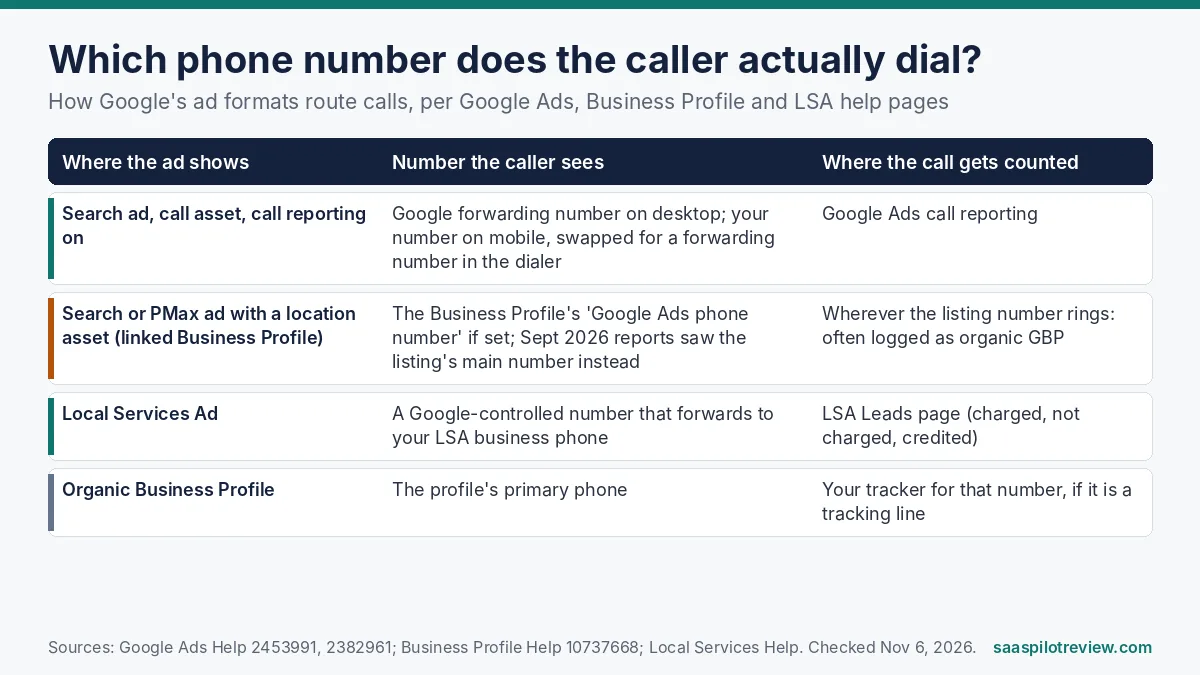
Short version: which number shows, and when
An ad that carries a location asset from your linked Business Profile can send callers to the phone number tied to that location, not the number in your call asset. Google’s own call assets help page says ads that feature specific business locations “may direct calls to the phone numbers that are associated with those locations.” Local Services Ads work differently again: Google shows its own number and forwards the call to the business phone saved in your LSA account.
If you have never set up separate tracking numbers, this whole issue is mostly invisible to you: every format rings the same office line. It only bites when you use different numbers to tell paid calls from organic ones, which is exactly what our guide to tracking Google LSA calls recommends.
What advertisers reported in September
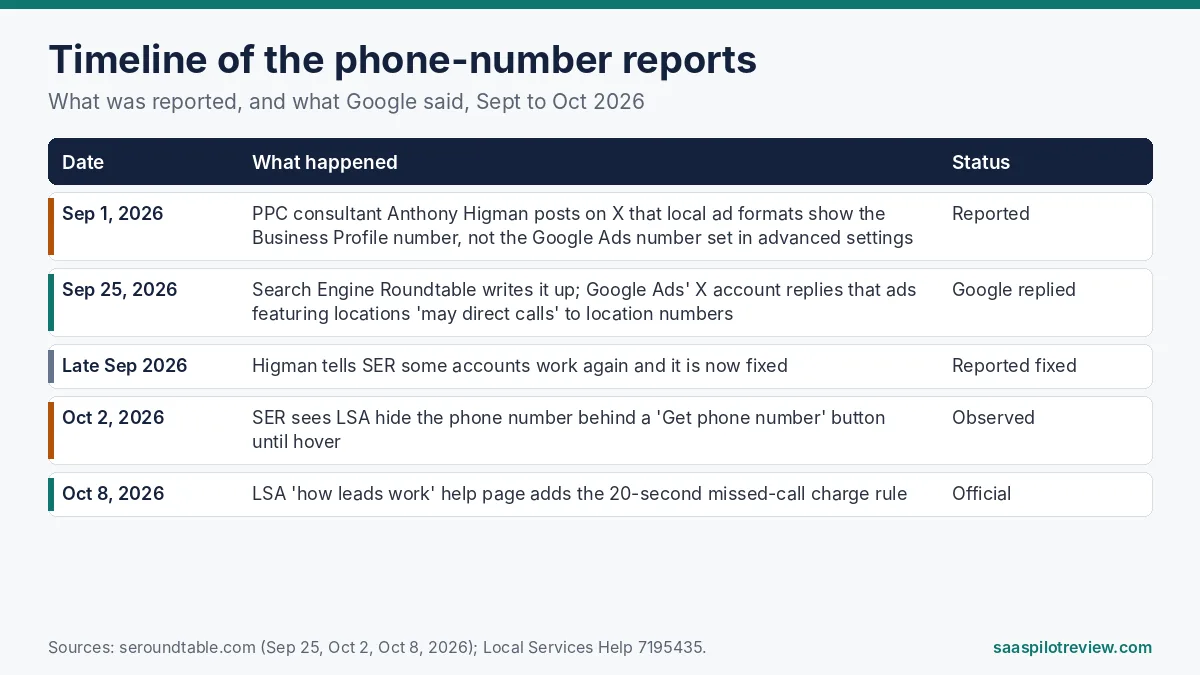
PPC consultant Anthony Higman first raised it on X on September 1, 2026. His setup had a Google Ads number entered in Business Profile advanced settings, verified and active, and the listing number still appeared on every active local ad format. Search Engine Roundtable covered it on September 25 under a Local Service Ads headline.
- What Google said: a reply from the Google Ads account on X repeated the help-page rule about location and call assets. That is a description of how the system can behave, not an admission of a bug.
- The trade-off it creates: Higman described it as “an impossible choice.” Keep call assets without location assets and your tracking holds, or keep location assets and lose sight of which calls came from ads.
- Where it stands: Higman later told SER some accounts were working again and that it was fixed. SER itself was unsure whether the behavior was new. We found no Google announcement either way as of November 6, 2026.
One detail worth getting right: the formats named in the report are the Google Ads local formats driven by location assets. Local Services Ads have their own number system, covered below. Many owners call all of these “LSA,” which is part of why the advice online gets muddled.
Why the wrong number skews your reports
The damage is in attribution, not in lost calls. A caller who sees your listing number still reaches you. But if that number is the one your call tracking tool labels “Google Business Profile,” the call counts as organic. Three things then go wrong at once:
- Paid looks weaker than it is. Ad spend stays the same while tracked paid calls drop, so cost per call appears to jump.
- Organic looks stronger than it is. Your Business Profile line picks up calls that an ad produced, which can hide a real slowdown in organic calls.
- Google’s own call reporting goes quiet. Google forwarding numbers power call reporting on the Search Network, per the Google forwarding number help page. A call that goes straight to a location number never passes through one, so it does not show up as an ad call conversion.
Since Google already removed call history from Business Profile, you may have no Google-side view of these calls at all, which leaves your tracking tool as the only record.
Check your own account in about 10 minutes
You do not need a new tool for this. You need the two settings that decide the number and two weeks of call counts.
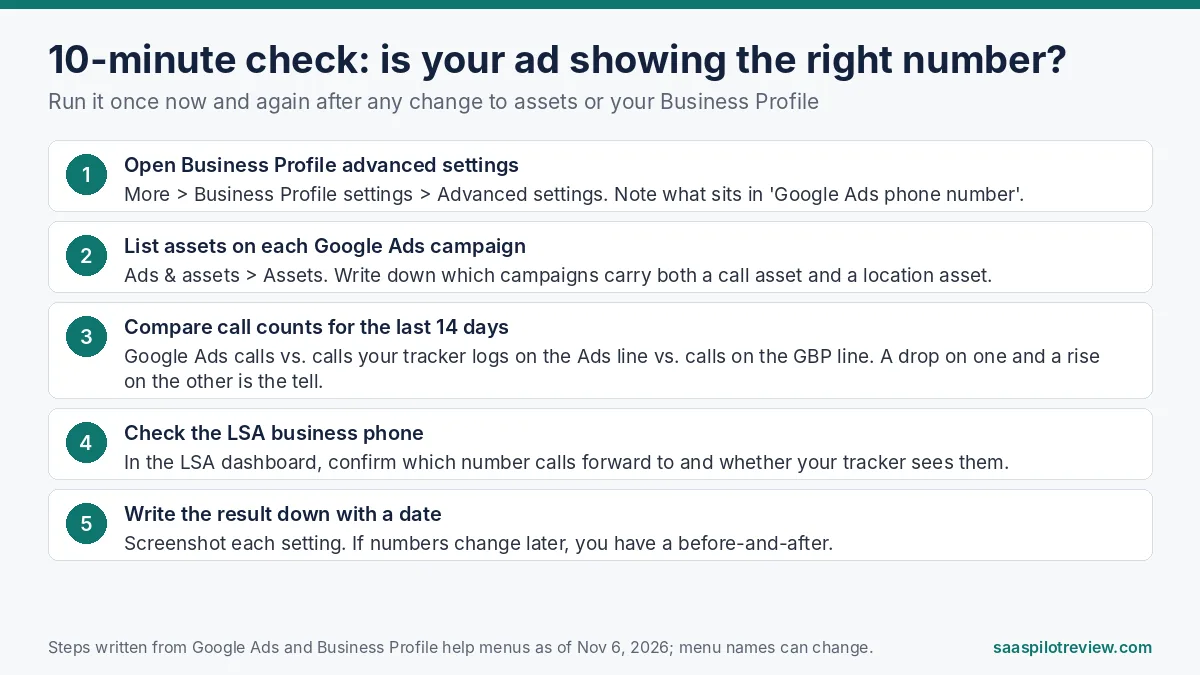
- Business Profile advanced settings. Google’s advanced settings help page describes a Google Ads phone number field that lets the location asset show a different number from your listing. The path is More, then Business Profile settings, then Advanced settings. Note what is in that field today.
- Assets on each campaign. In Google Ads, open Ads & assets, then Assets. Mark every campaign that carries both a call asset and a location asset. Those are the campaigns the September reports were about.
- Two weeks of call counts, side by side. Put three numbers next to each other: Google Ads phone calls, calls your tracker logs on the ads line, and calls on the Business Profile line. A drop on the ads line that lines up with a rise on the profile line is the pattern to look for.
- The LSA business phone. In your Local Services dashboard, confirm which number LSA calls forward to and whether your tracker actually sees those calls.
- Screenshots with dates. Save each setting. If the behavior changes again, you will be able to prove when.
Fixes that match your setup
Pick the row that describes you. None of these needs you to change call tracking vendors, and if you are still choosing one, our CallTrackingMetrics vs CallRail comparison covers how each handles Google numbers.
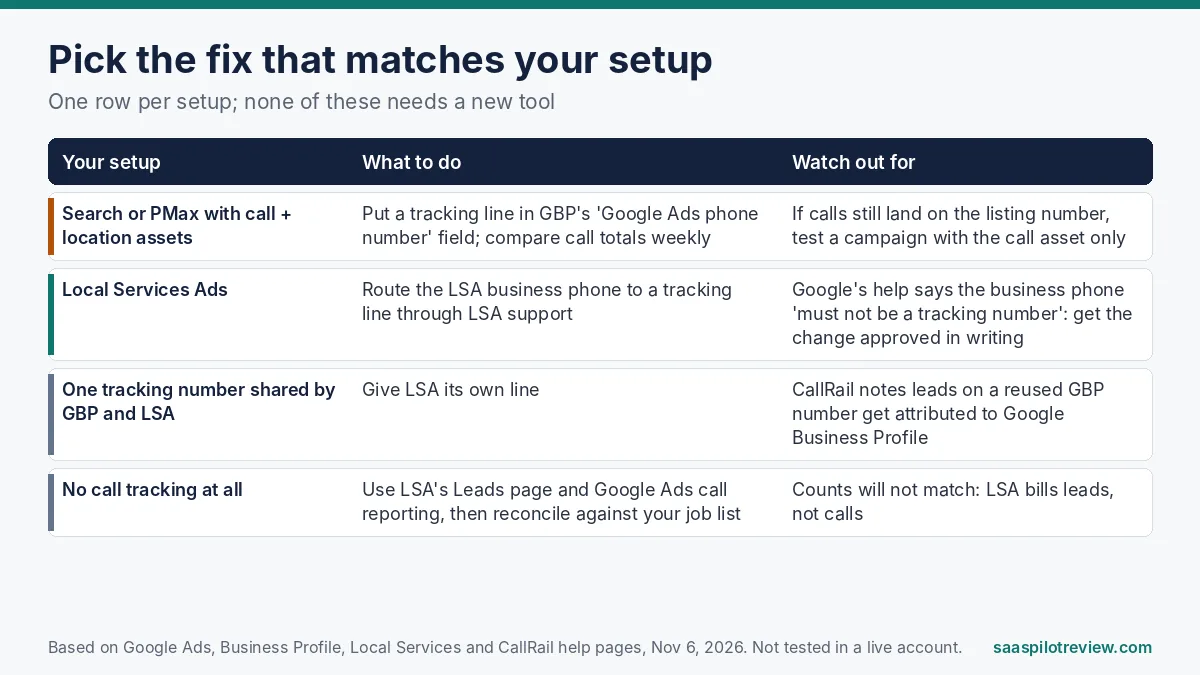
You run Search or Performance Max with location assets
Put a dedicated tracking number in the Business Profile’s Google Ads phone number field. CallRail’s help article on using a tracking number as a location extension walks through exactly this: create the number, enter it under Google Ads phone number in advanced settings, then add the location asset in Google Ads. After that, compare call totals weekly. If calls still land on your listing number, run one campaign with the call asset only for two weeks and see whether the ads line recovers. That tells you which asset is costing you the data.
You run Local Services Ads
LSA shows a Google-controlled number and forwards calls to the business phone saved in your account. CallRail’s LSA setup guide tells you to replace that business phone with a CallRail tracking number, entered by hand, and notes the change “often requires a re-verification process” through LSA support. If you reuse your Business Profile tracking number here instead, CallRail says the leads will be attributed to Google Business Profile.
You have no call tracking yet
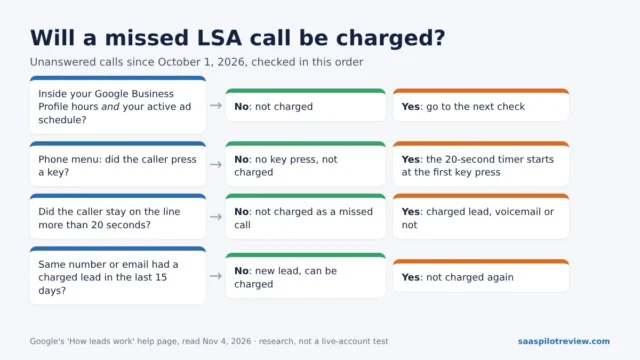
Use what Google gives you: Google Ads call reporting for Search, and the Leads page in LSA. Expect the two to disagree with your job list. LSA charges by lead, not by call, and its rules changed in October, as covered in our piece on LSA charges for missed calls.
The LSA rule that conflicts with tracking advice
This is the part most call tracking tutorials skip. Google’s Local Services help page on editing business information lists changing “the phone number where your calls are routed to” as an edit that needs a support agent and documents such as a business registration or license. The same page says, in plain words: “your business phone number must not be a tracking number.”
Vendor guides, including CallRail’s, still tell you to put a tracking number there. We cannot tell you which side Google enforces in practice, and we have not tested it. What we would do in your position:
| Option | Upside | Risk |
|---|---|---|
| Keep your real office number in LSA | Matches Google’s written rule; no re-verification | LSA calls are only visible on the LSA Leads page, not in your tracker |
| Swap in a tracking number via LSA support | Every LSA call shows up next to your other channels | Conflicts with the help page; ask support to confirm in writing before you switch |
| Forward your office line to the tracker on your phone system | LSA account keeps the real number | Depends on your phone provider; calls may forward twice and add delay |
A delay matters more than it used to. LSA’s how leads work page now says an unanswered call during business hours can be charged if the caller stays on the line for more than 20 seconds. A phone tree or a slow double-forward eats into that window before anyone picks up.
What to watch over the next few weeks
- The number may move again. SER also saw LSA hide the phone number behind a “Get phone number” button until hover on October 2. Small display changes like this shift call volume without any change on your side.
- Location-asset campaigns. Keep the weekly side-by-side from step 3 running for a month. If the ads line and the profile line move in opposite directions again, you have your answer.
- Tracking on your website. If you also swap numbers on your site, our guide on dynamic number insertion and local SEO covers how to keep that from confusing Google about your real number.
More guides on measuring calls from ads and listings live in our call tracking and lead gen hub.
Questions owners ask about this
Is Google still showing the Business Profile number on ads?
It depends on your setup. The reporter said it was fixed for at least some accounts by late September, but Google’s help page still says ads featuring locations may route calls to location numbers. Run the 10-minute check above rather than assuming either way.
Will removing the location asset hurt my ads?
It removes your address and map details from those ads, which can matter for “near me” searches. That is why we suggest testing it on one campaign for two weeks instead of stripping it everywhere.
Can I put my own tracking number directly on a Local Services Ad?
No. The number shown on an LSA is Google’s. You can only control the business phone it forwards to, and changing that goes through LSA support.
Sources (read November 6, 2026): Google Ads Help, “About call assets” and “Google forwarding number”; Google Business Profile Help, “Advanced profile settings”; Local Services Help, “Edit your ad or business information” and how leads work; CallRail Help, location extension and LSA setup articles; Search Engine Roundtable, September 25 and October 2, 2026.