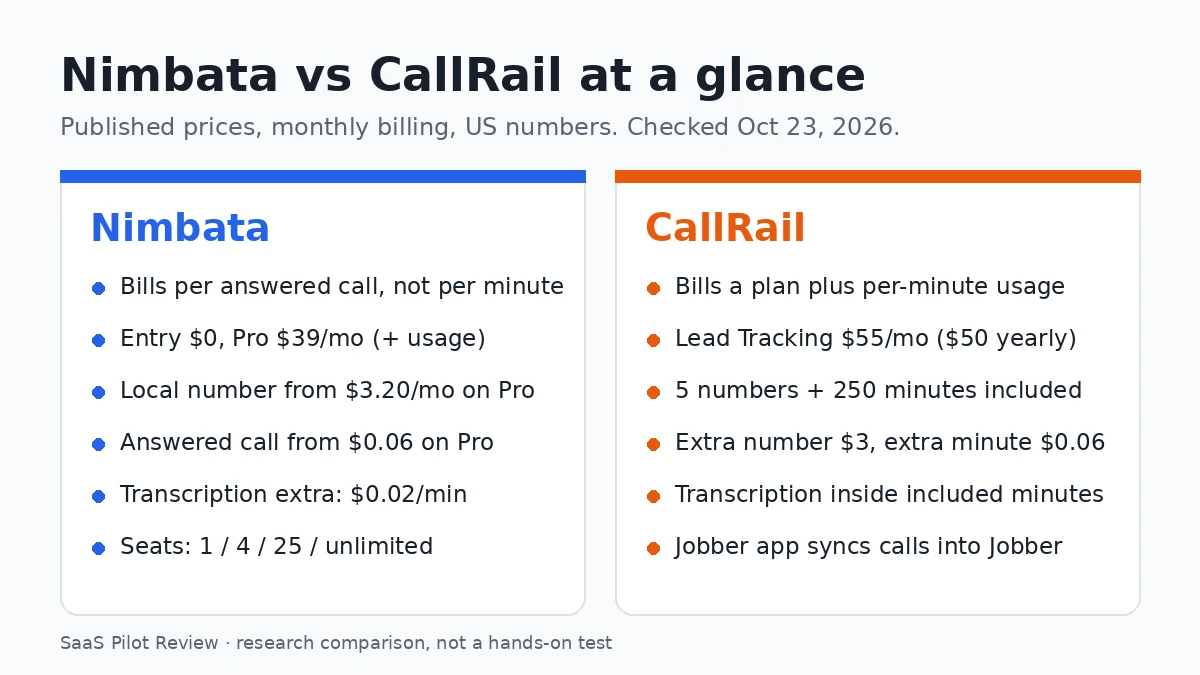
Nimbata and CallRail both give a service business tracking numbers, and show which ad, listing or page made the phone ring. The real difference is how they bill. Nimbata charges a small plan fee plus a rate for every answered call, however long it runs. CallRail charges a plan that includes 5 numbers and 250 minutes, then bills extra minutes. For a small contractor the two bills come out close, so the better pick usually depends on the software you already run.
How this comparison was made: it is research, not a hands-on test. We read both pricing pages on October 23, 2026, set Nimbata’s rate table to United States, and did the cost math ourselves. We have not run either tool on a live phone line, so there is no score here. If you are setting up tracking because Google changed how it reports calls, start with our guide to tracking Google LSA calls after the move to Performance Max.
Per answered call or per minute: the one difference that drives the bill
Nimbata prices usage per answered call. Its page says the rate stays the same “no matter the duration”, with one exception: if the average call to a destination runs longer than 3.5 minutes, Nimbata may add a line item worked out from the extra minutes.
CallRail prices usage per minute. Every plan includes 250 local minutes, and each minute after that costs $0.06. Those minutes also cover transcription, so you do not pay for transcripts separately on the tracking plans.
In practice: a shop that gets many short calls (“are you open Saturday?”, “can you come today?”) suits Nimbata’s model. A shop with long quoting calls, or one that wants every call transcribed, loses most of Nimbata’s price edge.
Plans and prices side by side
| Item | Nimbata | CallRail |
|---|---|---|
| Entry plan | Entry: $0 + usage (no DNI, no call recordings) | No free plan |
| Plan most small shops need | Pro: $39/mo monthly, $35/mo billed yearly, + usage | Lead Tracking: $55/mo monthly, $50/mo billed yearly |
| Higher plans | Marketing $89 ($80 yearly); Agency $149 ($120 yearly) | Lead Tracking Complete $105 ($95 yearly); Lead Conversion $165 ($150); Lead Conversion Complete $215 ($195) |
| Local tracking number | From $4.60 (Entry), $3.20 (Pro), $2.30 (Marketing), $1.60 (Agency) a month each | 5 included; extra $3 a month each |
| Usage | Per answered call, from $0.10 (Entry), $0.06 (Pro), $0.04 (Marketing), $0.03 (Agency) | 250 local minutes included; extra $0.06 a minute |
| Toll-free | Number from $5.00 / $3.50 / $2.50 / $1.80; answered call from $0.48 / $0.28 / $0.18 / $0.13 | Number $5; minute $0.08 |
| Transcription | $0.02 a minute on Pro and up | Included in the plan minutes |
| Users | 1 / 4 / 25 / unlimited seats; extra seat $5 a month | Not stated on the pricing page |
| Free trial | 14 days, no card, Agency features, capped at 2 numbers and 50 answered calls | 14 days, no card; texting available after the trial |
Sources: Nimbata and CallRail pricing pages (listed at the end), US rates. Nimbata number and call rates are marked “starting at”. Prices checked October 23, 2026.
Nimbata’s Entry plan is the cheapest way to count calls from one listing: one local number at $4.60 plus 40 answered calls at $0.10 comes to $8.60 a month. It does not record calls or swap numbers on your website, so it is a counter, not a full setup. If you are worried that swapping numbers on your site affects local rankings, read dynamic number insertion and local SEO.
What a normal month costs on each
We priced three common setups on monthly billing, using Nimbata Pro (the cheapest Nimbata plan with website number swapping and Google Ads) against CallRail Lead Tracking.
| Setup | Nimbata Pro, no transcripts | Nimbata Pro + transcripts | CallRail Lead Tracking |
|---|---|---|---|
| Solo shop: 3 numbers, 120 answered calls, 3 min average | $55.80 | $63.00 | $61.60 |
| 4-truck shop: 8 numbers, 300 answered calls, 3 min average | $82.60 | $100.60 | $103.00 |
| Long calls: 3 numbers, 120 answered calls, 5 min average | about $58.89 | about $70.89 | $76.00 |
Our math from list prices on October 23, 2026, before tax. Nimbata: $39 + numbers at $3.20 + answered calls at $0.06, transcripts at $0.02 a minute; the long-call row adds the 3.5-minute surcharge using the formula on Nimbata’s page. CallRail: $55 + numbers over 5 at $3 + minutes over 250 at $0.06.
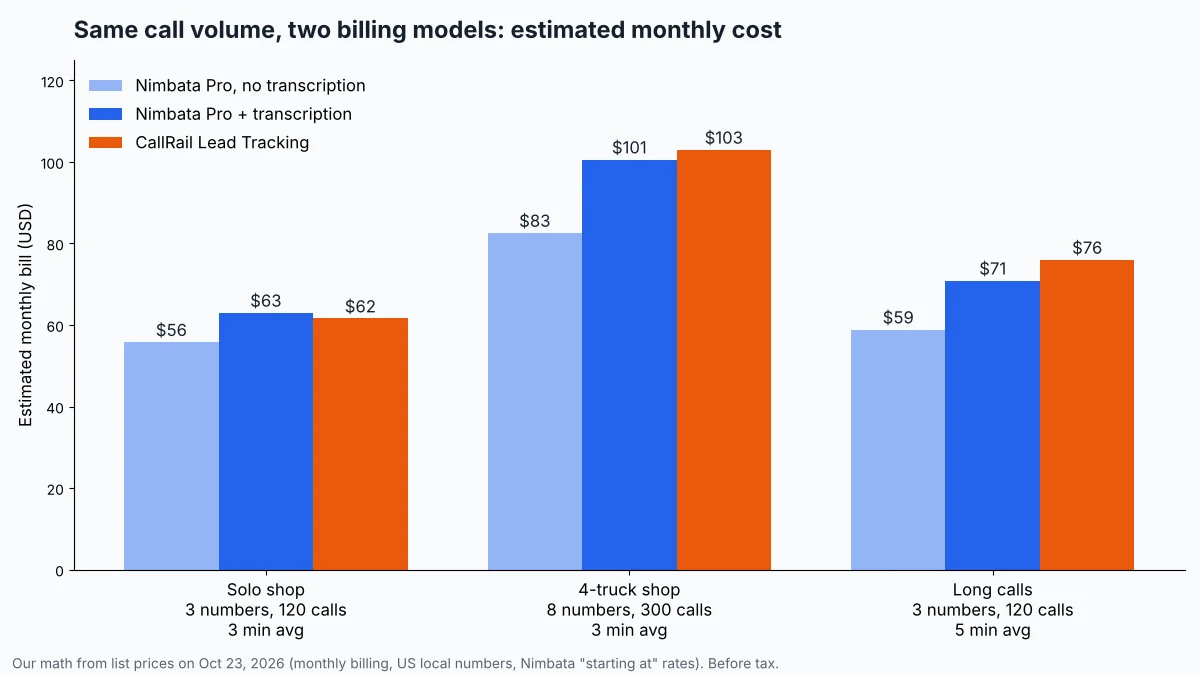
With transcripts on, the two land within a few dollars for a solo shop. Without transcripts, Nimbata is about $6 cheaper for the solo shop and about $20 cheaper for the 4-truck shop. Nimbata’s rates are “starting at” figures and can change with the number you forward calls to, so run your own numbers through its calculator before you commit. If you are still deciding whether tracking is worth paying for, our missed call cost calculator puts a dollar figure on the calls you miss now.
Where CallRail is ahead
CallRail is the better fit if you run your jobs in Jobber. Jobber’s help center describes a CallRail app that matches inbound calls to existing clients by phone number, creates a client and a request when there is no match, and adds the lead source, campaign, call summary and recording link to that request. Texts and form fills do not sync. Nimbata’s pricing page lists CRM connections such as HubSpot, Zoho CRM, Pipedrive and Salesforce, but no field service app. If you are on Jobber, our Jobber pricing breakdown covers which Jobber plan you would be paying for alongside it.
Transcripts are simpler on CallRail. They are counted inside the plan minutes, while Nimbata adds $0.02 a minute. CallRail’s Lead Conversion plans ($165 monthly) add call summaries, sentiment analysis, trend reports and automatic conversion tagging for owners who want the phone calls graded, not just counted.
Watch for: CallRail’s page says overage fees are not refundable, and text messages only work after the trial ends. The yearly discount is up to 10%. One more CallRail change: its Lead Center softphone has been retired, so if you answered calls there, see our CallRail Lead Center alternatives.
Where Nimbata is ahead
Nimbata is cheaper to start and cheaper per number as you grow. Pro costs $39 a month against CallRail’s $55, and Nimbata’s per-number rate drops on each higher plan, to $1.60 on Agency, while CallRail charges $3 for every number past the first 5. That matters for anyone running a separate number per ad campaign, per listing or per client.
Logins are clearer too. Nimbata lists 1 seat on Entry, 4 on Pro, 25 on Marketing and unlimited on Agency, with extra seats at $5 a month and extra projects (a brand, site or location) at $15. White-label reporting costs $55 a month on paid plans. If you need a full client dashboard rather than a call report, see how AgencyAnalytics, DashThis and Reportei compare for local-service agencies. Its page also says every answered call gets AI tagging, sentiment and notes without an add-on, and shows AI call summaries from Pro up. The yearly discount is larger: up to 20%.
Watch for: Pro does not include form tracking (that starts on Marketing), and Salesforce, the API and webhooks are Agency-only. The trial is capped at 2 numbers and 50 answered calls, which is too small to test a busy shop.
Fine print on both pricing pages
- Nimbata’s 3.5-minute rule: if your average call to one destination runs longer than 3.5 minutes, the extra time is billed using a formula on the page. Plumbers and roofers who quote on the phone should check this first.
- Nimbata’s rates depend on location: the table defaults to the visitor’s country. Set it to United States, or the rates you see will not apply to a US business.
- Nimbata billing: the card is charged the base fee for the coming month plus last month’s usage.
- CallRail’s two prices: the page opens on yearly billing ($50). The monthly price is $55.
- CallRail’s AI Voice Assist is separate: from $95 a month on top of Lead Tracking, plus $1 a call after 50 calls over 15 seconds.
Whichever you choose, keep the tracking numbers local and in your own account. Our guide to tracking calls now that Google removed GBP call history shows how to set one up on a Business Profile without hurting the listing.
Which one should you pick?
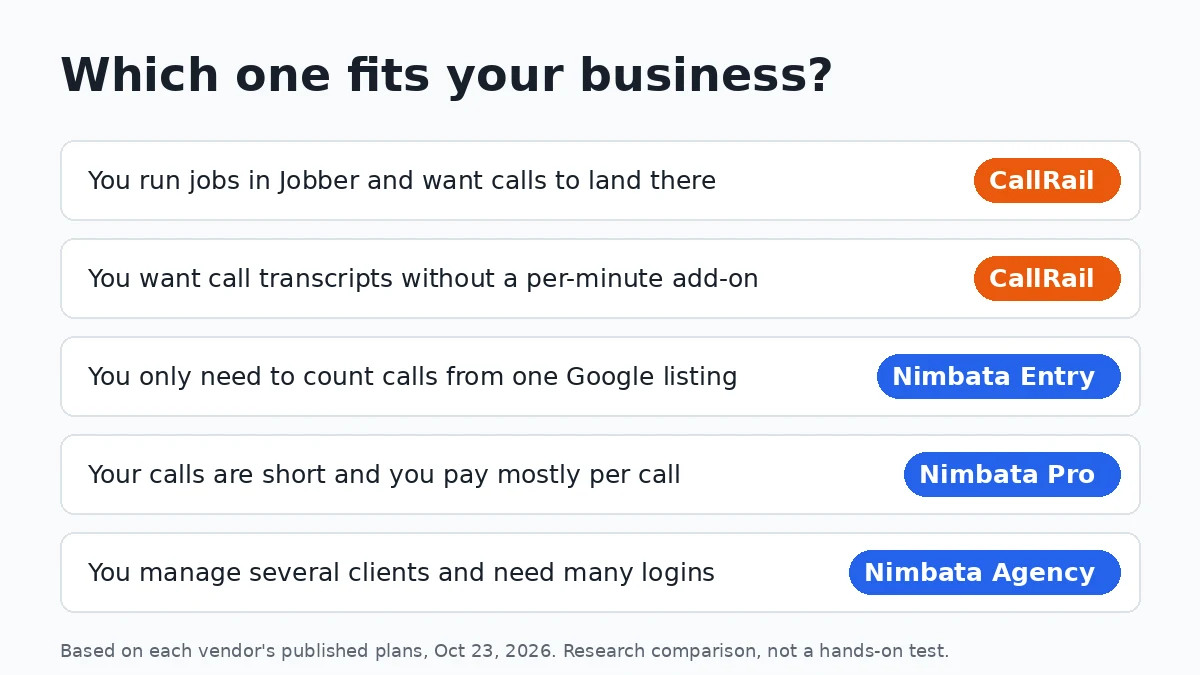
- You run Jobber and want calls to show up as requests: CallRail Lead Tracking ($55 monthly). The Jobber app is the deciding feature.
- You want every call transcribed and one simple bundle: CallRail. With transcripts on, the two came within about $5 a month in all three of our setups, and CallRail has no surcharge formula to track.
- You only want to count calls from your Google listing: Nimbata Entry, from about $9 a month at low volume.
- You run Google Ads, get lots of short calls and do not need transcripts: Nimbata Pro, from $39 plus usage.
- You are an agency or manage several locations: Nimbata Agency for unlimited seats and the lowest per-number rate. CallRail is still worth a quote if your clients use Jobber. If you are also weighing CTM, our CallTrackingMetrics vs CallRail comparison prices both for 5, 10 and 30 clients. If your clients run Google Local Services Ads and work leads in HighLevel, see how to push LSA leads into GoHighLevel.
More call tracking guides are in our call tracking and lead gen hub. Read how we research and test for how comparisons like this one are put together.