How this page was made: researched from the Jobber, Housecall Pro and Joist pricing and help pages, not hands-on tested. Prices checked November 19, 2026. We do not earn a commission from any tool on this page.
Plenty of solo pressure washers, cleaners and handymen run the whole business from one Google Sheet: a tab of clients, a tab of jobs, and a column that says “paid?” It is free, it is already on your phone, and for the first few months it is often enough. The question is when the spreadsheet starts costing more than software would. Our answer: stay on Google Sheets while you send fewer than a handful of quotes a week and nobody else touches the schedule; start paying once you are chasing unpaid invoices, losing track of quotes, or adding a second person. At that point the cheapest real job software costs $10 to $79 a month, and the CRM-or-Sheets question becomes a simple sum. If you already know you want software, start with our list of the best field service software for small business.
What Google Sheets does well for a one-person business
A spreadsheet is not a bad system. It costs nothing with a personal Google account, works on a phone, and you decide every column. For a business doing a few jobs a week, a sheet with these tabs covers the basics:
- Clients: name, phone, email, service address, how they found you, notes (gate code, dog, parking).
- Quotes: date sent, client, amount, status (sent, accepted, lost), follow-up date.
- Jobs: date, client, service, price, materials cost, done yes/no.
- Invoices: invoice number, amount, date sent, date paid, method.
Keep the client name spelled the same way on every tab, and keep the street address in its own column. That one habit makes the move to software much easier later, because both Jobber and Housecall Pro import clients from a file (more on that below).
What a sheet cannot do is act on its own. It will not text the customer a reminder, send the invoice, take a card payment, or tell you a quote has sat for nine days without a reply. Every one of those jobs is you, remembering, at night.
When the spreadsheet starts costing you money
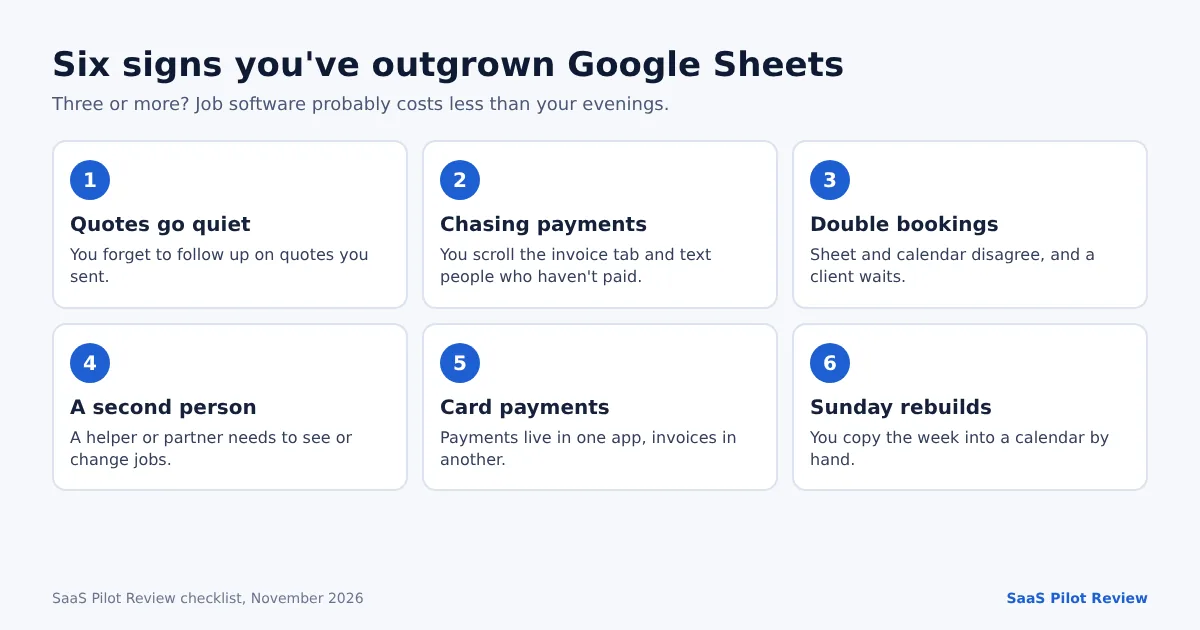
The switch point is not a revenue number. It is when the sheet starts leaking work or cash. These are the signals we would watch:
- Quotes go unanswered and you forget to follow up. A sheet shows a “sent” status; it does not nudge you or the client. Every forgotten follow-up is a job a competitor gets.
- You chase payments by hand. If you scroll the invoice tab every week to see who has not paid, then text each one, that is the clearest sign. Job software sends the invoice with a pay link, so the customer can pay from the message.
- You have double-booked, or nearly. A sheet plus a phone calendar means two places to update. One missed update is a client waiting at home.
- Someone else needs the schedule. The day a helper, partner or spouse needs to see or change jobs, shared spreadsheets get overwritten and you lose track of who changed what.
- Customers want to pay by card. You can take cards with a separate reader, but then the payment lives in one app and the invoice in another. See what each app charges per payment in our card processing fees comparison.
- You rebuild the week every Sunday. Copying jobs to a calendar, texting reminders and mapping the route by hand is the admin software was built to cut.
One or two of these and a better sheet may do. Three or more, and you are paying for “free” with your evenings.
What the cheapest job software costs
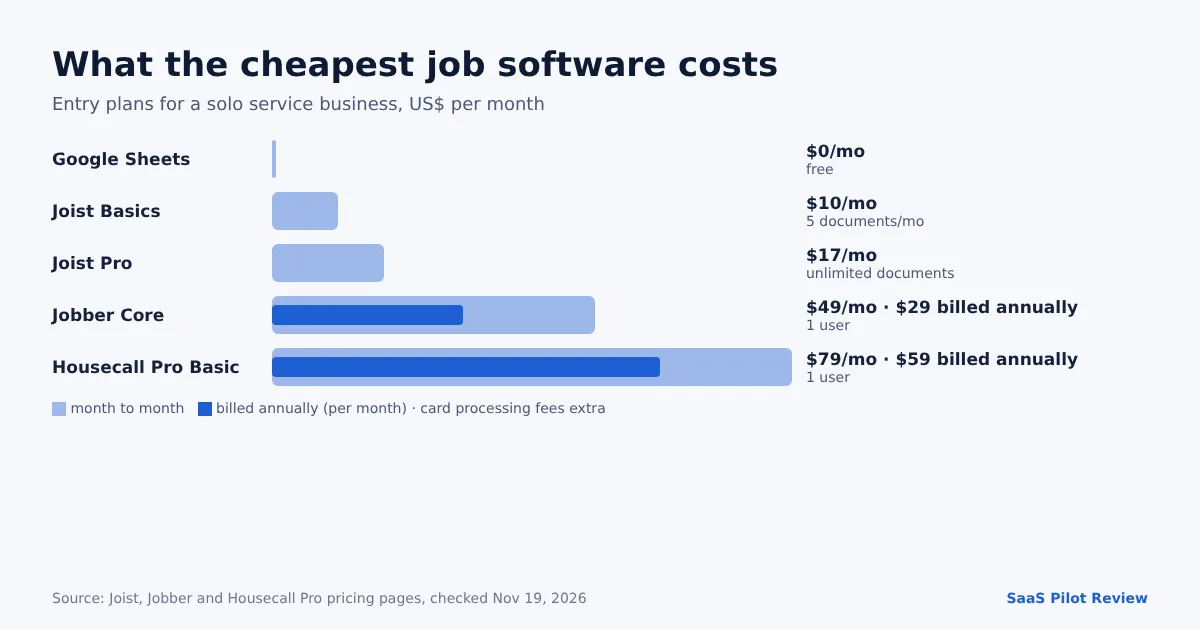
These are the entry plans a solo operator would actually start on, taken from each vendor’s pricing page on November 19, 2026. Our home service software price tracker lists every tier and the date each price was last checked.
| Option | Monthly | Billed annually (per month) | What the entry plan covers | Source |
|---|---|---|---|---|
| Google Sheets | $0 | $0 | Whatever you build; no reminders, invoices or payments | Personal Google account |
| Joist Basics | $10 | Not published (annual billing “2 months free”) | Estimates to invoices, online payments; up to 5 documents a month | Joist pricing |
| Joist Pro | $17 | Not published | Unlimited documents and clients, work orders | Joist pricing |
| Jobber Core | $49 | $29 | 1 user; online booking, scheduling, quotes, invoicing and online payments | Jobber pricing |
| Housecall Pro Basic | $79 | $59 | 1 user; online booking, scheduling and dispatching, quotes, invoices and payments, review management | Housecall Pro pricing |
Card processing fees come on top of every paid plan when customers pay online. Joist, Jobber and Housecall Pro all offer a 14-day free trial, so you can try the workflow before you pay; Joist no longer has a free plan. For the full plan breakdowns, see Joist pricing, Jobber pricing and Housecall Pro pricing.
Do the math with your own numbers
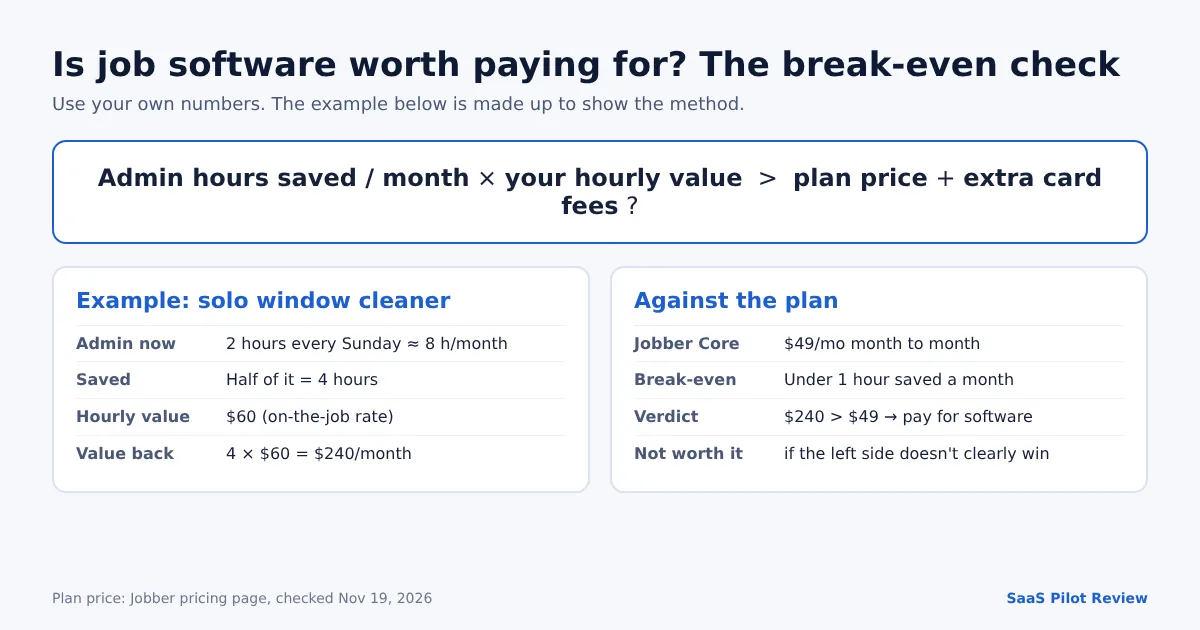
You do not need a study to decide; you need two numbers you already know. The software pays for itself when:
hours of admin it saves each month × what one hour of your time is worth > monthly price + extra card fees you would not pay otherwise
Here is a worked example with made-up numbers, to show the method. Say you are a solo window cleaner who bills $60 an hour on the job. You spend two hours every Sunday copying jobs into your calendar, sending invoices and texting reminders, so about eight hours a month. If software cut that in half, you get four hours back, worth $240 at your own rate, against Jobber Core at $49 month to month. Even if it only saves one hour a month, $60 already beats the $49 plan. Put in your own hours and rate; if the left side does not clearly win, stay on the sheet a while longer.
Two things the sum leaves out, both in software’s favor: a pay link removes a step between the customer and paying you, and a quote you remember to follow up has a better chance of becoming a job than one you forget. Neither is easy to put a number on, so we leave them out of the formula and treat them as a bonus.
Which first step fits which business
If the math says pay, the cheapest plan is not always the right first step. Match the tool to the job you are trying to fix:
- You only need quotes and invoices to look professional and get paid online: Joist. Basics caps you at 5 documents a month, which a busy week can use up, so most working businesses will need Pro at $17. Our Invoice Simple vs Joist comparison covers the other budget option.
- You need scheduling and online booking as well: Jobber Core is the lowest-priced plan here that covers the full cycle from quote to paid invoice, and the annual price ($29 a month) is less than an hour of most trades’ time.
- You want review management built in from day one: Housecall Pro Basic includes it, at a higher price. Compare the two head to head in Housecall Pro vs Jobber.
Whichever you pick, try it on real jobs during the trial, not on test data. A week of actual quotes and invoices shows you fast whether it saves time or just moves the admin somewhere else.
Moving from a spreadsheet without retyping everything
You can bring your client list across from Google Sheets. Download the Clients tab as a CSV file (File, Download, Comma-separated values), then import it:
- Jobber: Clients, More Actions, import, then map your columns to Jobber fields. Its client import help article says the file must be under 2.5 MB (roughly 5,000 rows), each row needs a name or company name, and a client without a Street column gets no property. Only admin users can import.
- Housecall Pro: Customers, Import, choose the file. Its customer import help article says it accepts .csv and .xlsx among other formats, maps columns for you, and flags rows with errors in red before you upload.
Clean the sheet first: one client per row, no merged cells, phone numbers in one format, and duplicates removed. Ten minutes of tidying saves an afternoon of fixing duplicate clients inside the new app. And if you ever want to leave again, our guide to exporting clients from Jobber shows the way back out.
Our take
Google Sheets is a fine way to run a one-person service business while the work fits in your head. Pay for job software when the sheet starts losing you quotes, payments or evenings, not when someone tells you that a “real business” uses a CRM. For most solo operators that moment comes with the second worker or the first month of chasing three unpaid invoices at once. Browse more options in our field service software guides.