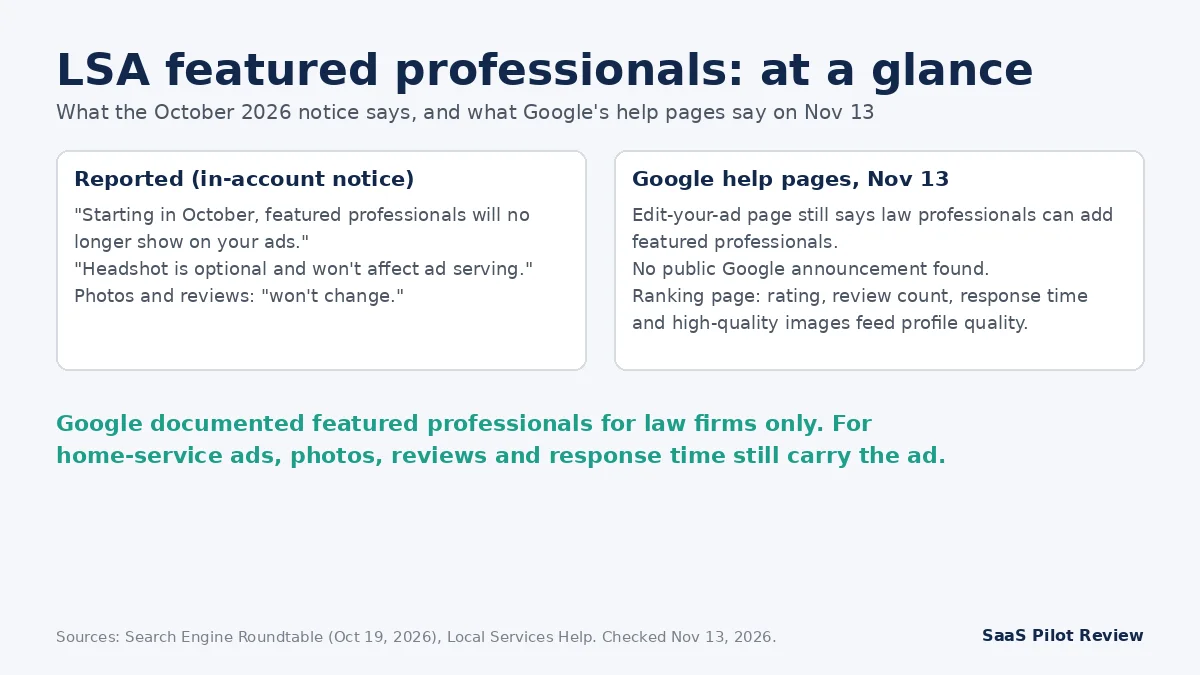
Updated November 13, 2026 — what changed: an in-account Google Ads notice, reported by Search Engine Roundtable on October 19, 2026, says local services ads featured professionals are removed from ads “starting in October” and that headshots are now optional. Google has not announced it publicly, and its own help page still describes the feature.
If you run Local Services Ads for a plumbing, HVAC, electrical, roofing or cleaning business, this change most likely does not touch your ad directly. Google’s help pages describe featured professionals only as an option for law professionals, so home-service profiles rarely used it. What the notice does confirm is the part that matters to you: the rest of the ad, “including photos, reviews, and more, won’t change.” Those are the pieces Google’s ranking page ties to profile quality, so this is a good moment for a short profile cleanup, especially if you already pay for leads you could be losing. If you are still sorting out where LSA leads go, our guide on sending LSA calls, messages and bookings into GoHighLevel covers the routing side.
How we put this together: researched from vendor pages, not hands-on tested. We read the Search Engine Roundtable report, two follow-up trade write-ups and six Google help pages on November 13, 2026, and we separate what was reported from what Google’s own pages say. Our research and testing method explains how we work.
The notice, line by line: reported vs. on Google’s pages
Everything about this change so far comes from one place: a notice inside Google Ads accounts. PPC consultant Anthony Higman shared a screenshot of it on X, and Barry Schwartz covered it on Search Engine Roundtable on October 19, 2026. Higman had also posted on LinkedIn a couple of weeks earlier that he was seeing lawyer listings without headshots. TechWyse (October 21) and Miraflow (October 22) wrote follow-ups, but neither found anything from Google beyond the notice.
| Claim | Where it comes from | Status on November 13, 2026 |
|---|---|---|
| “Starting in October, featured professionals will no longer show on your ads.” | In-account notice, via a screenshot | Reported. No public Google announcement found. |
| “Headshot is optional and won’t affect ad serving.” | Same notice | Reported. Google’s requirements page still lists a “Headshots requirements” section, and we could not read its current text. |
| “The rest of your ad, including photos, reviews, and more, won’t change.” | Same notice | Reported, and consistent with Google’s photo and ranking help pages. |
| Featured professionals are a law-firm feature | Google’s “Edit your ad” help page | Confirmed as documented: “Law professionals have the option to add featured professionals and education details.” |
| The help page linked from the notice explains the change | Search Engine Roundtable | Not confirmed. SER found nothing about it on that page, which covers business screening and verification. |
Two things are still unknown: which countries and categories the notice went to, and whether stored professional records are deleted or simply hidden. The notice does not give a reason either. Any write-up that tells you why Google did this is guessing.
Does dropping featured professionals affect a home-service LSA ad?
For most trades businesses, no. The featured professionals option let a firm add individual people, such as its lawyers, with education details, and feature one of them on the ad. Google’s “Edit your ad” page points it at law professionals, where clients pick a person as much as a firm. A two-truck plumbing company sells the company: the badge, the reviews, the response time and photos of the work.
Use this quick check to decide whether you need to do anything about the removal itself:
- Your LSA category is legal or another professional service, and you used featured professionals: expect the person’s name and headshot to drop off the ad. Move that trust signal into business photos and reviews that mention the attorney by name.
- You are a home-service business and never saw an “Education” or featured professionals section: nothing to remove. Skip to the profile check below.
- You uploaded a headshot of the owner at signup: the notice says headshots no longer affect ad serving. You do not need to delete it, but do not count on it showing.
- Your ad stopped getting leads in October: look elsewhere first. Budget, the move to Performance Max, missed-call charges and verification problems are far more likely causes than this notice.
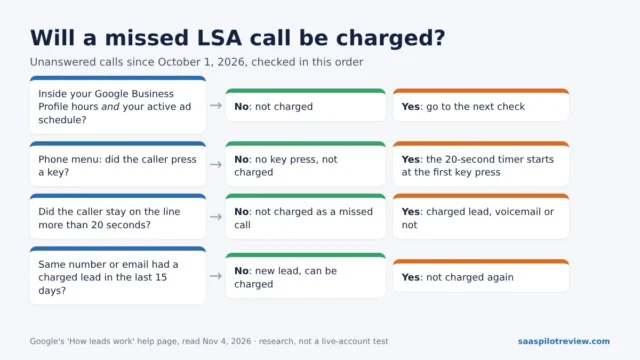
On that last point, two other LSA changes landed around the same time and are easy to confuse with this one. Since October 1, 2026, some unanswered calls are charged as leads; our breakdown of which missed LSA calls Google now bills walks through the 20-second rule. And many accounts are being moved into Google Ads, which changes where you edit the profile (more on that below).
What still moves an LSA ad: Google’s own ranking list
Google’s “About ad rankings” help page says LSA listings are ranked by an auction that weighs your bid and “overall profile quality.” The page names what goes into that quality, and none of it is a professional’s headshot:
- Reviews: “Your rating, number of reviews, average response time, use of high-quality images.”
- Responsiveness: how quickly you answer customer inquiries and requests.
- Contact options: turning on message and booking leads gives customers more ways to reach you.
- Verification: the checks you have completed.
- Relevance: how well your job types and business match what the customer searched.
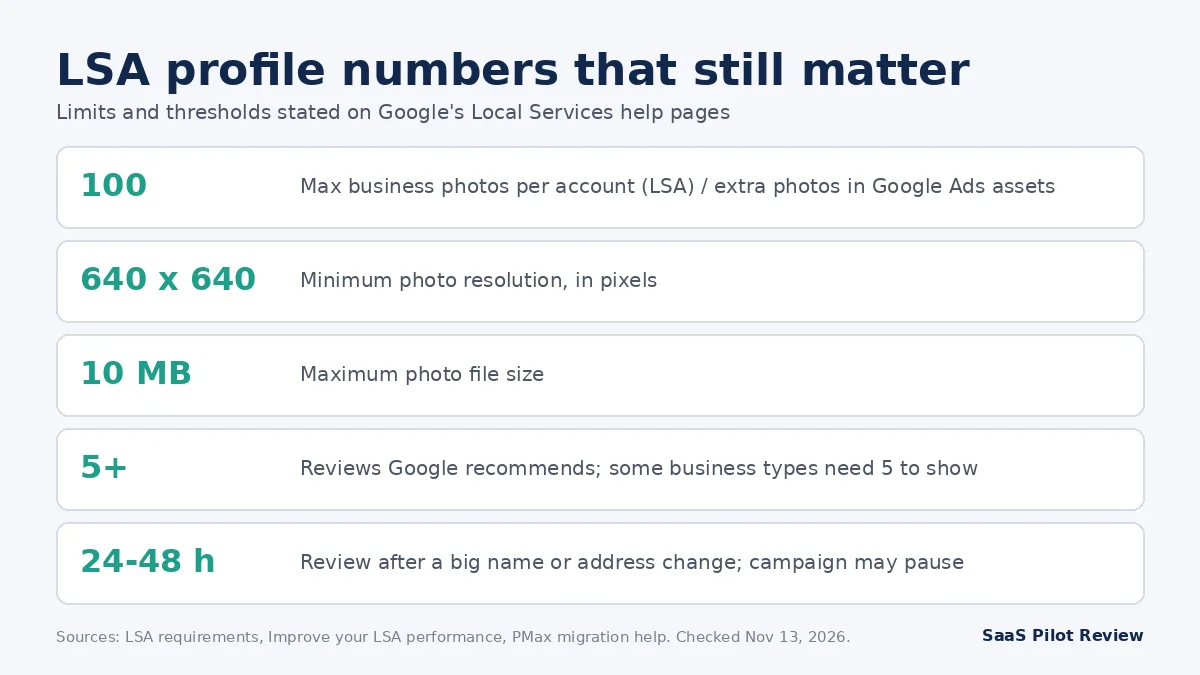
Google’s “Improve your Local Services Ads performance” page adds two specifics: it recommends 5 or more reviews and notes that some business types need 5 before the ad shows, and it says message leads “typically cost less than phone leads.” That makes the practical message of this news simple. If a headshot was never a lever for your trade, the levers left are photos, reviews, response time and clean business information.
A 30-minute LSA profile check for trades businesses
Here is the order we would work in if your account is still in the LSA dashboard. Google’s “Edit your ad” page gives the path: sign in to your Local Services Ads lead inbox, open the menu at the top left, choose Profile & Budget, pick the section, edit and click Save. Google says changes can take a few hours to go live.
- Photos (10 minutes). Upload several real job photos: a tech at work, a before-and-after, a clean truck or equipment. Check each against Google’s photo rules in the table below. The rule that trips trades businesses most is phone numbers: a photo with your number on the van door, a uniform or the shop sign is not allowed. If you have good photos on your Business Profile, Google’s photo help page says you must add them to your LSA profile for them to count there; they do not copy over by themselves.
- Reviews (5 minutes). Confirm your Business Profile is linked. Linking lets your ad show Business Profile reviews, not only reviews from jobs booked through LSA. If linking fails, Google says to unlink and relink and choose the correct business group, and to fix any wrong address in the Business Profile first; syncing can take 24 to 72 hours. If you are short of 5 reviews, start asking recent customers this week. Our HVAC review request playbook has timing and wording you can reuse for any trade.
- Hours and ad schedule (5 minutes). Make the hours match the hours you actually answer the phone. Since missed calls inside business hours can now be charged, hours that run later than your real coverage cost money twice: a charged lead and a lost job.
- Job types and service area (5 minutes). Google’s performance page recommends selecting every job type you do and a broad service area, using a county as its example rather than a list of ZIP codes. Uncheck jobs you will not take, so the leads you pay for are ones you want.
- Business bio and messaging (5 minutes). Pick up to 6 highlights for your business bio. Turn on message leads if someone can answer texts during the day, because Google lists response time as part of profile quality and message leads as a cheaper lead type.
Some fields you cannot change yourself. Google’s help page says the business phone number (which “can’t be a tracking number”), business name, home city, address and website need a support request with documents such as a business registration or DBA. If you want to understand why the number on your ad and your Business Profile number keep getting mixed up, see our piece on LSA showing your Business Profile number before you open a ticket.
Photo rules from Google’s LSA requirements page
| Rule | What Google’s page says |
|---|---|
| File types | JPEG, PNG, BMP, ICO |
| Minimum resolution | 640 x 640 pixels |
| Maximum file size | 10 MB |
| Maximum photos | 100 images per account |
| Not allowed | Phone numbers anywhere in the image (vehicles, uniforms, storefronts), email addresses, street addresses, another business’s watermark, screenshots, duplicates, blurry or badly lit shots, images unrelated to your service |
| People | “No personally identifying photos should be uploaded” |
| Review | Photos are reviewed against these guidelines before they show on your ad |
Our own rule of thumb, not Google’s: take two or three photos on each of your next ten jobs with the truck and uniforms out of frame, and pick the best ten. That gets you past “several high-quality photos” without staging anything.
If your LSA account has already moved to Performance Max
The steps are the same, but the menus are not. Google is moving Local Services Ads into Google Ads as Performance Max campaigns with pay-per-lead goals. Its transition help page says, for migrated accounts:
- Photos: your business photos “move over seamlessly,” and you can add up to 100 more under Campaigns > Assets.
- Name, address and hours: these are “Managed directly in your Google Business Profile” and sync one way into Google Ads. Hour changes sync within 24 hours.
- Service areas, ad schedule and categories: edit them under Campaigns > Settings, without touching your Business Profile.
- Verification: your verified status and Google Verified badge transfer automatically. A significant change to your business name or physical address triggers a review that typically takes 24 to 48 hours and may pause the campaign, so do not tidy up your name on a busy Monday.
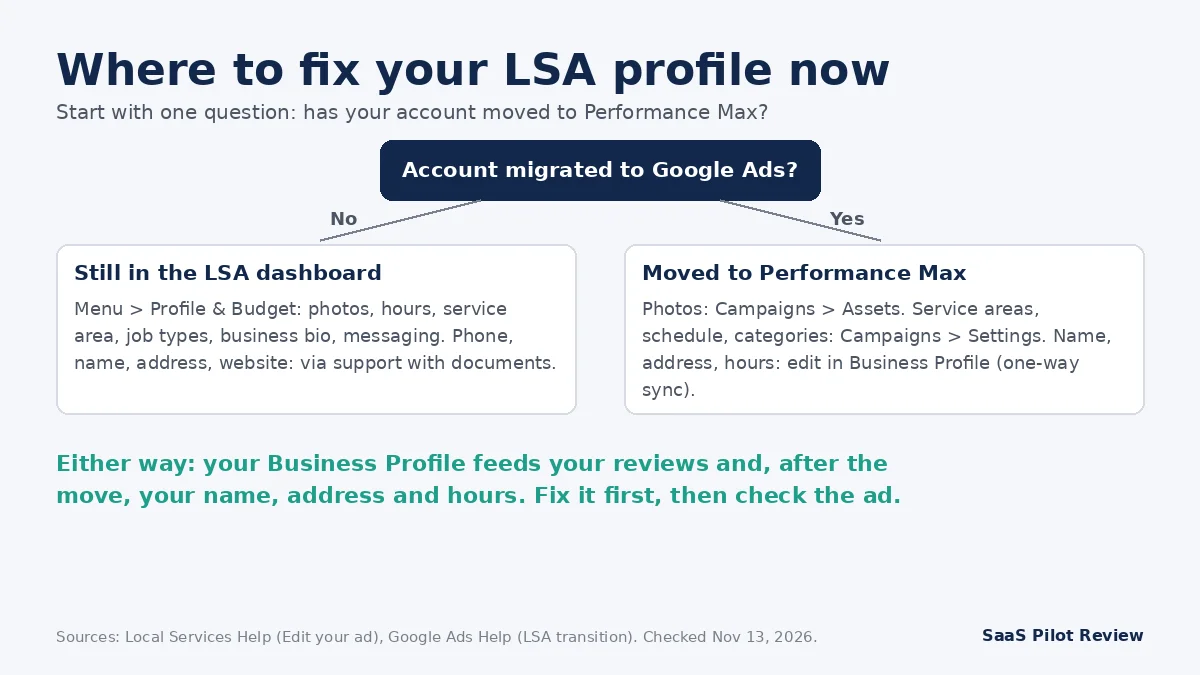
Because hours now come from your Business Profile after the move, a wrong or pending edit there flows straight into your ads. Google can also accept public suggestions to your profile, which is one more reason to check it weekly; our note on Google Business Profile suggested edits explains the review window. If your migration email has not arrived yet, our guide to tracking LSA calls after the move to Performance Max lists what to screenshot before the old reports disappear.
What to watch for next
We will update this page if Google publishes anything official. Three signals are worth checking yourself:
- The “Edit your ad” help page. As of November 13, 2026, it still says law professionals can add featured professionals. When Google removes or rewrites that line, the change is documented.
- The headshot section of the requirements page. The page still lists “Headshots requirements.” If that section disappears or says headshots are optional, the notice’s second line is confirmed.
- Your own ad preview. Search for your service and town on a phone, find your ad and look at what it shows. If photos are missing, recheck the photo rules above before assuming the ad format changed.
For a law firm, the loss of the individual attorney on the ad is a real change in how clients choose. For a home-service business, this news is mostly a reminder: the parts of the ad Google says are not changing are the parts that decide who gets the call.
Sources
Read November 13, 2026: Search Engine Roundtable, “Google Ads To No Longer Show Featured Professionals, Headshots Are Optional” (October 19, 2026); TechWyse follow-up (October 21, 2026); Local Services Help: Edit your ad or business information, About ad rankings, Improve your Local Services Ads performance, About Local Services Ads with photos, Local Services Ads requirements, Business screening and verification requirements (United States); Google Ads Help: help page on the Local Services Ads move to Google Ads.